
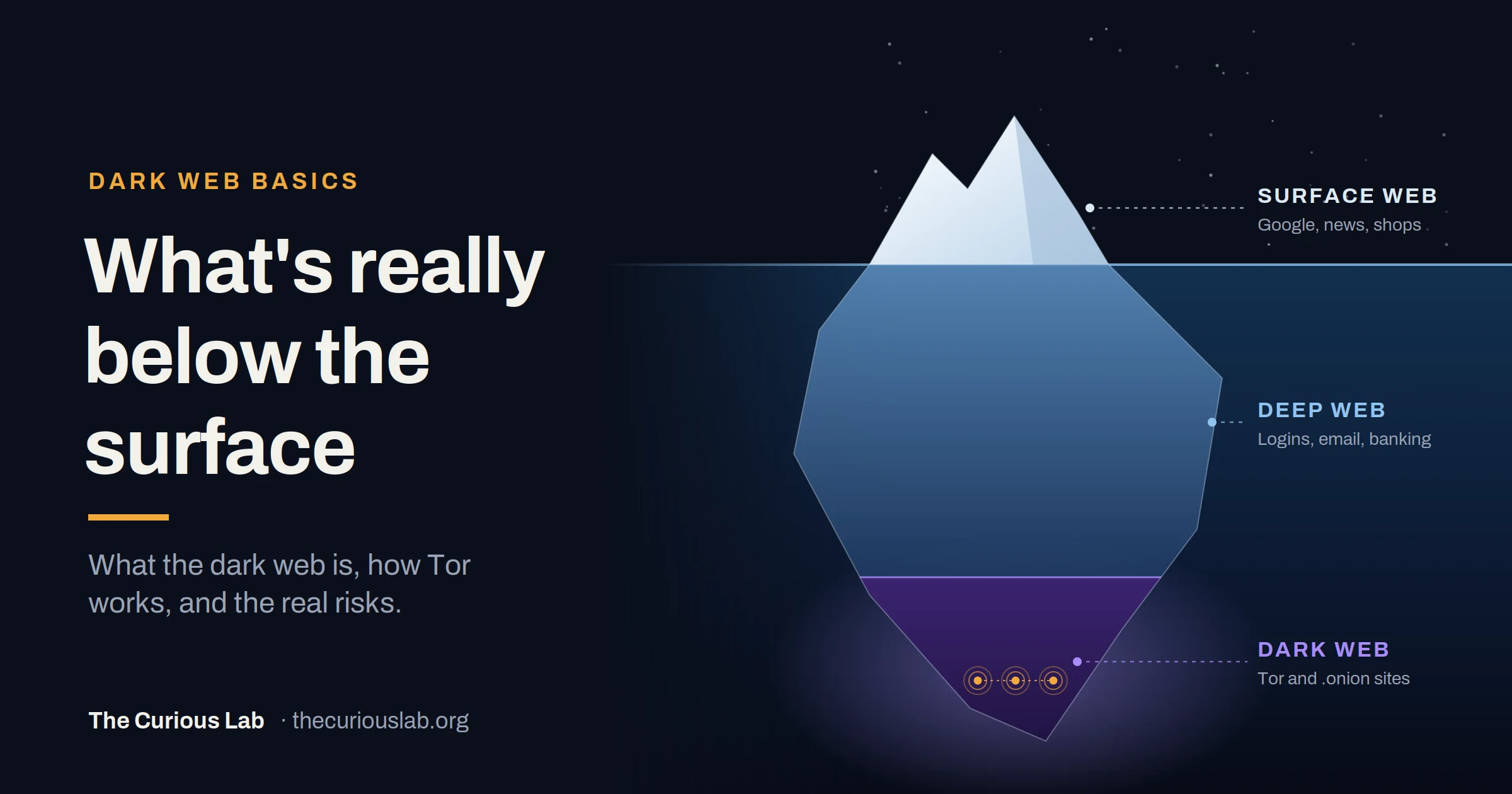
The dark web isn’t a secret place that only hackers can reach.
It is a part of the internet that needs a special browser to open. Anyone can download that browser for free. Note that some of the websites on it are completely normal, such as the BBC, DuckDuckGo and even the CIA.
This is what makes the dark web so confusing. It was built to protect privacy, but criminals use it too, especially to buy and sell stolen data.
In this post, we will see where the dark web came from, how it is different from the deep web, how Tor keeps you anonymous, how to access the dark web safely, which real websites run on it, what is sold there and for how much, and how to check if your own data is on it.
No technical background is needed to understand this. We have written it for the common person, with basic technical details added along the way.
Where did the dark web come from?
Everyone who knows the dark web today sees it as a criminal platform for underground activities, but they don’t know who started it or why.
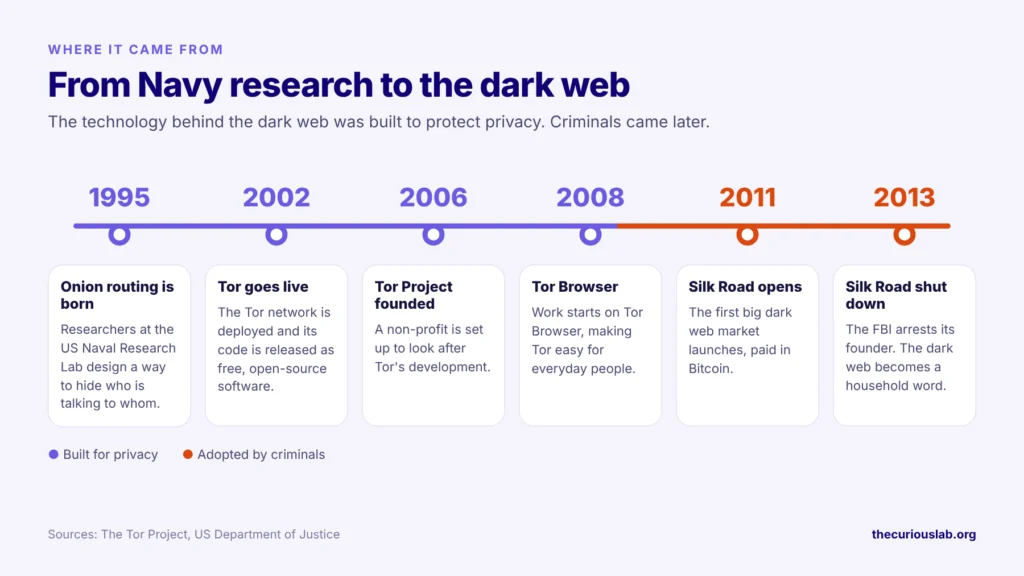
In the mid-1990s, researchers at the US Naval Research Laboratory wanted a way to communicate online without revealing who is talking to whom. Encryption hides what you send, but it still shows who sent the data and where it is going. So, they created onion routing, a system that sends traffic through several relays, so that no one can see both the origin and the destination. It is called onion routing because the data is wrapped in layers of encryption, like the layers of an onion.
If only the Navy used this tool, anyone watching could tell that the traffic came from the Navy. There would be no point in being anonymous. So, the researchers released the code under a free, open-source license in 2002. In 2006, the non-profit Tor Project was set up to look after it.
The dark web was initially considered a boon for journalists, whistleblowers, activists, undercover government operations, and people who love anonymity and don’t want to be tracked.
But later on, this technology was adopted by criminals.
This led to the rise of the first illegal market on the dark web, called Silk Road.
Note that after the rise and fall of the Silk Road, the dark web became famous among the common people. But people still do not know much about the dark web.
Most people know it for criminal activity, but the real reason it was built was different.
What is the dark web?
Now we understand the very basics of when and why the dark web was built. It was never called the dark web at the time, but we can call it that as per today’s understanding.
Now we’ll look at what the dark web is and how to access it.
The dark web is the hidden part of the internet that no one learns about in school or college.
People often learn about the dark web only after they accidentally discover it.
Your daily internet activities, like using a search engine such as Google, Bing, or other websites, are part of the surface web. You can access these websites without any specific tools.
What is the difference between the surface web, deep web and dark web?
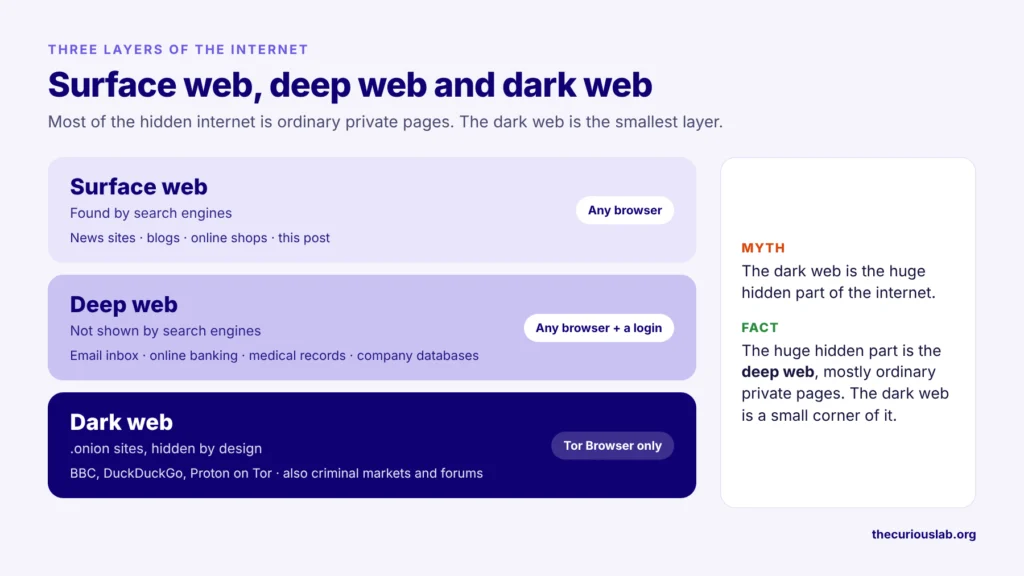
The internet has three layers. Most people only know the first one.
The surface web: Everything a search engine such as Google or Bing can find and show you. News websites, blogs, online shops and this post are all part of the surface web.
The deep web: Everything on the internet that search engines don’t show. This includes your email inbox, your online banking, your medical records, company databases and any page behind a login. Note that the deep web is not secret or dangerous. You use it every day when you open your email.
The dark web: A small part of the deep web that needs a special browser, the Tor Browser, to open. Its websites use addresses that end in .onion, and they are built to hide both who runs them and who visits them.
It is like an office building. The surface web is the shop on the ground floor that anyone can walk into. The deep web is the offices upstairs, which need a key card. The dark web is a room that you can only reach through a hidden door, with a special key.
Three layers of the internet. The dark web is the smallest.
| Surface web | Deep web | Dark web | |
|---|---|---|---|
| How you open it | Any browser | Any browser, with a login | Tor Browser |
| Shown in search engines | Yes | No | No |
| Examples | News sites, blogs, shops | Email, online banking, medical records | .onion sites, such as the BBC’s |
| What the website sees | Your IP address | Your IP address and your account | Not your IP address |
Many articles show the internet as an iceberg, with the dark web as the huge part under the water. This picture is misleading. The huge hidden part is the deep web, and most of it is ordinary private pages. Basically, the dark web is only a small corner of the hidden internet.
How does Tor keep you anonymous?
Tor stands for “The Onion Routing.” To understand it, start with how the normal internet works.
On the normal internet, your computer connects straight to a website. The website sees your IP address, which is like the home address of your computer on the internet. Your internet provider also sees every website you visit.
Tor changes this. Your traffic doesn’t go straight to the website. It passes through three computers called relays, which are run by volunteers around the world.
- Guard relay: the first relay. It knows your IP address, but not which website you are visiting.
- Middle relay: it passes the traffic along. It knows neither you nor the website.
- Exit relay: the last relay. It connects to the website, but it doesn’t know who you are.
Before your traffic leaves your computer, Tor Browser wraps it in three layers of encryption, one for each relay. Each relay can remove only its own layer, like peeling one layer of an onion. So no single relay knows both who you are and where you are going.
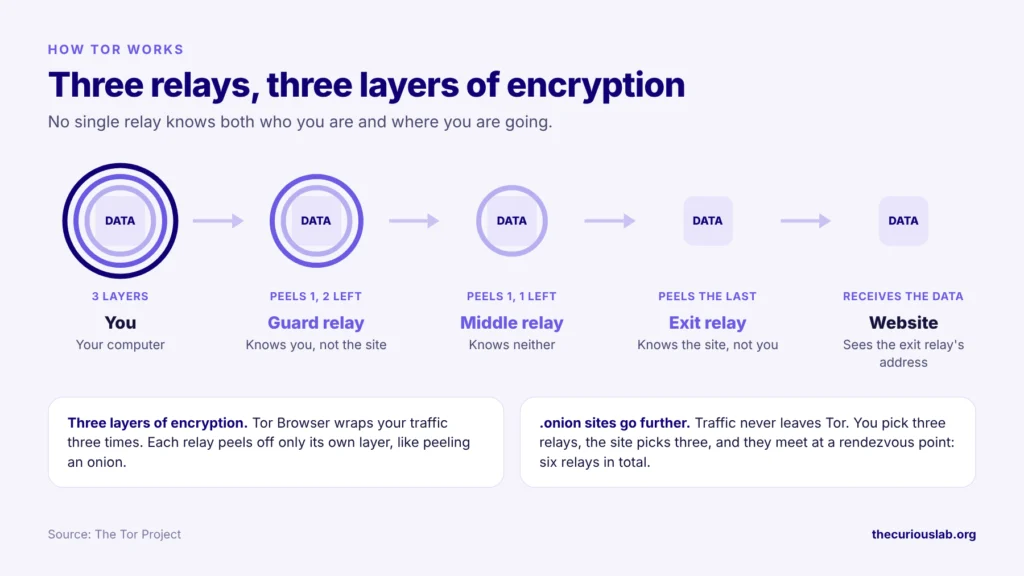
A .onion website goes one step further. When you open one, your traffic never leaves the Tor network. Your Tor Browser picks three relays, and the third one becomes a meeting point called the rendezvous point. The website picks three relays of its own to reach that meeting point. So, in total, the connection passes through six relays, and it is encrypted from end to end. This is what hides the location of the website as well as yours.
Note that Tor hides who you are, not what you do. If you log in to your own Facebook account through Tor, Facebook still knows it is you. Tor also doesn’t protect you from malware, fake websites or scams. Basically, Tor hides the road you take, but you still choose where you go.
How do you access the dark web safely?
You can open dark web websites only through Tor, using the Tor Browser (or Onion Browser on iPhone). This is because all websites on the dark web use the special “.onion” extension, and these websites will not work in regular browsers.
Say, for example, “thecuriouslabkjhakjdkjbdhsvbfkhdsfvbkhdsvfhdbf.onion.” This is an example domain to illustrate an onion domain/website, and it is not a real domain.
Now we’ll look at the safe way to open the dark web. Note that these steps protect your privacy and your device. They don’t make illegal activity legal.
Step 1: Download Tor Browser only from torproject.org. Many apps and websites copy the Tor name, so type torproject.org yourself and download it from there. Tor Browser is available for Windows, Mac, Linux and Android. There is no Tor Browser for iPhone. For iPhone, the Tor Project recommends an app called Onion Browser, but Apple’s rules stop it from having all of Tor Browser’s privacy protections. For readers who want more, the Tor Project also explains how to check the download’s digital signature, which confirms the file hasn’t been changed.
Step 2: Connect to Tor. Open Tor Browser and click Connect. If Tor is blocked where you live, a feature called Connection Assist will try to connect you through a bridge automatically.
Step 3: Set the security level to Safest. Open the Security Level setting, choose Safest and restart the browser. At this level, JavaScript is turned off on all websites, some fonts, icons and images are turned off, and audio and video only play when you click them. Some websites won’t work properly, and that is the price of safety.
Step 4: Use a bridge if you need to hide that you use Tor. A bridge is a hidden entry point into the Tor network. Your internet provider can normally see that you are connecting to Tor, but not which websites you open. A bridge makes the Tor connection itself harder to spot. Go to Settings → Connection, and under Bridges, choose one of the built-in bridges, such as Snowflake.
Step 5: Keep your real identity out of it. Do not log in to your personal accounts. Do not use your real name, email or usual passwords. Do not install browser add-ons. Do not download files, and never open one you already downloaded.
Step 6: Keep Tor Browser updated. When Tor Browser asks to update, let it. Updates close security holes that attackers already know about.
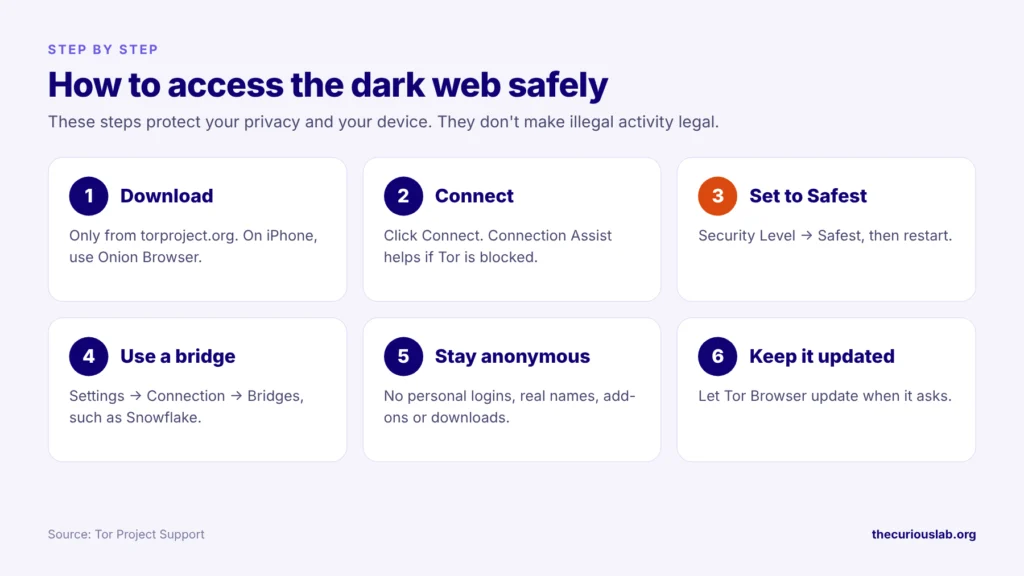
Six steps, in order.
Remember, the dark web has no customer support and no refunds. If something feels wrong, close the browser.
What should you check before you visit a dark web website?
If you have a link to a dark web-hosted website, consider the following before entering it.
Many of these websites are run illegally, and no organization controls them. They don’t work on ethics.
Using Tor is legal in most countries. Some countries, such as China, Russia and Iran, block or restrict it, so check the rules where you live. Note that Tor being legal doesn’t make illegal activity on it legal.
Always think and decide. Ethics and morality come into play.
Think about why you are going. Legitimate uses include using SecureDrop to contact journalists, visiting BBC mirror and Wikipedia mirrors, privacy forums, or academic research.
People are curious, no matter what, and no matter how many lessons they learn, some people still want to see what is happening on the dark web and its illegally hosted websites and markets.
Before you visit these websites, consider the following safety tips.
Safety tips to visit the dark web:
- Only use the official Tor Browser installed from torproject.org, and keep it updated.
- Set the Tor Browser security level to Safest. This turns off JavaScript on all websites.
- Never trust anyone on the dark web.
- Do not download or open any files from the forum. That can be dangerous.
- If you have doubts, leave the website.
- Do not buy anything from the dark web.
- Never engage in any illegal activities on the dark web.
- Don’t use any of the usernames or passwords that you use on the surface web.
- Create a new identity, a new email, and a dummy name.
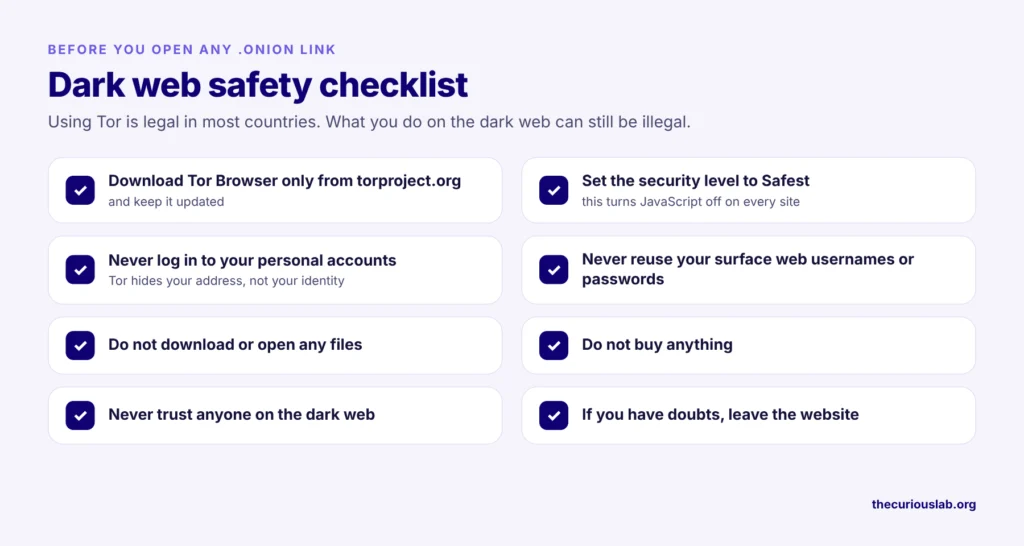
Remember, some activities on the dark web are illegal and can lead to serious consequences from law enforcement.
Do you need a VPN to access the dark web?
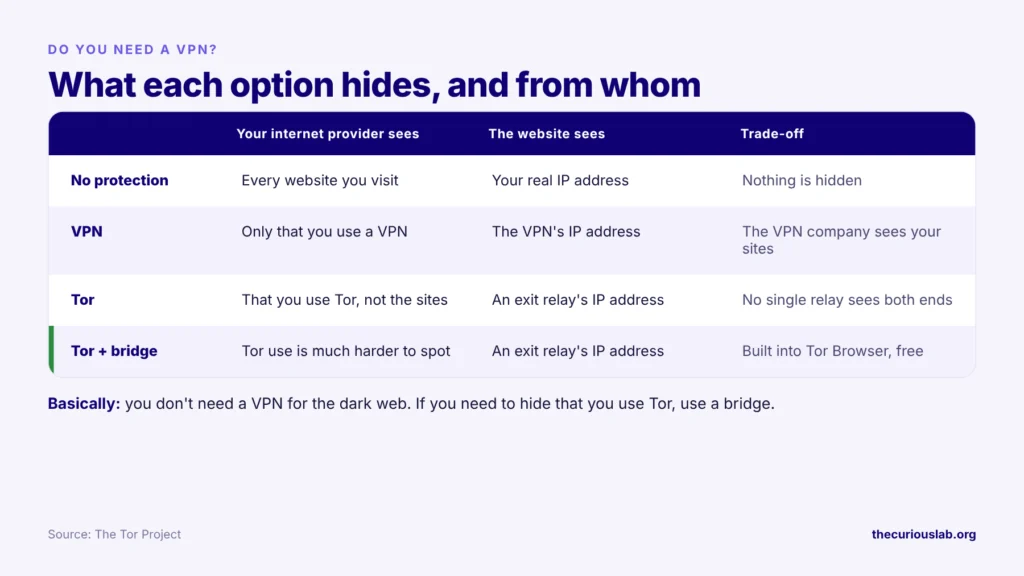
No. You don’t need a VPN to access the dark web. Tor already sends your traffic through three volunteer relays, each with its own layer of encryption.
A VPN only hides from your internet provider that you are using Tor. If you need that, Tor Browser has a free built-in option called bridges, which does the same job without trusting a VPN company.
What was the Silk Road?
We consider that the Silk Road played a major role in the rise of the dark web. It may be a reason for the popularity of the word.
Silk Road was the first dark web market.
Consider it as a modern e-commerce market, such as eBay.com or Amazon.com or any other e-commerce website that is popular in your country.
It was so popular because people could buy and sell illegal goods and believed they would not be caught.It was so popular because people could buy and sell illegal goods and believed they would not be caught.
Payments were made in Bitcoin, which people believed was anonymous. No banks were involved, which made the money harder to trace and monitor.
According to the FBI, Silk Road handled about 9.5 million bitcoin in sales over its life, worth about $1.2 billion at the time. When its founder, Ross Ulbricht, was arrested in 2013, the FBI seized about 174,000 bitcoin from the site and his computer.
At the time, the FBI called it the largest Bitcoin seizure ever.
So, after Silk Road, there was a rise in traffic on the dark web.
New illegal markets emerged. Many of them have been caught and shut down.
Even today, many illegal markets operate on the dark web. Most of them are either caught or end in an exit scam, where the owners disappear with their users’ money.
After its popularity in the news, the dark web had a steady rise in popularity and traffic.
We consider Silk Road to be one of the key reasons that common people today know about the dark web.
Which real websites have .onion links?
Unlike regular domains, dark web links have a special extension: “.onion”. We have already stated this above.
But it is hard to imagine what these websites look like in real life.But it is hard to imagine what these websites look like in real life.
So, here we provide a few links to news websites, social media, search engines, CIA, tech, and software to get an idea of what these links look like in real life.
Most probably, you will find that these websites look the same as regular clear web websites. When you open them through Tor, the website can’t see your IP address. If you log in, it still knows who you are.
BBC:
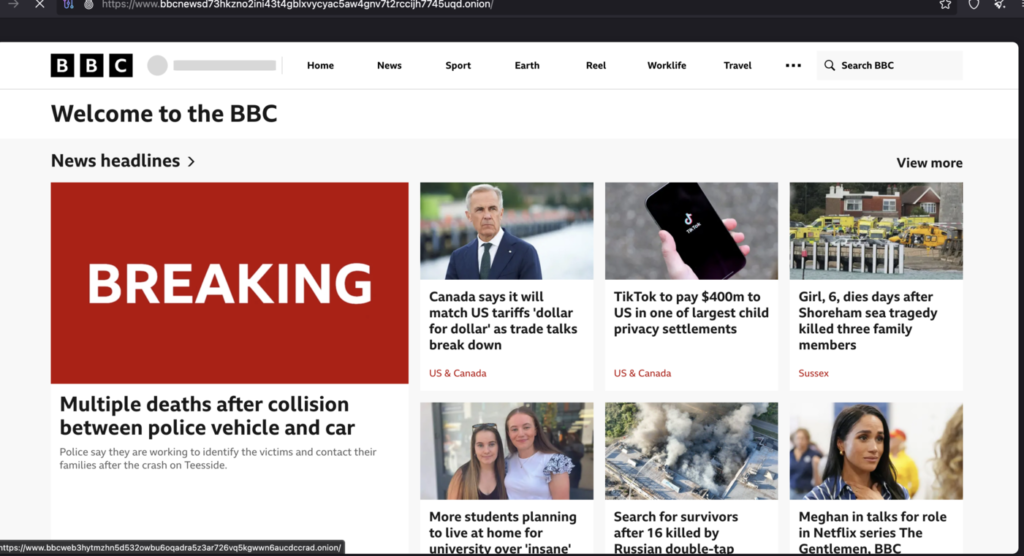
Link – https://www.bbcnewsd73hkzno2ini43t4gblxvycyac5aw4gnv7t2rccijh7745uqd.onion/
Link 2 – https://www.bbcweb3hytmzhn5d532owbu6oqadra5z3ar726vq5kgwwn6aucdccrad.onion/
While comparing their website on the clearnet, the website theme is slightly different, and the news on the clearnet website is the same, but there are quite different new posts on the onion website.
Also, you can add a country name at the end of the domain, for example /russia or /europe to read articles or news according to your country and language.
Below is a screenshot of the website.
Hidden wiki:
Link – http://wiki47qqn6tey4id7xeqb6l7uj6jueacxlqtk3adshox3zdohvo35vad.onion/
The Hidden Wiki is a popular dark web-associated term. This is because there was a website named Hidden Wiki that served as a directory of dark web links. Above is a mirror of something like that, but we found an incredible number of links that run as a directory.
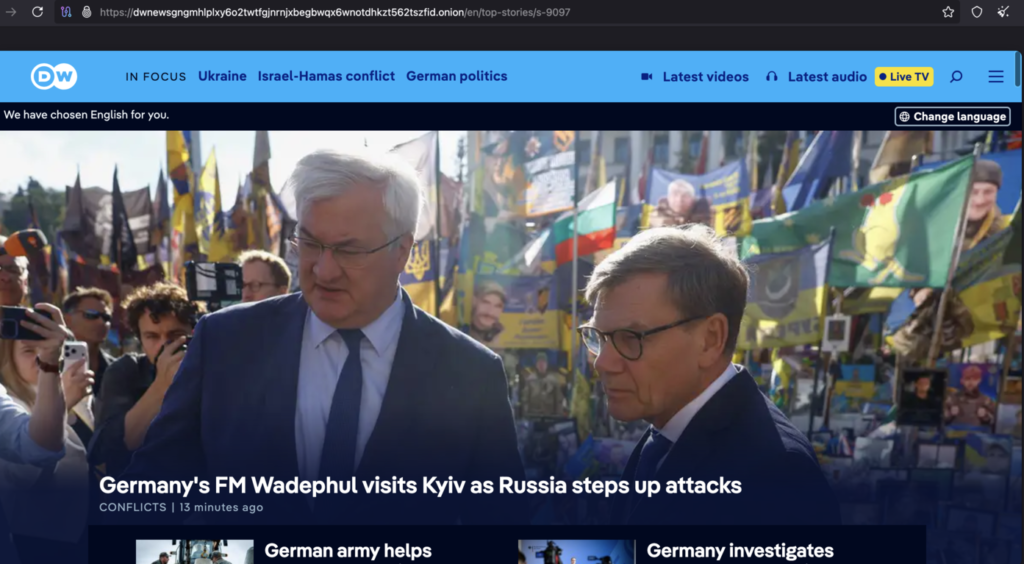
Deutsche Welle (DW News):
Link – https://dwnewsgngmhlplxy6o2twtfgjnrnjxbegbwqx6wnotdhkzt562tszfid.onion
DW is Germany’s international broadcaster, with news in many languages.
When compared with the clear web link dw.com, unlike the BBC, the website has the same news across its clear web and onion links.
Below is the screenshot.
Facebook:
Link – https://www.facebookwkhpilnemxj7asaniu7vnjjbiltxjqhye3mhbshg7kx5tfyd.onion/
The Social Media giant Facebook has its very own onion link domain.
We believe that this is the link to Facebook. When we tried loading it, the link didn’t work. We will update if there is a change in the link or if the link works.
DuckDuckGo:
Link – https://duckduckgogg42xjoc72x3sjasowoarfbgcmvfimaftt6twagswzczad.onion/
DuckDuckGo is a popular search engine that is loved by privacy lovers. It does not track or store your browsing data, unlike other search engines.
DuckDuckGo is the default search engine in Tor Browser.
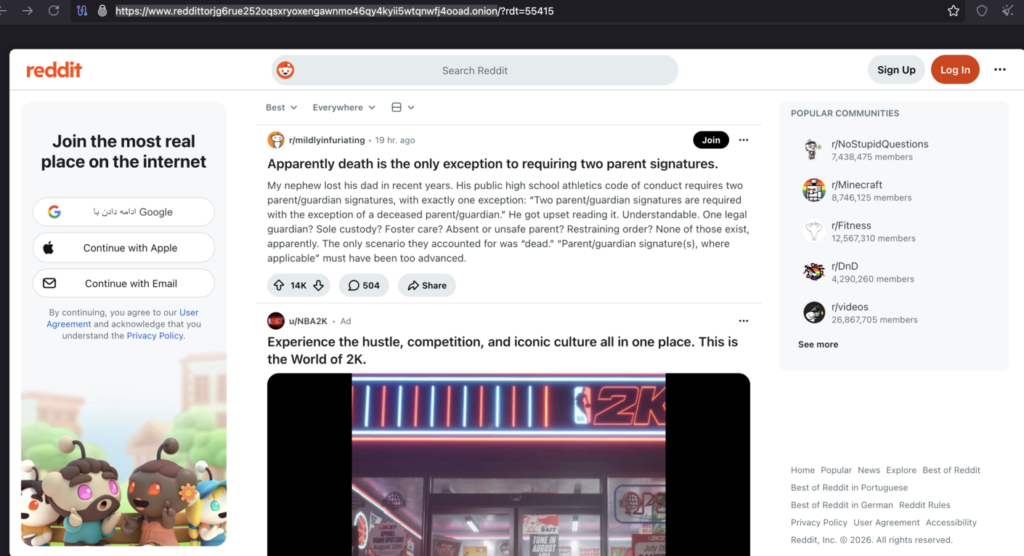
Reddit:
Link – https://www.reddittorjg6rue252oqsxryoxengawnmo46qy4kyii5wtqnwfj4ooad.onion
Reddit also provides its service on an onion domain.
It was great using this on the onion address, rather than the application.
Below is the screenshot.
Twitter:
Link – https://twitter3e4tixl4xyajtrzo62zg5vztmjuricljdp2c5kshju4avyoid.onion/
After Twitter was acquired and changed its name to X, the services on the onion domain have been discontinued. The domain no longer works, so don’t try to open it.
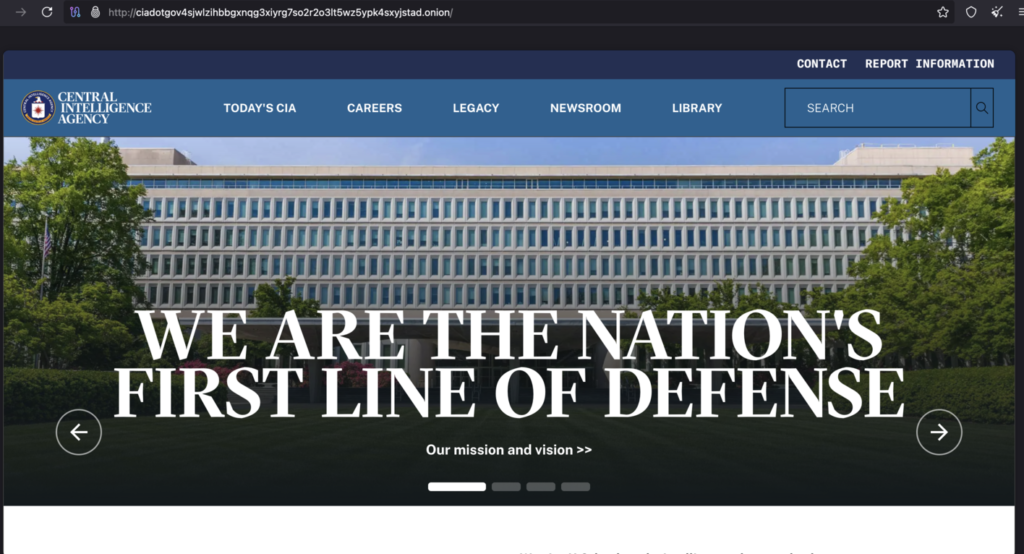
CIA:
Link – http://ciadotgov4sjwlzihbbgxnqg3xiyrg7so2r2o3lt5wz5ypk4sxyjstad.onion/index.html
CIA, the Central Intelligence Agency of the United States of America, has its website hosted on the onion network.
This is because if you live in a country where you cannot communicate directly with the CIA, you can use their link to reach them without the government noticing it.
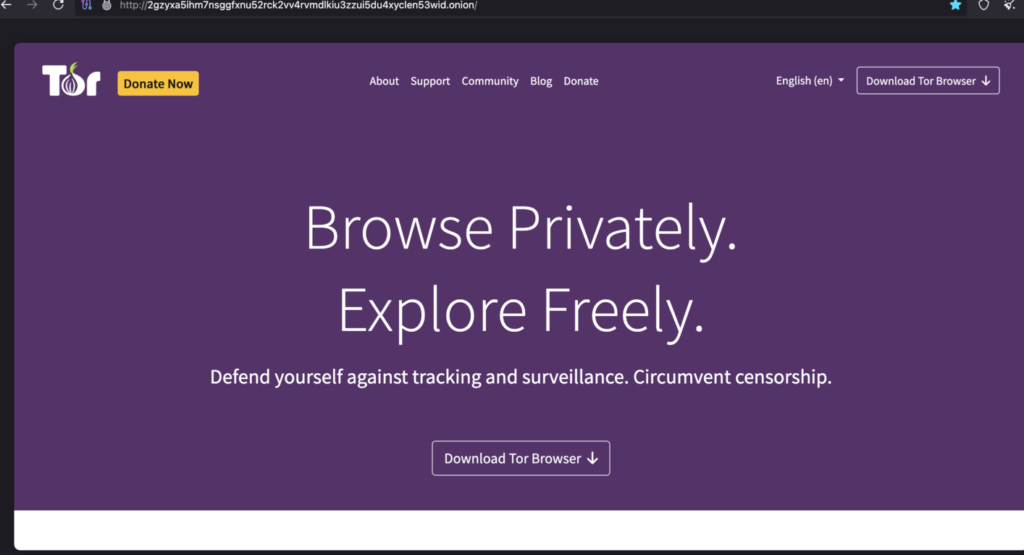
Tor Project:
Link – http://2gzyxa5ihm7nsggfxnu52rck2vv4rvmdlkiu3zzui5du4xyclen53wid.onion/
This is nothing but a mirror of its clear web domain, torproject.org, with download links and other information.
Qubes OS:
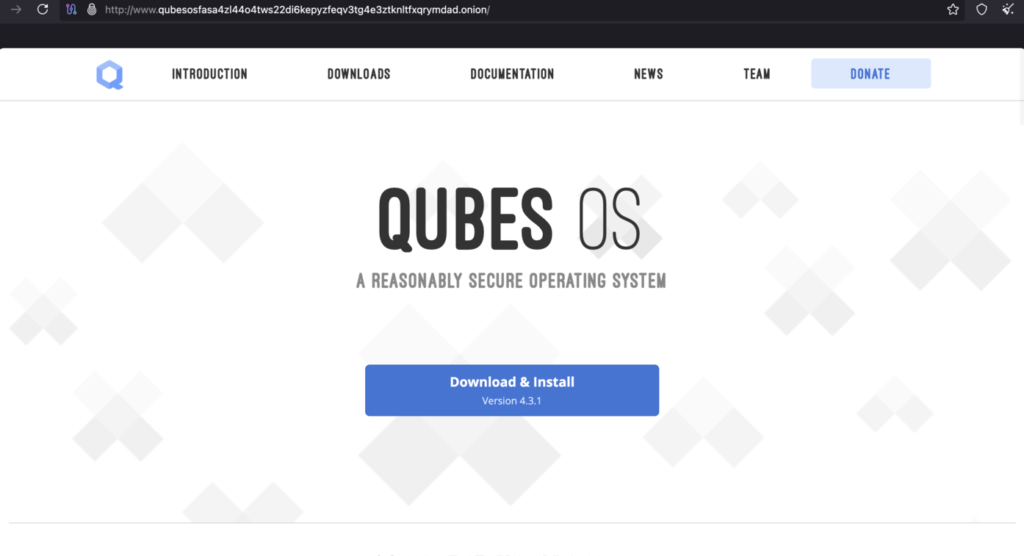
Link – http://www.qubesosfasa4zl44o4tws22di6kepyzfeqv3tg4e3ztknltfxqrymdad.onion/
Qubes OS is a free, security-focused operating system, and its website is also on the Tor network.
ProtonMail:
Link – https://protonmailrmez3lotccipshtkleegetolb73fuirgj7r4o4vfu7ozyd.onion/
The famous Proton Mail service has its domain service on Tor. Users can access their email with the above link.
Why does the dark web matter in cybersecurity?
The dark web plays a key role in cybersecurity. It plays a major role in handling stolen data and communicating more safely for hackers and their associated groups.
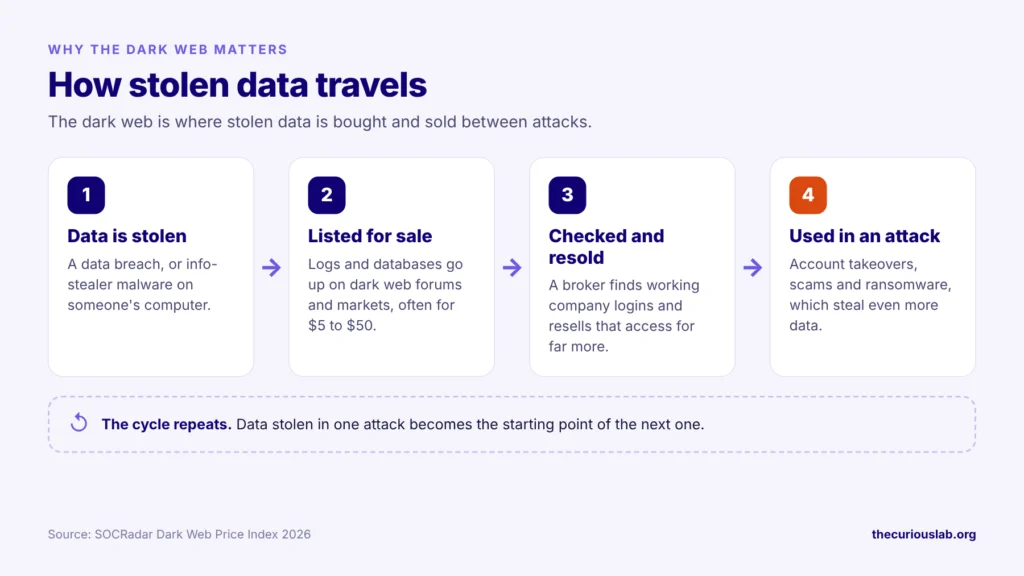
Many cyberattacks start with stolen data, and much of that data is sold on dark web forums.
Stolen data is often the first step in a cyberattack.
A lot of credential theft from larger organizations and corporations ends up on a forum or a marketplace on the dark web.
Hackers do have sophisticated websites designed only for themselves, which are secret and invite-only. These websites are mostly a communication tool for them, where one exchanges stolen data with others as a trade.
Many hacker groups communicate on these specially designed websites, which are private and encrypted.
Only the person who has the link and login details can know what is happening inside the website.
So, as said, these unknown, non-indexed websites and illegal hacking forums all together play a major role in cybersecurity.
When a major attack happens on an organization, the stolen credentials often start to show up on a marketplace or a forum, sometimes one created by the attackers themselves. This data is listed with a price next to it.
What is sold on the dark web, and for how much?
As mentioned earlier, stolen data is the main product on the dark web. According to SOCRadar’s 2026 Dark Web Price Index, leaked data and databases make up about 64% of the dark web activity it tracks, and about 59% of posts are selling something. Basically, the dark web is mostly a shop.
The prices are much lower than most people expect.
| What is sold | Typical price (USD) |
|---|---|
| Personal record (email, phone number, address) | $1 to $4 |
| US Social Security number | $1 to $6 |
| Payment card with CVV | $5 to $50 |
| Social media account | $20 to $50 |
| Scan of an ID, passport or driver’s license | $30 to $60 |
| PayPal or similar payment account | about $100 |
| Bank login (low balance) | $200 to $500 |
| Complete medical record | $250 to $310 |
| Info-stealer malware | from $15 |
| Access to a company network | hundreds of dollars to six figures |
Source: SOCRadar Dark Web Price Index 2026.
What stolen data sells for. Source: SOCRadar Dark Web Price Index 2026.
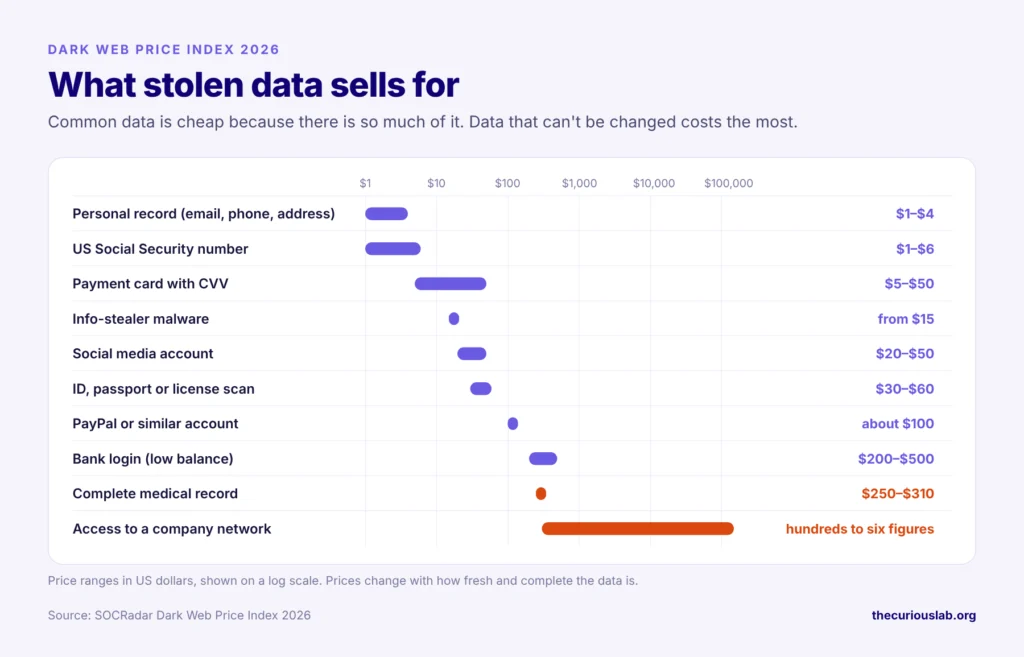
Note that cheap doesn’t mean harmless. Your data is cheap because there is so much of it. Years of data breaches have flooded the market. So, an attacker can buy thousands of email addresses and passwords for very little, and then try them on banking, shopping and email websites. This is why one leaked password can open many doors. We explained how to stop this in our post on how to protect your home computer.
Medical records cost the most because they can’t be changed. A bank can cancel a stolen card in minutes, but nobody can cancel your medical history.
The most valuable item is access to a company network. Attackers called initial access brokers break into a company and then sell that access to ransomware groups. SOCRadar describes how this works: a stolen log from an info-stealer sells for around $5 to $50, and if it contains a working company login, a broker can resell that access for far more. We covered what happens after that in our post on what is ransomware.
Ransomware groups also run leak sites on Tor, where they publish data from victims who don’t pay.
So, before and after an attack, the dark web is a place for trading services for stolen data. The dark web makes these trades much easier to hide.
We covered how stolen passwords are used in our post on how to protect your home computer.
How is Bitcoin connected to the dark web?
Cryptocurrency is the main trading currency on the dark web.
Silk Road had Bitcoin as its payment method. Because no bank is involved, it can be cashed out easily with an exchange rather than traditional banking methods.
It is a myth that Bitcoin is famous only because of the dark web. It is famous for its very own use case.
Other cryptocurrencies, including stablecoins, are also used on the dark web.
Some people believe Bitcoin was created for illegal trades. This is also a myth.
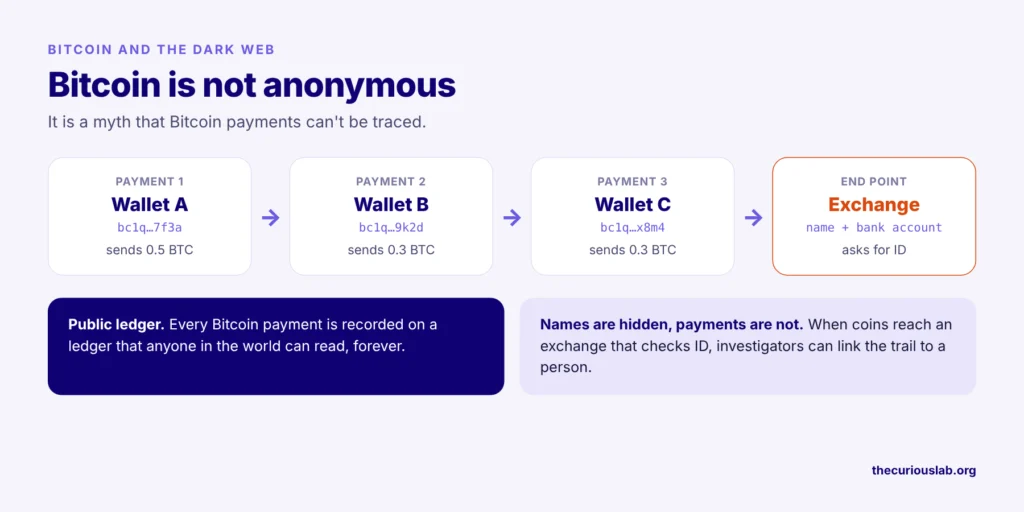
Bitcoin hides names, but every transaction is public and can be traced back. It has other use-case scenarios, so learn about it and know the basics of cryptocurrency to avoid any confusion.
How to check if your data is on the dark web
You don’t need to visit the dark web to find out whether your data is there. Free tools check known data breaches for you.
Have I Been Pwned (haveibeenpwned.com): Type your email address, and it shows which known data breaches included it. It is free.
Mozilla Monitor (monitor.mozilla.org): It uses the Have I Been Pwned database, sends you an email when your address shows up in a new breach, and explains what to do next. You can monitor up to 20 email addresses for free.
Your password manager: Google Password Manager, Apple Passwords and Firefox can warn you when a saved password has appeared in a known breach. Check their security or password check page once in a while.
The Curious Lab Breach Index: Our free Breach Index lists the data breaches made public this year, so you can see whether a company you use has been hit.
Note that Google’s Dark Web Report no longer exists. Google stopped scanning for new breaches in January 2026 and removed the tool on February 16, 2026. If an older article tells you to use it, use one of the tools above instead.
What to do if your data shows up in a breach
Don’t panic. A breach alert means your data was exposed, not that someone has already used it. Act in this order.
- Change the password for that account straight away, and on every other account where you used the same password. Our free password generator can create a strong one.
- Turn on two-step verification, starting with your email account.
- Sign out of all devices in that account’s settings, so that anyone who logged in with the old password is thrown out.
- Call your bank if your card details were part of the breach.
- Freeze your credit if you are in the US and your Social Security number leaked. It is free with each of the three credit bureaus: Equifax, Experian and TransUnion.
- Watch out for phishing. Attackers use leaked details, such as your name and the company that was breached, to make scam emails look real.
Found your email in a breach? Do these four things.
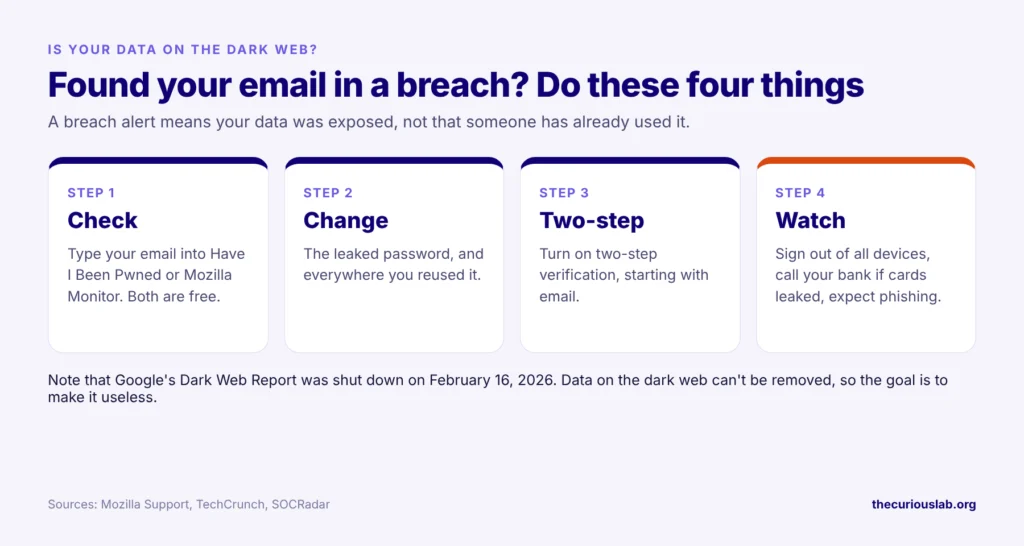
Remember, once data is on the dark web, it can’t be removed. So the goal is to make the leaked data useless. A changed password and two-step verification do exactly that.
Final thoughts:
The dark web is a part of the internet that needs the Tor Browser to open. It was built to protect privacy, and many honest websites, such as the BBC and DuckDuckGo, use it today. Criminals use it too, mostly to sell stolen data and run ransomware leak sites.
Note that visiting the dark web is not illegal in most countries, but what you do there can be. Use only the official Tor Browser, set it to Safest, never download files and never buy anything.
If you are new to cybersecurity, start with our guide on how cyberattacks work.
Stay safe, stay alert!