
 Chief Editor
 We have already discussed how cyberattacks work. We have discussed, stage by stage, how an attack unfolds. Now we will see what is ransomware?
What is ransomware?
Everyone will have a different perspective on ransomware; one can imagine this type of attack in multiple ways, as shown in movies, through their own theory, or as something done with a single click, etc. But the attack won’t work the way you think.
Once you know how a ransomware attack happens, every time you hear about a ransomware news story, you can have a clear picture of what would have happened.
Let’s unfold every stage.
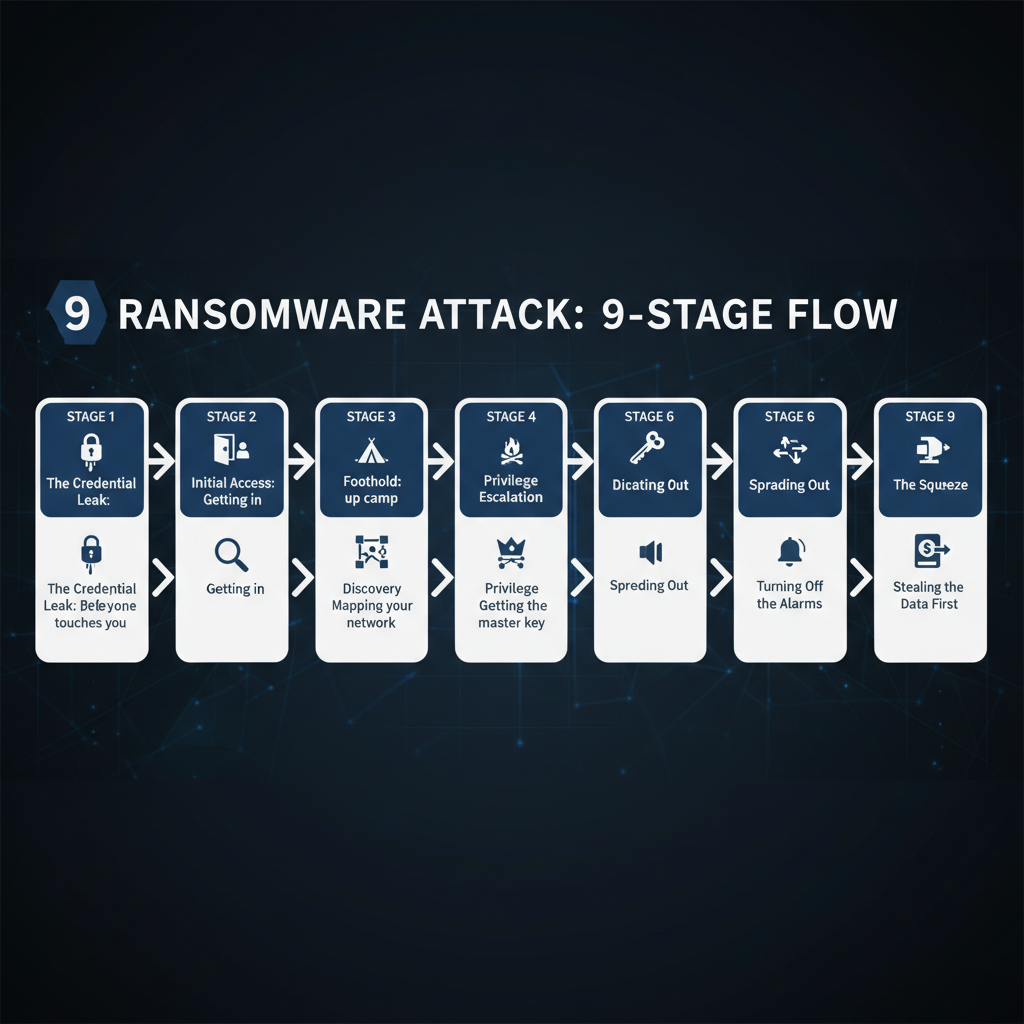
The nine stages of a ransomware attack
Stage 1 — The credential leak: before anyone touches you
Most ransomware attacks do not start randomly by choosing a company. They start months earlier; you will never know it is coming.
The usual source is infostealer malware. It is malware that quietly copies every password stored in the web browser and sends it to the attacker.
The malware will be sent to a basic employee in the company where anti-virus software and other malware protection tools will not apply/work.
As per the report, 76% of victims of the attacks contained an infostealer infection on the device.
Infostealers do not only take passwords. They also take session cookies.
A session cookie is the small file your browser keeps after you log in, so the site does not ask for your password again. If an attacker steals a valid session cookie, they can load it into their own browser and land inside your account already logged in.
No password screen. No MFA prompt. Multi-factor authentication never fires, because as far as the system is concerned, you already logged in successfully.
Stage 2 — Initial access: getting in
The 2026 Verizon report recorded a first. Exploiting software vulnerabilities has overtaken stolen credentials as the top way attackers get in.
This doesnot mean that stolen credentials are no longer a threat.
Attackers sneak through other methods. Attackers always find a new way to get in. The most common ways include VPN, malware, firewalls, file transfer servers, or any other console reachable from outside.
As attackers use AI and other modern sophisticated techniques, the attack time has been reduced from months to hours. AI is faster than humans in tasks. Attackers use AI to build tools to create exploits faster than defenders can patch.
We have already published an article on zero-day exploits.
So, attackers usually sneak in through stolen credentials or external devices. These stolen credentials are often leaked on the dark web for free or for money.
Getting inside can be achieved in so many ways. We can think that all our doors are closed; no one can enter, but the attacker will already be inside your system, stealing information.
Other ways include social engineering, where someone pretends to be someone you trust and asks for login details or other information. Almost everyone falls victim to this method.
Your email filter doesn’t work, because none of it arrives by email. Our phishing guide covers the psychology behind why these methods succeed.
Third parties related to the company or that provide supply chain to the company were involved in 48% of breaches, up about 60% in one year.
Stage 3 — Foothold: setting up camp
Once the attacker gains access, they don’t immediately make a noise. They settle first.
They make sure that they can get back in.
Attackers mostly prefer normal remote-access software over custom malware like AnyDesk, ScreenConnect, Atera, TeamViewer, Splashtop.
The reason is that a real company signs the software; it is already allowed in many networks, and the traffic it creates looks exactly like a support session. Because it is a support session.
While custom malware has to be written, tested against antivirus, and it stops working the moment it is found; it’s a waste of time. A signed commercial tool is free and makes it look like the software is doing its job.
Stage 4 — Discovery: mapping your network
Now, after settling down, the attacker needs to know what they are into, looking at the ways and mapping every possible entry and exit.
This will help them have a clear understanding of what is inside and whether the resource is worth the time spent.
This process includes collecting data of every user, employee, controller, server, login, etc.
This is a crucial stage of the attack because there is so much noise; unusual traffic patterns can be detected and set off an alarm.
So the attacker will be much more careful in handling this stage.
Tip: We can break the attacker’s intrusion here with a simple honeytrap. Create a fake administrator account that nobody should ever look at, or a fake password inside a script. Anything that is fake works. Any activity on this account or password must trigger a genuine alert. So, once these fake accounts have an unusual login pattern or network activity, the antivirus should alert the administrator.
Now, we can know that someone is inside and also make sure that the attacker never goes beyond by making an emergency plan.
Stage 5 — Privilege escalation: getting the master key
So, after mapping the whole network, the attacker now has to get one credential that opens everything: a master key.
The most common methods are,
- Pulling passwords out of the memory of a running Windows machine. This method is known as a password extraction attack.
- Requesting login tickets for service accounts. It works because service account passwords are usually old, weak, and never changed.
- Passwords that are not protected, that is, saved in a spreadsheet or a Word file.
- Repeatedly using the same password on every server or computer.
- Either method will work, and the attacker will gain access to the master key.
This stage is the key to the whole attack. Before this, the attacker is an intruder. After this, they are an administrator.
Everything they do from here looks legitimate in the logs, because technically it is legitimate.
After Stage 5, there will be nothing strange to notice.
Stage 6 — Spreading out:
Now the attacker has master key access; they will now begin spreading out in the network.
They spread out and get all the necessary information.
They go for domain controllers, backup systems, and virtual servers.
They delete, encrypt, and corrupt all the backups, because backups are the only key reason for a company to refuse the payment.
So, now they have gained control over all the company’s data, deleted backups, and shut down all the virtual servers.
Stage 7 — Turning off the alarms
Using the administrator access, the attacker will now switch off all the security software that can alert the admin or anyone at the company.
This will mostly happen on a Friday evening or at midnight when the manager or other employees are hard to reach. This delays restoration if a backup is available, which can disrupt the company’s operations.
Ransom notes will start to appear on every folder on every system. Sometimes, printed on office printers.
Stage 8 — Stealing the data first
Stealing the data is now standard.
The attacker finds and copies all the data and then moves it from the company server to their cloud or third-party file-sharing tool.
It happens during working hours, so that terabytes of data can be moved over a few days.
This stage can be found and stopped by measuring the data that the servers usually send out. If there is a significant rise in the data transfer, make an alert notification.
Stage 9 — The squeeze
Now the attacker will go for the ransom, which is the final stage.
There will be a countdown timer on the website with proof and samples. The timer is for you to make the decision quickly and put pressure on you.
The question you will get is “should I pay or just let it go. If I don’t pay, my organization’s reputation will go down with the data that the attacker has”
A real example: how one phone call cost $100 million
In September 2023, a group called Scattered Spider gathered information on an MGM Resorts employee through LinkedIn.
They gathered enough public information, called MGM’s IT help desk, said they were that employee, and said they were locked out of their system.
The help desk did what help desks are trained to do. They were helpful. They reset the access.
The phone call lasted about ten minutes.
From there, the attackers moved through the network, took data, and eventually deployed ransomware to more than 100 virtualization servers. MGM shut everything down to stop the spread.
Slot machines went dark. Room key cards stopped working. Check-in was done by hand. The disruption ran for about ten days across more than 30 properties.
MGM refused to pay. The incident still cost them over $100 million, and the personal data of roughly 37 million customers was exposed.
A ten-minute conversation opened up a company valued in the tens of billions. No malware. No zero-day. No genius hacker.
Their competitor, Caesars, was hit by the same group around the same time and chose to pay roughly $15 million.
Five beliefs that get companies hurt.
“We are too small to be a target.”
“We have antivirus and a firewall.”
“We have backups.”
“Our IT provider handles security.”
“We would know if someone was in our network.”
Final thoughts:
Ransomware doesn’t appear immediately; it is a slow process.
If you understand what happens at each step, you can impose maximum security and a plan on what to do next.
By implementing basic things, ransomware can be stopped.
In upcoming posts, we will look at how criminals actually buy and sell access to companies, and what happens on the dark web after your data is taken.


 Fredric Sherman
 Chief Editor