
Understanding Cyber Security Basics for Everyone
Today, everything around us involves the internet. Our every action needs internet access. Sending a message to a friend, booking a train ticket, paying our bills, etc., whatever we do, we depend on the internet. The Internet makes our lives easier and faster.
But there is a hidden risk in making our lives simpler, as we depend mostly on the online. We share our personal information almost everywhere online, putting our privacy at risk.
Cybersecurity is simply a way to protect ourselves, our devices, and our information when using the internet and computers. By understanding and adopting smaller practices, we can protect our privacy, money, and personal information.
You don’t need to be an internet expert to stay safe online. Most attacks are successful not because the attacker is a genius, but because ordinary people are unaware of the simple dangers.
Why Cyber Security Matters to You
Some people assume that hackers or attackers target only big companies, banks, or organisations. This is not true. Ordinary people are targeted every day. In fact, attackers often target individuals rather than organizations, as they usually have weaker protection.
Here is what a criminal might be after:
* Your money. They may try to get into your bank account or trick you into sending them money.
* Your personal information. Your name, address, date of birth, and ID numbers can be used to open accounts or take loans in your name. This is called identity theft.
* Your accounts. Your email, social media, or shopping accounts can be taken over and used to trick your friends and family.
* Your files. Precious photos, documents, and work files can be locked or deleted.
Losing any of this information can cause real stress and real money, losses, and it can take a long time to fix. This is why learning a few basics is worth your time.
Common Online Dangers Explained Simply
Let’s look at the most common threats. Once you understand them, you are already much safer.
1. Malware (Bad Software)
Malware is short for “malicious software”. It is nothing but a harmful program. It is a virus for your phone or computer. It can affect your mobile or computer without you knowing about it. Some malware spies on what you type on your keyboard, including your important passwords, such as your bank password. Some malware can show annoying adverts, and some may steal your files.
Malware usually affects your system when you download a file from an untrusted link or install an app.
These types of malware usually enter your system in the form of a phishing link.
2. Viruses
A virus is one type of malware that spreads from one device to another while sharing a file or using the same pen drive between two computers. These viruses can slow your computer, damage your files, and potentially lose your information.
3. Phishing (Fake Messages)
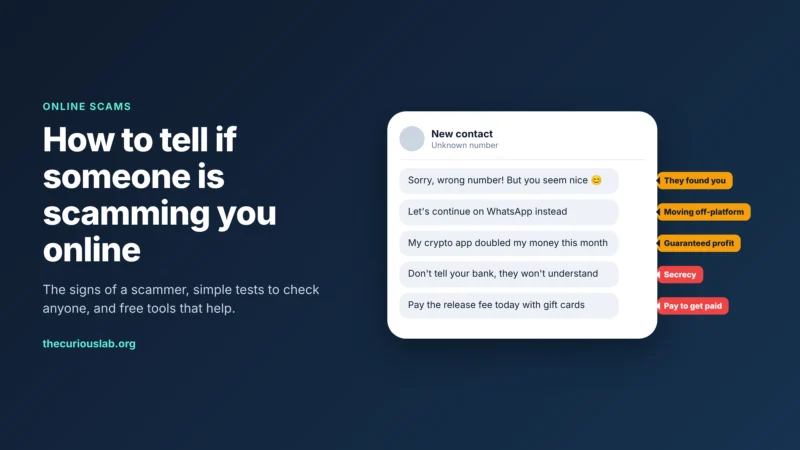
Phishing is one of the most common tricks; the word sounds like “fishing,” and it is exactly what it is. Phishing usually happens when you receive a message, an email. Usually, these phishing links will be sent from known friends, as your friends have also lost their access to the attackers.
The message will be so true that the receiver will believe it as it is original and not a fake. Usually sent through the bank name, government office name, or by a popular website like Amazon.
The message often scares you by saying, “Your account has been locked. Click on this link to unlock.” You have been charged with a parking violation. Usually, scammers or attackers send these fake messages to scare you so that you immediately click on the link.
Once you click the link, it is already over.
The criminal will have developed a same website similar to your bank’s. You will enter the username and password. The criminal on the other end will type the same and log in to your account and steal the fund.
4. Weak Passwords
A password is the key to your online accounts. Keeping your account password as “123456” “password”, your name, or your date of birth. This will take only seconds to break.
Using the same password everywhere is also risky. If one password is cracked, the criminal will use the same password everywhere else to log in.
5. Ransomware
Ransomware is a malware that locks all your files, photos, email, etc., and then the criminal will demand money to unlock them. If there are important documents on your phone or computer, you should pay or negotiate with the attacker to release them after the payment. Even if you pay, there is no guarantee that the attacker will release it.
6. Scams on Public Wi-Fi
Public Wi-Fi attacks are usual. Free Wifi in hotels, cafes, and airports will always come with a risk. On an unprotected public network, a criminal might be able to see the information you send, such as passwords or card details. It’s like having a private conversation in a crowded room where anyone could be listening.
7. Social Engineering (Tricking the Person)
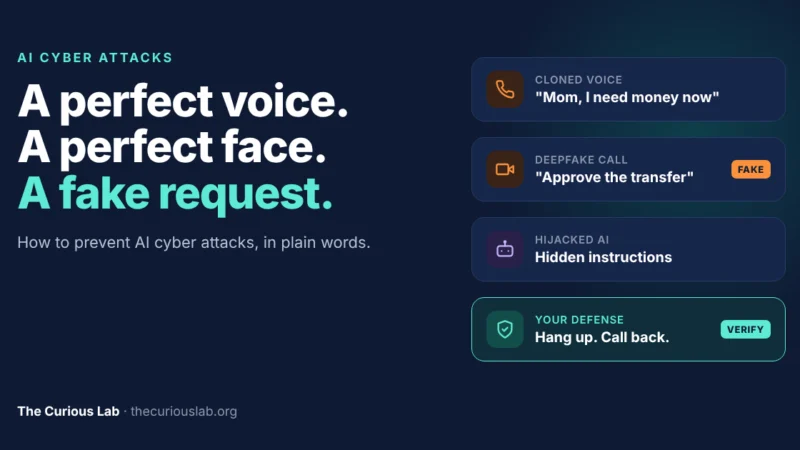
Sometimes, criminals don’t attack your computer at all — they attack you by using clever tricks and lies. This is called social engineering. For example, someone might call you pretending to be from your bank’s “security team,” act very friendly and urgent, and slowly talk you into sharing your password or a security code. They rely on trust and pressure, not technology.
Simple Ways to Protect Yourself
Below are the steps that you should follow, and you don’t need to be an expert or require special skills.
Use Strong, Unique Passwords
A strong password is long and hard to guess. Instead of a single word, use two to three words and combine them with special characters and numbers so you can remember them. For example, “Ninja+cyber+!@#$543”
It is long and a little difficult to memorize, but it is a strong password and hard to crack.
Do not use the password elsewhere. Use different passwords so that if one is leaked, the attacker may not be able to access other accounts with the same password.
Consider a Password Manager
Remembering every password is hard. A password manager is an app that safely stores your passwords. You only need to remember one strong master password to access the password manager.
<h3
Two-factor authentication, or 2FA, is one of the best protection tools one can use, and it is easy to set up.
2FA is nothing but an additional code. Once you enter the password, the website you use will send a code to your phone or email to confirm it’s you while logging in.
So attackers, when they try to access with the password, will be stopped here before login.
Also, when you receive the 2FA code, you can be alerted that someone else is trying to log in to your account.
Keep Your Software Updated
Every time there is a software update, your phone or computer will alert you. Most people just ignore the notification because it is annoying. But it is important to update, as the new update will fix the bugs that criminals could sneak in.
So, update immediately or on the same day when you receive the notification. You can also turn on automatic updates, so the update will happen automatically at night when you sleep or don’t use the phone/computer.
Think Before You Click
This is one of the important habits you can nurture. Before clicking a link to open, always have a doubt and always have a suspicion.
- Check for the sender’s email address/phone number.
- Check if you know the sender.
- Check for the domain address in the message.
Banks and other organizations use a specific number to send messages.
If you are unsure, just delete the message and move on, rather than risking it.
Back Up Your Important Files
Back up all the files regularly to a cloud plan. There are free tools for backup. You can use any of the tools. You can also buy premium plans. If your device is a victim of an attack, the backup will help you restore important data and files.
Use Antivirus Software
Antivirus software is a program that watches your device for malware and removes it. Many computers and phones already come with basic protection built in. Just make sure it is switched on and kept up to date.
Be Careful on Public Wi-Fi
Do not log in to the bank, type your card details, or use any account on public WiFi. Use a VPN while using public WiFi. You can use your mobile data if you are unsure.
Check for the Padlock
When you visit a website, look at the web domain address. A small padlock icon and an address that starts with “https” indicate the connection is secure. It is not a guarantee that the website itself is honest, but it is a good, basic sign that your information is being sent securely.
Protect Your Privacy on Social Media
Be careful while using social media accounts. Do not share your full birth date, home address, or holiday plans, as this information can be used against you.
Always turn on privacy settings so that only your followers can see your basic information. You can still make it to nobody if you are unsure.
What to Do If Something Goes Wrong
Even after following every single measure, things can go wrong. If you think something has happened, immediately follow these steps.
Change your passwords.
Contact the bank and freeze your account and block debit/credit cards.
Turn on two-factor authentication.
Run an antivirus scan and delete the malware if found.
Warn your friends and family if your account was taken over, and ask them to report it on social media.
Contact cybercrime authorities and report the incident.
Acting fast can greatly reduce the damage. Never feel too embarrassed to ask for help — these scams are designed to fool even smart, careful people.
Conclusion
Data safety is the ultimate goal.
Cyber crimes don’t happen over time. It takes time to build. Being a victim of a cybercrime attack is nothing to panic about. Do not panic and act fast.
Following safety tips drastically reduces the chance of an attack to almost zero. Even in the case of an attack, you will know what the very first few steps are to take. Educate yourself, your friends, and your family about the safety tools. Together, we can reduce cyber attacks.