
 Chief Editor
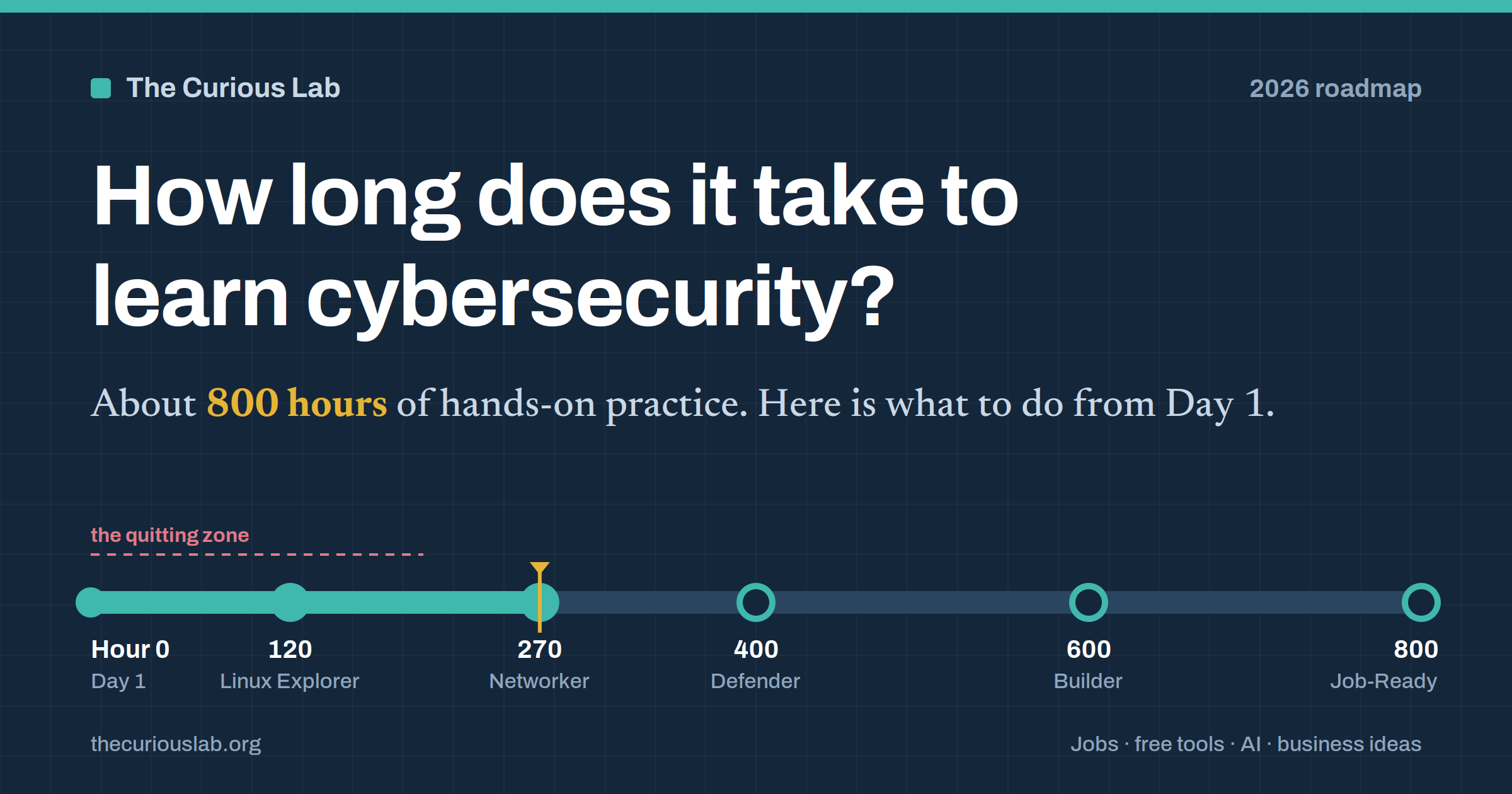
 How long does it take to learn cybersecurity?
A Day-1 roadmap for beginners, with the hours, the tools, the jobs, and the business ideas in one place.
Most people think learning cybersecurity takes a computer science degree and four years of college.
Other people think the opposite. Watch some YouTube videos, finish a six-week bootcamp, and you are a “hacker.”
Both are wrong.
The honest answer sits somewhere in the middle. And it is not measured in months. It is measured in hours.
For most beginners, it takes around 800 hours of hands-on practice to be ready for an entry-level cybersecurity job. If you already work in IT, it is closer to 550 hours.
Whether those hours take you six months or two years depends on one thing you control. How many hours you put in each week.
In this post, we will see what to do from Day 1, how the first year looks stage by stage, which jobs you can get, which free tools you need, and how people make money with these skills.
No computer science degree required.
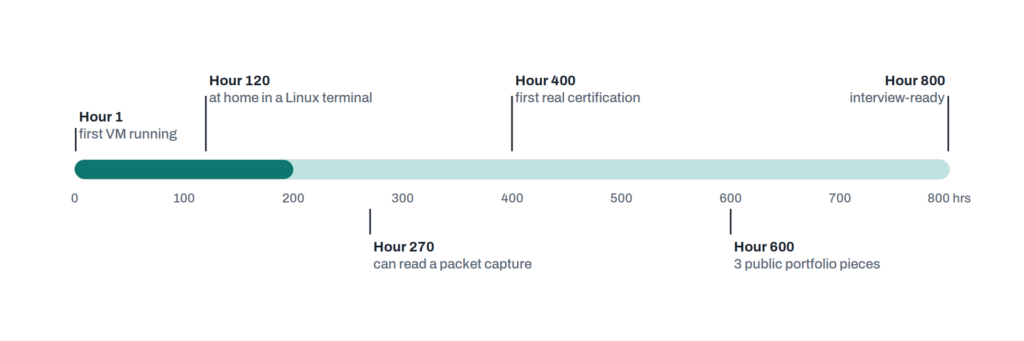
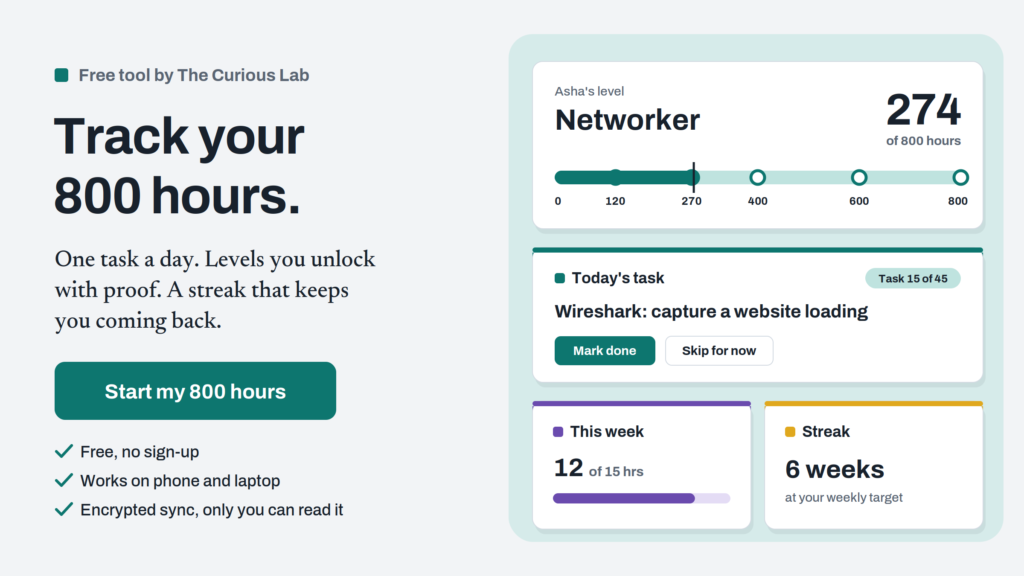
The 800-hour ruler. Each milestone is something you can prove, not just something you watched. The dark part at the start is where most people give up. It is the first 200 hours, before anything feels like “hacking.”
Why hours and not months?
You will see guides that say “6 months.” You will see others that say “2 years.”
Both can be right. They just forget to tell you the most important number.
Someone studying one hour a day and someone studying full-time are on the same road. They are just driving at different speeds.
One more thing. Not every hour counts the same.
An hour of watching videos is worth about 20 minutes of real practice. Practice means typing commands, breaking things, fixing them, and writing down what you learned.
Here is how the same 800 hours look on a calendar.
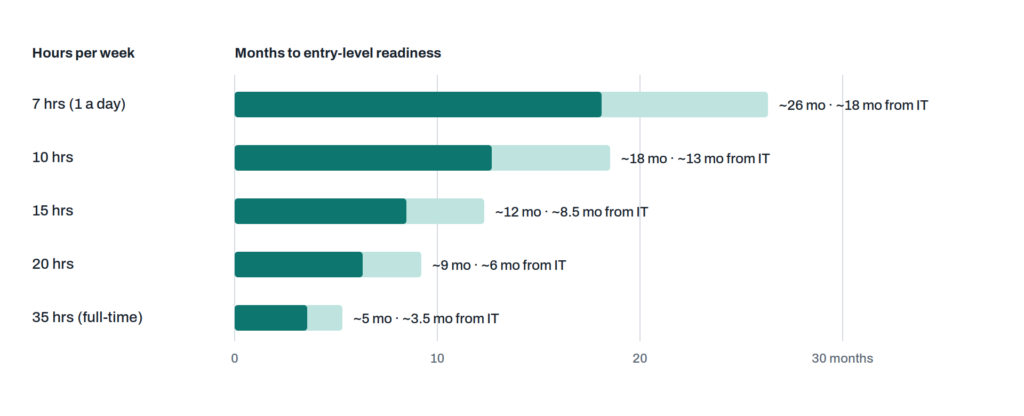
Same road, different speeds. Light bars show a start from zero (about 800 hours). Dark bars show a start from IT, networking, or programming (about 550 hours). Very few people manage 35 truly focused hours a week, so treat the bottom row as the best case.
For most working people, 15 hours a week is the sweet spot.
That is two hours on weeknights and five hours on the weekend. At that pace, you are job-ready in about a year, without burning out.
Below 7 hours a week, you forget things almost as fast as you learn them.
Quick summary. Count hours, not months. Aim for about 800 of them. 15 hours a week gets most people there in a year.
What has changed in 2026?
A lot of the advice you see on social media was written for the job market of 2021 to 2023. The market has moved. Here is what is different now.
- Skills matter more than numbers: For years, we heard that millions of cybersecurity jobs were empty. According to the ISC2 2025 Cybersecurity Workforce Study, the bigger problem now is missing skills. 59% of professionals said their teams have critical or significant skills gaps, up from 44% a year earlier. So “I am interested in cyber” is not enough anymore. A specific skill you can show is what gets you hired.
- AI is taking over the bottom step: The classic first job is a Tier 1 SOC analyst. A SOC is a Security Operations Center, the team that watches a company’s alerts all day. Much of that alert-sorting work is now done by AI tools. The job still exists, but there are fewer seats and more people fighting for them.
- The step above is growing: Jobs like writing detection rules, cloud security, and incident response are where demand is rising. This guide is built to get you there, not just to the bottom step.
- A brand new area exists: Securing AI systems themselves is now a real job. Think of chatbots being tricked into leaking data, or AI assistants given too much access. The field is only a few years old, so a beginner and an expert start at almost the same level.
What do you actually need to learn?
Cybersecurity is not one subject. It is a stack of subjects, like floors in a building.
You cannot build the fifth floor before the first. And most beginners who “fail” skipped a floor. Usually it is networking.
If you are completely new, our post on cyber security basics for everyone is a good warm-up before you start.
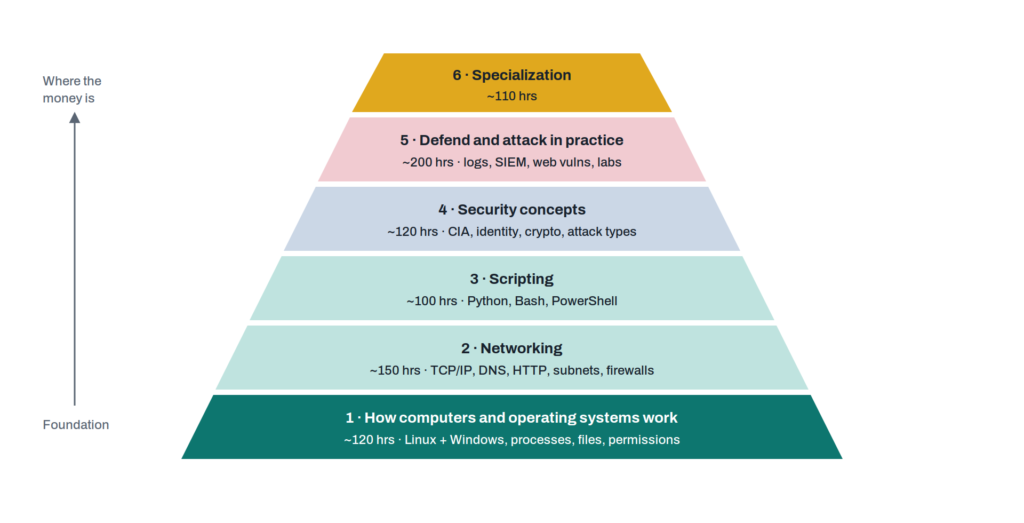
The six floors add up to about 800 hours. Floors 1 to 3 do not feel like security, so people skip them. They are also what interviewers test hardest, because you cannot fake them.
How do you know a floor is finished?
Not when you finish a course. A floor is finished when you can pass its test without looking anything up.
| Floor | You are done when you can… |
| 1. Computers and operating systems | Explain what happens between pressing the power button and seeing your desktop. Find which program is using a network port on Linux and on Windows. Fix a file permission error without Googling. |
| 2. Networking | Explain everything that happens when you type a website address and press Enter. Then show each step in a Wireshark capture you recorded yourself. |
| 3. Scripting | Write a short Python script that reads a log file, counts failed logins per IP address, and prints the top ten. |
| 4. Security concepts | Explain to a friend the difference between hashing and encryption, why MFA beats a long password, and how one phishing email can turn into ransomware. |
| 5. Attack and defend | Break into a practice web app, then write the rule that would have caught you. Doing both halves is what makes you stand out. |
| 6. Specialization | Publish something useful in your chosen area. A detection rule, a cloud security write-up, a policy template, or a small tool. |
A few words from that table, explained:
- Wireshark: A free tool that records network traffic so you can see what your computer is sending and receiving.
- Log file: A diary that a computer keeps. It writes down who logged in, what failed, and when.
- MFA: Multi-factor authentication. A second check, like a code on your phone, on top of your password.
What should you do on Day 1?
Most people spend their first day searching for the perfect course.
Don’t. Your first day should end with a working lab and one written note. Starting matters more than the perfect resource.
Keep three hours free and do these four things.
- Protect yourself first (30 minutes): Install a password manager. Bitwarden is free. Change your email password to a long, generated one, and turn on MFA for your email and bank. You cannot protect others if your own accounts are one leaked password away from being taken. If you want to know how accounts usually get stolen, read our post on what phishing is.
- Build your first virtual machine (60 minutes): A virtual machine is a computer running inside your computer. If you break it, nothing happens to your real laptop. Install VirtualBox (or UTM on newer Macs) and set up Ubuntu Linux. Take a “snapshot” as soon as it starts. A snapshot is a save point you can return to.
- Play OverTheWire Bandit, levels 0 to 5 (60 minutes): It is a free game that teaches Linux commands. You will get stuck. That is fine. Getting unstuck is the real skill you are learning.
- Start a learning log (30 minutes): Create a free GitHub account and a folder called something like security-journey. Write down what you did today. This log becomes your portfolio, your proof of hours, and your interview story.
For the rest of week one, finish Bandit up to level 15 and install a free Windows trial virtual machine from Microsoft.
You must be thinking, “What about Kali Linux? Everyone on YouTube starts with Kali.”
Not yet. Beginners who start with attack tools learn to press buttons. They don’t learn how systems work. Kali comes in Stage 2.
How does the first year look?
This plan assumes about 15 hours a week. If you study more or less, stretch or shrink the months using the chart above.
Each stage ends with something you can show. Not something you watched.
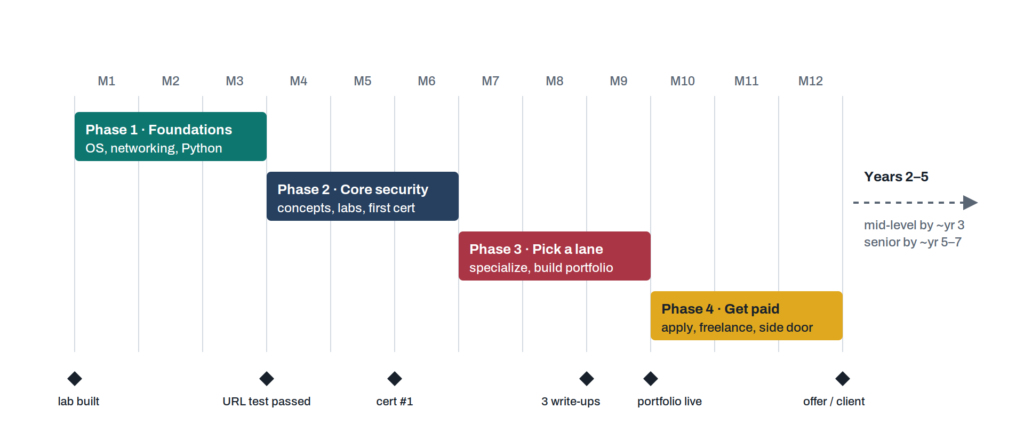
Four stages, six checkpoints. The diamonds are your checkpoints. If you miss one by more than a month, don’t push forward. Go back and fix the floor underneath.
Stage 1 — Foundations: learning how computers talk (Months 1–3)
About 200 hours. Linux first, because most servers, cloud systems, and security tools run on it. Then networking. Then enough Python to automate boring tasks.
- Linux: Finish OverTheWire Bandit. Learn permissions, running programs, and where Linux keeps its logs (/var/log).
- Windows: Learn Event Viewer, basic PowerShell, users and groups. Also learn what Active Directory is. It is the system most companies use to manage staff logins, and you will meet it everywhere.
- Networking: Watch Professor Messer’s free Network+ videos, or take Cisco Networking Academy’s free courses. Do ten subnetting practice problems a day for two weeks.
- Wireshark: Record your own traffic while loading a website. Find the DNS lookup, the TCP handshake, and the TLS hello.
- Python: Loops, files, and simple text searching. Build the log script from the table above.
Stage 2 — Core security: learning how attacks work (Months 4–6)
About 200 hours. Now the real security topics, always tied to hands-on labs so they stick.
- Theory: The CIA triad (Confidentiality, Integrity, Availability), login vs permissions, encryption, hashing, and common attack types. Our post on how cyberattacks work walks through an attack stage by stage. Also get familiar with MITRE ATT&CK, a free public map of the techniques attackers use.
- Defense practice: Install Sysmon on your Windows virtual machine. Sysmon records detailed activity. Send those records to a free SIEM like Wazuh or Splunk Free. A SIEM is a tool that collects logs from many machines in one place and raises alerts. Then attack your own machine and watch what shows up.
- Attack practice: PortSwigger’s free Web Security Academy is the best free web security course available. TryHackMe’s free rooms are great too.
- First certificate: At the end of this stage, sit one beginner exam. For most people, it is CompTIA Security+. In 2026, the voucher costs around US$425. Check CompTIA’s site for the current exam version before you buy, because they update it every few years.
Stage 3 — Specialization: picking your lane (Months 7–9)
About 200 hours. In 2026, generalists struggle to get hired. So choose one area from the career map below and go deep.
Your goal for this stage is three public pieces of work. Things a hiring manager can click on and judge in five minutes.
Specific beats general.
“I finished 80 TryHackMe rooms” is weak.
“I built a home lab, attacked it with a password-guessing attack, and here are the three detection rules I wrote, with screenshots of them catching it” is strong.
Other good examples are a write-up of a retired Hack The Box machine, a cloud mistake you found and fixed in your own free AWS account, or a security policy pack for a made-up 20-person company.
Stage 4 — Getting paid: your first job or client (Months 10–12)
About 200 hours. Split your time in half. Keep building, and start applying.
Apply to security jobs, and also to the “side door” jobs we will see shortly. Join online communities and go to local meetups. OWASP chapters and BSides conferences are cheap or free, and they are full of people who hire.
Many first jobs in this field come from someone who saw your work. Not from a cold application.
How should you plan your week?
The number of hours matters. The mix matters more.
People who only watch courses feel busy, but they stall. People who only play hacking games build narrow skills with holes underneath.
This split works for most learners.
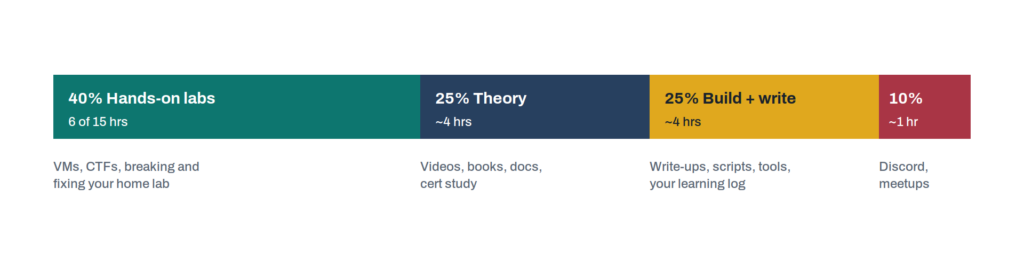
A 15-hour week. “Build and write” is the part people skip. It is also the part that gets you hired. When you write something down, you quickly find the parts you only half understood.
What jobs can you get?
“Cybersecurity” is not one job. It is dozens of jobs that feel nothing alike.
A penetration tester and a compliance analyst work in the same field, the same way a surgeon and a hospital manager both work in a hospital.
It is easier to think of them as four families.
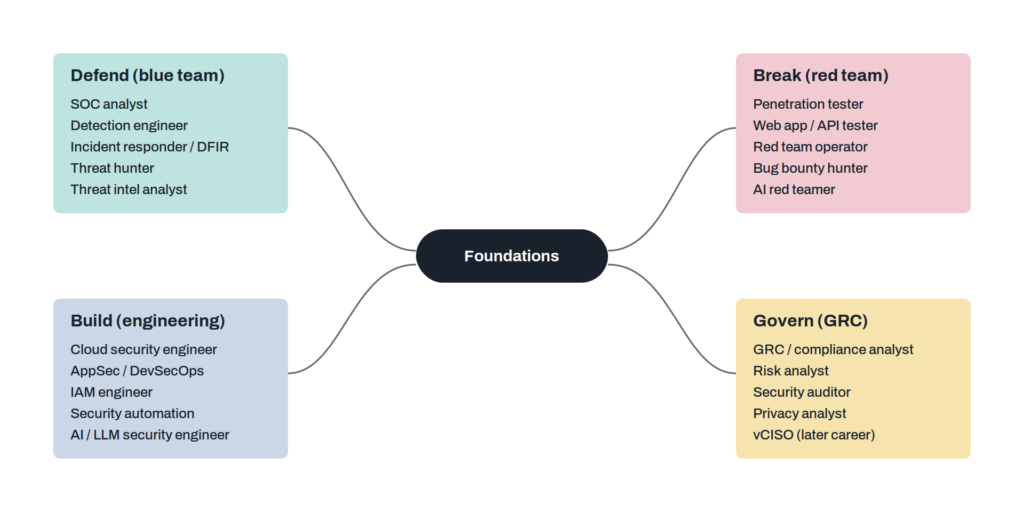
Four families, one foundation. Everyone learns floors 1 to 4. You choose a family in Stage 3. Moving between families later is common, and easier than people think.
Which family fits you?
- Defend (blue team): For people who enjoy puzzles and patterns, and stay calm when something goes wrong.
- Break (red team): For stubborn, curious people who are happy spending six hours on one problem. A penetration tester is someone paid to break into systems legally, so the owner can fix the holes.
- Build (engineering): For people who like making things and are comfortable with code and cloud dashboards.
- Govern (GRC): GRC means Governance, Risk, and Compliance. It suits people who communicate well and like structure. Many come from business, law, audit, or healthcare. It is the least technical family, and one of the easiest ways in.
Which jobs are safest from AI?
Not every entry point has the same future. The map below is our judgment, not survey data.
It places common jobs by two things. How hard the job is to get into, and how much of its daily routine work AI tools are already doing.
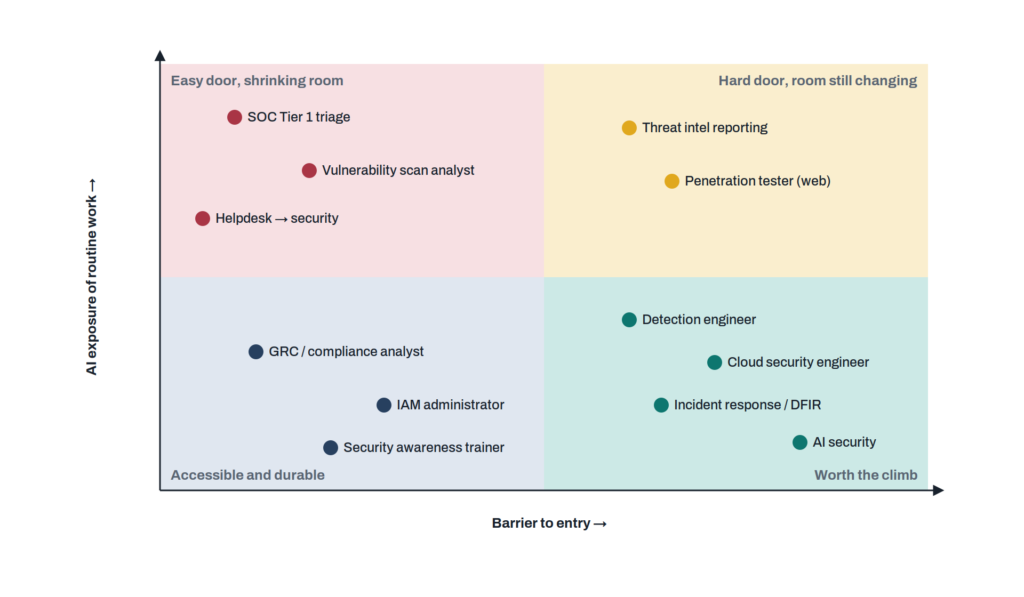
Aim for the bottom half. Top-left jobs are fine as a first job, but plan your way out from the start. Bottom-right jobs take longer to reach and repay the effort. Bottom-left is a quiet sweet spot for career changers with people skills.
Can you get in through the side door?
Yes. And most roadmaps never mention it.
Many security professionals were not hired into a security job first. They were hired into a job next to security. Then they moved across inside the same company.
When you move inside a company, you skip most of the competition. Your employer already knows you and trusts you.
That trust is hard to get as an outsider.
Side-door jobs worth looking at:
- IT helpdesk: This is often the easiest door to walk through. You reset passwords, deal with phishing emails that staff report, and see real security incidents from the front row. Many security analysts started exactly here.
- System or network administrator: The most direct path into security engineering.
- Cloud support or junior DevOps: A path into cloud security, the area with one of the biggest skills gaps.
- IT audit or compliance assistant: A path into GRC.
- Software tester: A path into application security.
Is your old career wasted?
No. It might be your biggest advantage.
A security person who understands hospitals, factories, or banks is worth more than one who only understands tools.
| If you came from… | Your natural bridge into security |
| Healthcare | Healthcare privacy and compliance, medical device security, hospital GRC |
| Accounting, finance, audit | IT audit, fraud detection, banking compliance |
| Teaching or training | Security awareness programs, phishing simulations, training content |
| Law or policing | Digital forensics, privacy law, investigations, policy |
| Manufacturing or engineering | OT security, which protects factory and utility systems. It is a small field with a big talent shortage. |
| Sales or customer support | Security sales engineering, customer security questionnaires, trust roles |
| Military | SOC work, threat intelligence, government and defense contractors |
Which certifications are worth your money?
A certificate does not prove you have the skill. But it does get your CV past the first filter, especially at big companies and government jobs.
So buy them carefully.
- First certificate: CompTIA Security+ is still the most widely recognized beginner certificate. The ISC2 CC is a cheaper option, though it is no longer free. We will see that story near the end of this post.
- Second certificate: Choose by your family. For defense, hands-on options like BTL1 or CompTIA CySA+. For attack, eJPT is a good step before the harder OSCP. For cloud, the security certificates from AWS, Microsoft, or Google. (We understand that everything seems to be complicated when you see or read it for the first time, but once you have started, it will be easy)
- Later: CISSP and CISM need years of paid work experience. Don’t chase them in year one.
- Skip: Anything you have never seen in a real job advert. Search your local job sites for the job you want and count which certificates appear. That count is your answer, and it changes from country to country.
The rule: Never let a certificate be your only proof. One certificate and three strong portfolio pieces beat four certificates and nothing to show.
What tools do you need?
Here is some good news. You can learn almost everything in this field without paying for software.
The one real cost is your laptop. 16 GB of RAM lets you run several virtual machines comfortably. 8 GB works if you run one or two at a time.
Your home lab will slowly grow to look like this.
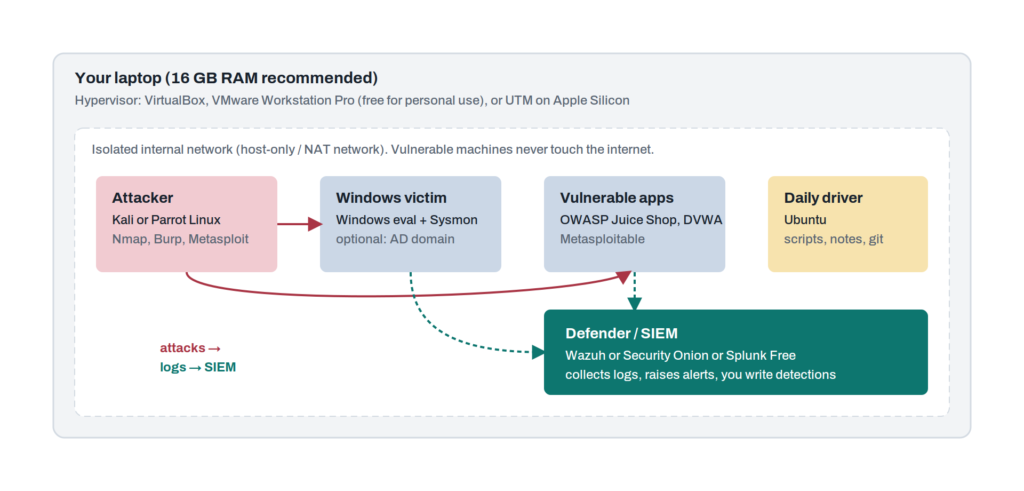
A home lab that teaches you both sides. First, attack your own machines. Then, find that attack in your own logs. Do this again and again, and you will learn more than any course can teach you. Don’t build it all at once. Start with Ubuntu in week one, add Windows in month two, and set up the SIEM (the tool that collects all your logs in one place) in month four.
Free learning platforms:
| Platform | Best for | When |
| OverTheWire (Bandit, then Natas) | Linux basics, then web basics, as games | Week 1 |
| Professor Messer (YouTube) | Free full courses for Network+ and Security+ | Months 1–6 |
| Cisco Networking Academy | Structured free networking and intro security courses | Months 1–3 |
| TryHackMe (free rooms) | Guided beginner labs in your browser | Months 2–9 |
| PortSwigger Web Security Academy | The best free web security training available | Months 4–9 |
| picoCTF | Beginner-friendly hacking puzzles, all year round | Months 3–9 |
| Blue Team Labs Online, CyberDefenders, LetsDefend (free tiers) | Investigation practice, like a real SOC | Months 5–12 |
| Hack The Box (free tier and Academy) | Harder attack practice and write-ups | Months 7+ |
| flAWS.cloud and flAWS2.cloud | Free AWS cloud security challenges | Months 7+ |
| MITRE ATT&CK | The public map of attacker techniques that defenders use | Months 4+ |
Free software, by task:
| Task | Free tools |
| Virtual machines | VirtualBox, UTM (Mac), VMware Workstation Pro (free for personal use) |
| Network analysis | Wireshark, tcpdump, Nmap, Zeek |
| Web testing | Burp Suite Community, ZAP, ffuf, your browser’s developer tools |
| Logs and alerts | Wazuh, Security Onion, Splunk Free, Elastic, Sysmon, Sigma rules |
| Investigations | Autopsy, Volatility, Velociraptor, KAPE, CyberChef |
| Malware study | Ghidra, YARA, Detect It Easy, always inside an isolated virtual machine |
| Passwords | Hashcat, John the Ripper |
| Attack simulation | Atomic Red Team, Caldera, Metasploit Framework |
| Cloud | AWS, Azure and Google Cloud free tiers, Prowler, ScoutSuite, Trivy |
| Notes and portfolio | Obsidian, GitHub, a free blog on GitHub Pages |
In upcoming posts, we will set up this home lab step by step.
How can AI help you learn?
AI assistants like Claude, ChatGPT, and Gemini are the best study partners self-learners have ever had.
They are also the fastest way to feel skilled without being skilled. So use them with a few rules.
Good ways to use AI:
- Explain, then quiz: Paste a confusing log line and ask for an explanation. Then ask for five quiz questions. Don’t move on until you get them right.
- Ask for hints, not answers: When you are stuck on a lab, say “give me the smallest possible hint.”
- Make practice data: Ask for a fake set of login logs with a hidden attack inside. Then hunt for it yourself.
- Review your writing: Ask it to check your write-ups the way a senior colleague would.
- Keep things private: Tools like Ollama let you run AI models on your own laptop, so your lab data never leaves your machine.
Rules to follow:
- Never share real company data: Don’t paste passwords, customer details, or internal documents into a public AI tool. Once it is pasted, you cannot take it back. Make this a habit from Day 1.
- Struggle first: Try on your own for 20 minutes before you ask AI. The struggle is where the real learning happens.
AI is also a subject to learn:
Spend at least 20 hours this year on AI security itself. Read the OWASP Top 10 for LLM Applications. It lists the most common ways AI apps get attacked.
Then try prompt injection on a free game like Lakera’s Gandalf. Prompt injection means tricking an AI with cleverly written text so it ignores its rules.
Very few beginners can talk about this yet. In an interview, it makes you memorable.
How can you make money with cybersecurity skills?
Not everyone wants a salary job. That’s fine.
Security is one of the few technical fields where small, local businesses do well. Small companies are scared of being hacked, and big security firms usually ignore them.
Security businesses usually grow like a ladder.
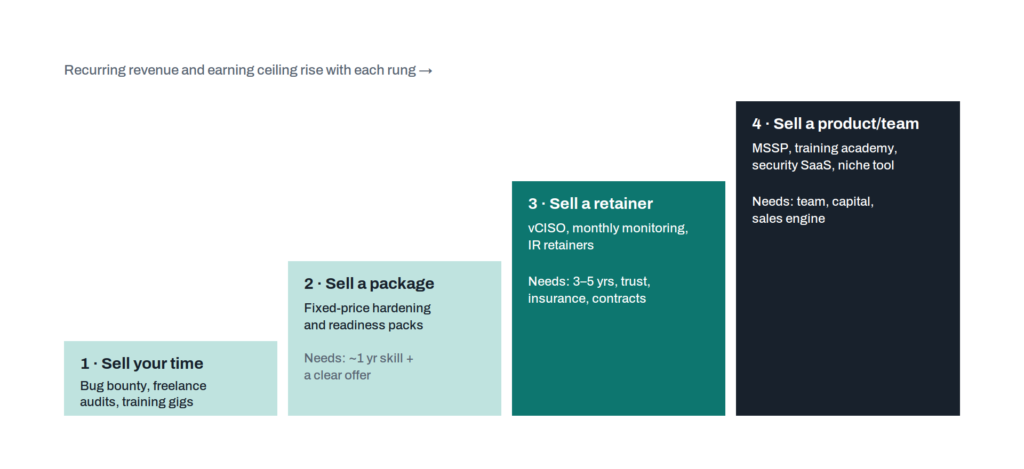
The four steps of a security business. Most successful businesses climb in order. Jumping from step 1 to step 4 without the trust built on steps 2 and 3 is the most common way they fail.
Here are real opportunities, roughly in the order you can start them.
- Small business security check-ups: Local clinics, law offices and shops often run Microsoft 365 or Google Workspace with default settings and no MFA. A fixed-price check-up covers turning on MFA, setting up email protection records (SPF, DKIM and DMARC, which stop scammers faking your email address), testing backups and cleaning up admin accounts. You can learn this in your first year.
- Security awareness training: Run phishing awareness workshops for small companies, schools and community groups. Former teachers are great at this. It also builds your local name, which helps every other step.
- Cyber insurance paperwork: Very few people talk about this one. Insurance companies now send small businesses long security questionnaires before giving them a policy. Most owners cannot answer them. Helping them meet the requirements and prove it is a clear and urgent service.
- Compliance help for startups: Startups selling to bigger companies are often asked for SOC 2 or ISO 27001. These are security standards that prove a company handles data safely. Preparing the policies and evidence is GRC work, and it suits people from audit or operations.
- Bug bounties: A bug bounty is a reward a company pays you for finding a security hole in its website or app and reporting it the right way. Platforms like HackerOne, Bugcrowd, and Intigriti connect you with these companies, and every target on them has given permission. But the money is not steady. One month you may earn something, the next month nothing. So for the first year or two, treat it as paid practice, not a salary. Website security for small sites: Many small business websites run old WordPress plugins with known holes. A monthly “maintenance plus security” plan is an easy recurring service.
- Content and teaching: Share what you learn while you learn it. Start with write-ups, which are simple step-by-step notes on how you solved a lab or challenge. Then try YouTube walkthroughs or a newsletter, and later, paid courses.
- Building practice labs: Training platforms and companies pay for well-made hacking challenges. It rewards creativity.
- Virtual CISO (vCISO): A CISO is the head of security at a company. Small companies cannot afford a full-time one, so they pay a part-time expert every month. This needs several years of experience, but it is one of the best-paid independent paths.
- A managed security company or training institute: The top of the ladder. You watch many clients’ systems with a team, or run your own academy. Both need money, contracts, and insurance, and both are built on the name you earned on the lower steps.
Before you charge anyone: Get the scope in writing. Get written permission for any testing. If you can, get professional liability insurance. In security, a verbal agreement will not protect you.
What mistakes slow beginners down?
- Tutorial hell: Finishing course after course without building anything. If you have not made something in 30 days, stop watching and start building.
- Tools before basics: Learning which buttons to press in Metasploit before you understand how a network connection works. Tools change every few years. The basics don’t.
- Collecting certificates: Five beginner certificates say “good at exams,” not “good at the job.”
- Skipping networking: The most common gap interviewers find in career changers.
- Learning in silence: Nobody can hire someone they have never heard of. Share your work.
- Only applying for Tier 1 SOC jobs: Widen your search to side-door jobs and less glamorous industries.
- Burnout sprints: 40 hours one week and zero for the next three. Steady 15-hour weeks win.
What is legal and what is not?
This part is short, but it is the most important part of the post.
Only test systems you own, or systems you have written permission to test.
Scanning a company’s website “just to practice” is a crime in most countries. So is logging into an account you found “just to see.” So is testing your employer’s network without approval.
Your intentions do not matter to the law.
Every platform in this post gives you legal targets. Use them. Your future background checks, and your whole career depend on a clean record.
The free certificate that disappeared
For almost four years, beginners heard the same advice everywhere.
“Start with the ISC2 Certified in Cybersecurity. The course is free, and the exam is free.”
It was true. In August 2022, ISC2 launched a program called One Million Certified in Cybersecurity. The goal was simple. Remove the money barrier for people who wanted to try this field.
It worked. More than one million people across 178 countries signed up for the free course and exam.
Then, in April 2026, ISC2 announced the program was closing. New public sign-ups ended on 20 May 2026.
The certificate still exists. You just have to pay for the exam now.
But here is the interesting part. Months later, many blog posts and videos still tell beginners it is free. People plan their whole first month around an offer that no longer exists.
That is the real lesson of this story. And it is not really about certificates.
In cybersecurity, information goes out of date fast. Tools change. Prices change. Attacks change. The habit that protects you is checking the original source yourself, every time.
That habit will serve you on Day 1. It will serve you just as much in year ten.
How do you know you are ready to apply?
Don’t wait until you “feel ready.” Nobody in this field ever feels fully ready.
Apply when you can tick most of these boxes:
- You can explain “what happens when I type a web address” out loud, including DNS and TLS.
- You can move around Linux and Windows using the command line, and explain what their logs record.
- You have written at least one useful script in Python or PowerShell.
- You have a home lab and can describe an attack you ran against it and how you caught it.
- You have one recognized certificate, or you are sitting the exam within weeks.
- You have three public pieces of work in your chosen family.
- Your learning log shows steady work over months, not one big burst.
- You can talk for two minutes about a recent real hack: how it happened and what would have stopped it.
Quick summary. About 800 hours. Six floors. Four stages. Four job families. One home lab. Three pieces of public work.
Final thoughts
Learning cybersecurity is not a sprint, and it is not a four-year degree either.
It is about 800 honest hours. Done in the right order. Written down as you go.
You now have the full map. The only thing missing is your first hour.
So close this page. Install a password manager. Set up your first Ubuntu virtual machine. Then write one line in a file called day-001.md about what you did.
Day 2 will be easier. By hour 100, you will be surprised by how much you understand.
In upcoming posts, we will build the home lab together step by step and look at how to write your first detection rule.
Stay safe, stay alert!


 Hubert Ramsey
 Anas
Anas 
 Fredric Sherman