
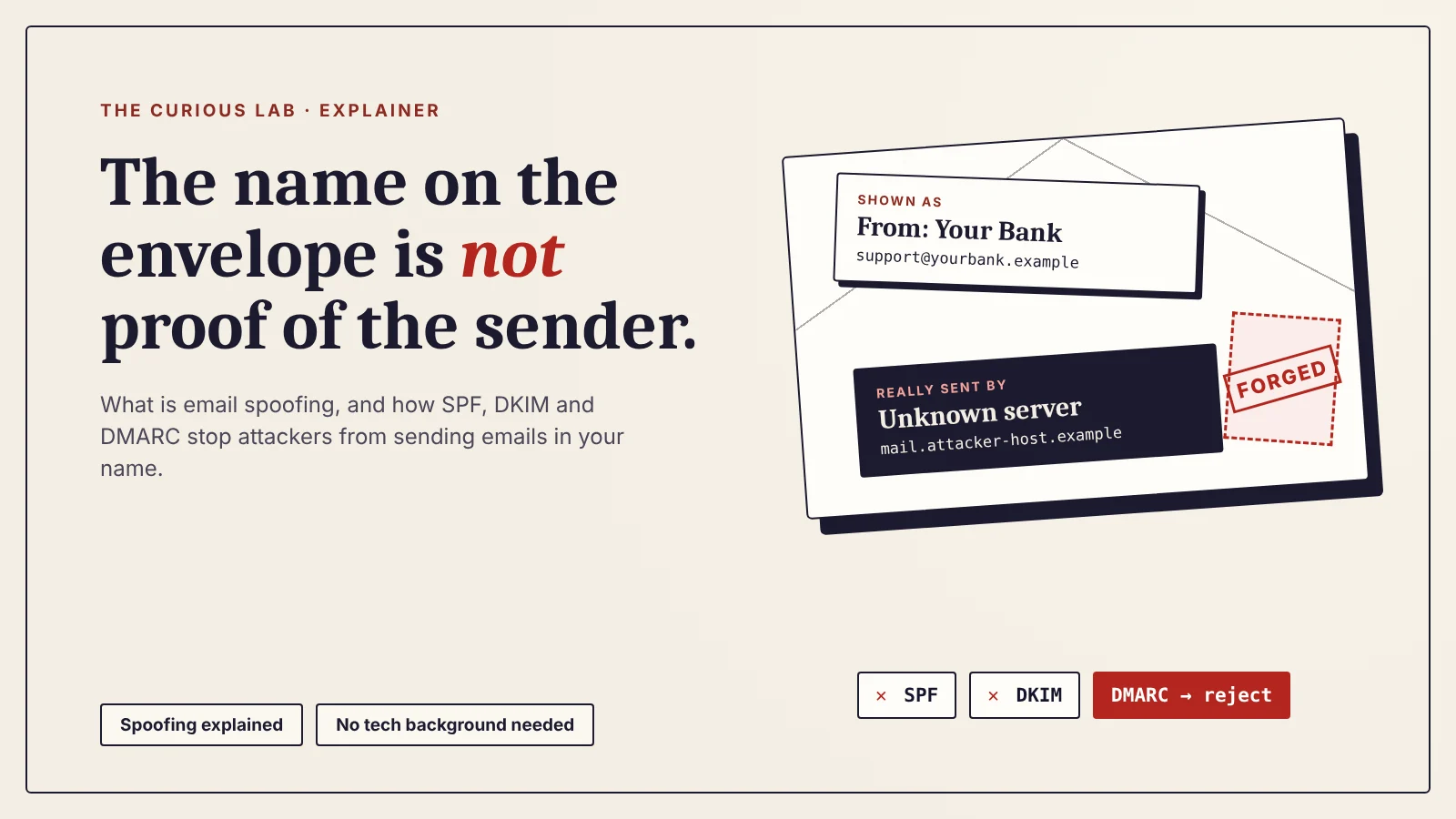
What Is Email Spoofing? How Attackers Send Emails From Your Name (and How SPF, DKIM and DMARC Stop It)
An attacker sending a fake email to you that looks the same as your employer, your bank, or your family is known as Email Spoofing.
This is why most email spoofing attacks work, as the message that arrives to you is from someone whom you trust.
In this post, we will see what email spoofing is, why email lets anyone fake the sender, the main types of email spoofing, what attackers do with it, how SPF, DKIM, and DMARC stop it, how to tell if an email is spoofed, and what to do if someone is sending emails in your name.
We usually write our articles for a common audience with no technical background, with some technical details for cybersecurity enthusiasts.
We are building new tools for The Curious Lab. Soon, you will be able to report any article where you find incorrect data, so we can check it and fix it. We will also introduce a space for public discussion on common cybersecurity topics, where you can share what you know and learn from other readers.
What is email spoofing?
Email spoofing means sending an email with a fake sender, so that it looks like it came from someone else.
The attacker changes what you see in the “From” line. The email may show the name and address of your bank, a delivery company, a government office, your manager, or even your own address.
Say, for example, your bank name is XYZ, and their official email address is [email protected]
But if you received an email with an address of [email protected] or any other additionally added name with it, most of the people will be confused by it. Some of them would believe it is the bank that has emailed them.
Even if only a few of the people who open the email is a win for the attacker.
So, in email spoofing, the attacker doesn’t steal the real account. They copy its label.
Here is the difference from two related attacks:
- Email spoofing: the attacker fakes the sender. The real account is never touched.
- Account takeover: the attacker logs in to the real account and sends from it. We saw this in the Revolut case, which we covered in our post on how a real government email fooled Revolut.
- Phishing: the trick itself, where a message gets you to click, pay, or share something. Spoofing is one of the most common ways to make a phishing email believable. (We covered phishing in detail in our post on what is phishing.
How does email spoofing work?
To understand email spoofing, it helps to know that every email has two sender addresses, not one.
It is like a letter in the post. The envelope carries a return address that the post office uses. The letter inside carries a name at the bottom that the reader sees. Nobody at the post office opens the envelope to check that the two match.
Email works the same way.
- The envelope sender is used by mail servers to deliver the message and to send back bounce notices. You almost never see it.
- The “From” address is what your email app shows you. This is the one you read and trust.
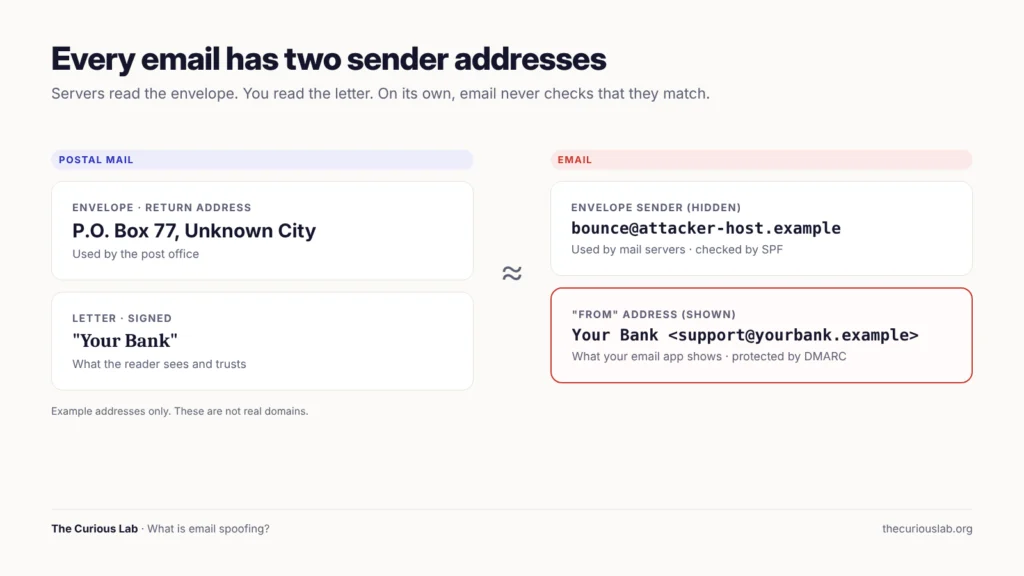
Every email has an envelope address that servers use and a “From” address that you see. Without checks, nothing makes them match.
The rules for sending email, called SMTP (Simple Mail Transfer Protocol), were written in the early 1980s, when the internet was a small network of universities and research labs. Everyone on it was trusted. So, SMTP lets the sending server write any “From” address it likes, and the receiving server accepts it.
Note that this hasn’t changed. SMTP still doesn’t check the “From” line by itself. The checks we have today, SPF, DKIM, and DMARC, were added on top of email much later. They only protect a domain whose owner has set them up correctly. When a domain has no checks, an attacker can still send email in its name.
Here is how a basic spoofing attack runs, step by step:
- The attacker picks a sender to copy, such as a bank, a supplier, or a company manager.
- They use their own mail server, or a cheap sending service, and type the copied name and address into the “From” line.
- They add a believable story: an unpaid invoice, a locked account, an urgent payment.
- The receiving server checks whether the copied domain has any rules about who can send for it.
- If the domain has no rules, or weak rules, the email lands in the inbox looking real.
What are the types of email spoofing?
Not every fake sender is made the same way. We group email spoofing into five types, from the simplest to the most advanced.
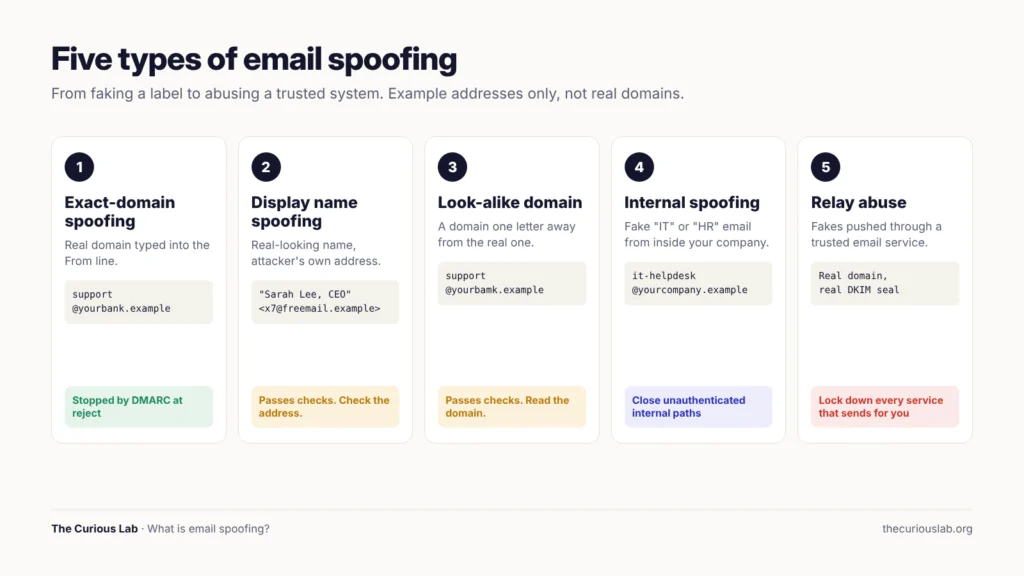
Five types of email spoofing. The first two fake the label. The next one fakes the address. The last two abuse trusted systems.
Type 1 — Exact-domain spoofing
The attacker uses the real domain in the “From” address, such as [email protected]. This only works when the real domain doesn’t publish strict rules. This is the type that SPF, DKIM, and DMARC were built to stop.
Type 2 — Display name spoofing
Every email has a display name, the friendly name shown before the address. The attacker sends from their own free email account, but sets the display name to “PayPal Support” or to your CEO’s name.
Many phone email apps show only the display name, not the address behind it. So, on a small screen, “Sarah Lee, CEO” looks exactly like the real Sarah Lee. Note that this type passes SPF, DKIM, and DMARC, because the attacker is honestly sending from their own domain. Only the name is fake.
Type 3 — Look-alike domains
The attacker registers a domain that looks almost the same as the real one. A letter is swapped, added, or removed, or a character from another alphabet is used. Say, for example, “yourbank.example” becomes “yourbamk.example” or “yourbank-support.example”. These are example domains to illustrate the idea, and they are not real domains.
Strictly speaking, this is not spoofing, because the attacker really owns the look-alike domain and can set up valid checks for it. We include it here because it is the attacker’s main answer to DMARC. When the real domain is locked, they buy one that looks like it.
Type 4 — Internal spoofing
Here, the fake email appears to come from inside your own company, such as “IT Helpdesk” or “HR”, sent to your work address.
In 2025, researchers at Varonis found a campaign that abused a Microsoft 365 feature called Direct Send. This feature exists so that printers and scanners can send email to people inside a company without logging in. Attackers used it to send fake internal emails, often with a PDF holding a QR code that led to a fake Microsoft login page. The campaign started in May 2025 and targeted more than 70 organizations, most of them in the United States. Microsoft has since added a setting called “Reject Direct Send” that lets companies block this path.
Type 5 — Relay abuse
This is the most advanced type. The attacker finds a weakness in a trusted email service and pushes fake emails through it, so the emails come out carrying real authentication. We tell the biggest example of this, EchoSpoofing, as a real story near the end of this post.
What do attackers do with spoofed emails?
Fake payment requests: An email “from the CEO” asks the finance team to pay an urgent invoice. An email “from a supplier” says their bank details have changed. This is business email compromise (BEC), a scam where the attacker uses a trusted email identity to get a company to send money or data.
Fake login pages: An email “from Microsoft” says your password expires today, with a link to a page that looks exactly like the real sign-in page. Whatever you type goes to the attacker.
Malware: An email “from a delivery company” has an attachment called “Shipping label.pdf” that installs malware when opened.
Fake fines and refunds: An email “from the tax office” offers a refund or warns about a fine, and asks for your card details.
Damage to your name: When an attacker spoofs a business, the people who get scammed often blame the business. Some stop trusting its real emails too.
According to the FBI’s 2025 Internet Crime Report, business email compromise caused about $3.05 billion in reported losses in the United States in 2025, from 24,768 complaints. That is the second-largest loss of any crime type in the report, after investment fraud. BEC made up only about 2.5% of all complaints, but about 15% of all reported losses.
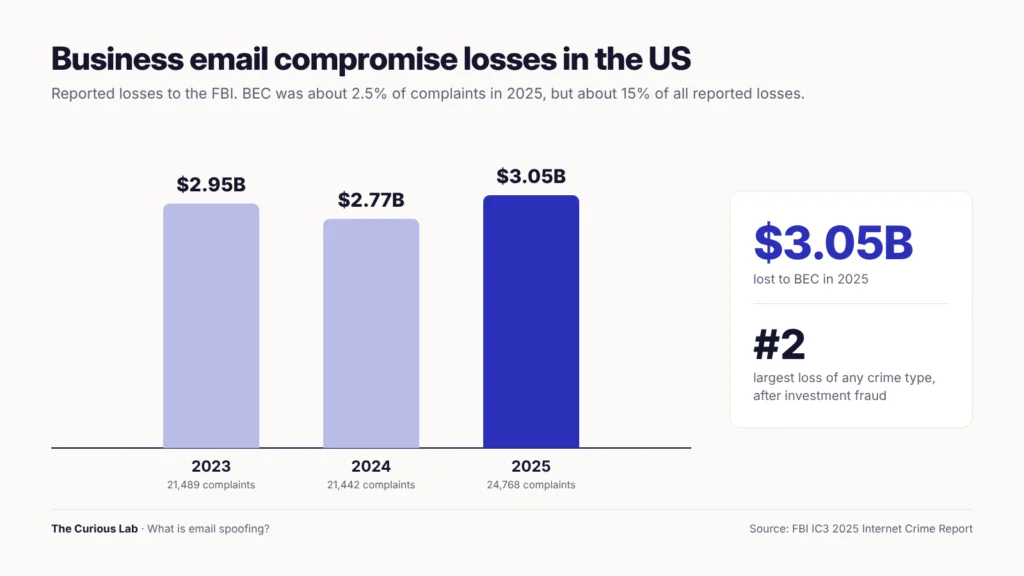
Reported business email compromise losses in the US, 2023 to 2025. Source: FBI IC3 2025 Internet Crime Report.
Note that BEC doesn’t always use spoofing. Some attackers take over a real account, and some use look-alike domains. But a spoofed or faked sender is at the heart of almost every BEC email, because the whole scam depends on you trusting the name at the top.
Attackers also don’t have to build these tools themselves. Ready-made phishing kits, which are packages of fake login pages and email templates, are bought and sold on dark web forums and on messaging apps such as Telegram. The email address lists they target often come from data breaches. We explained how stolen data and attack tools are traded in our post on dark web basics.
How do SPF, DKIM and DMARC stop email spoofing?
This part is pure technical, and if you don’t understand these technical parts, you can learn the basics. If you are a budding cybersecurity enthusiast, this part is for you. Others can skip it or read it at your own choice.
The next topic to stop is How to tell if an email is spoofed
This is the part that every website owner and business owner should know. SPF, DKIM, and DMARC are three small text records that a domain owner publishes in the domain’s DNS. DNS is the internet’s address book. It is where a domain tells the world which website and which mail servers belong to it.
Each of the three records answers one question. Together, they let a receiving mail server decide whether an email really came from the domain in the “From” line.
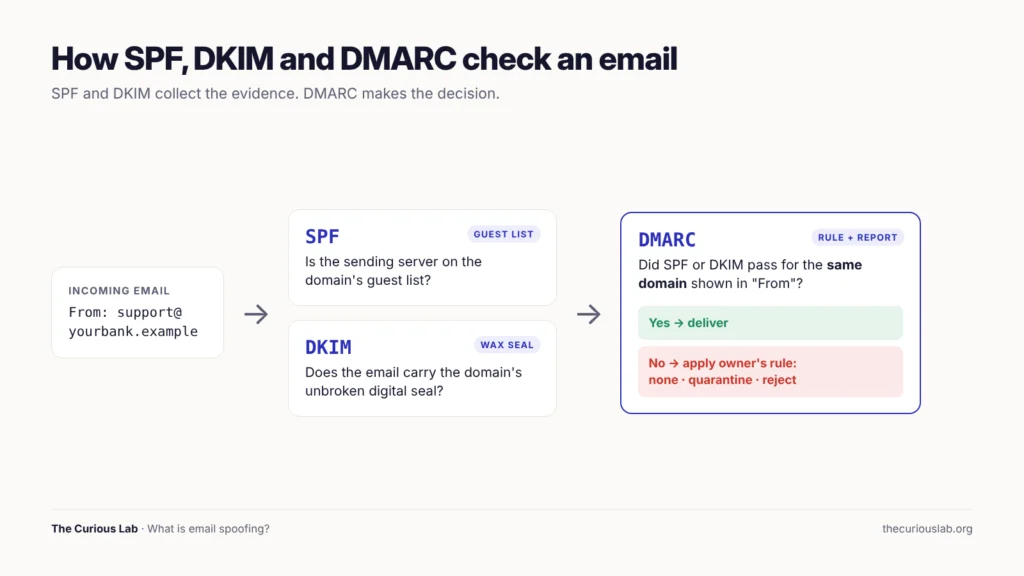
SPF checks who sent it. DKIM checks that it wasn’t changed. DMARC checks that both match the name you see, and decides what happens if they don’t.
SPF: the guest list
SPF (Sender Policy Framework) is a list of the servers that are allowed to send email for a domain.
It is like a guest list at the door. When an email arrives, the receiving server looks up the domain’s SPF record and checks whether the sending server is on the list. If it isn’t, SPF fails.
An SPF record looks like this:
v=spf1 include:_spf.google.com ~all
This one says: “Google’s mail servers may send for this domain. Treat everything else as suspicious.”
Note that SPF has one big gap. It checks the hidden envelope address, not the “From” address you see. So, an attacker can pass SPF for their own domain on the envelope while showing your domain in the “From” line. This is why SPF alone doesn’t stop spoofing.
DKIM: the wax seal
DKIM (DomainKeys Identified Mail) adds a digital signature to every email the domain sends.
It is like a wax seal on an old letter. The sending server stamps each email with a secret key that only the domain owner has. The matching public key is published in DNS, so any receiving server can check the seal. If the email was changed on the way, or if it was never sealed by the real domain, DKIM fails.
DKIM proves two things: which domain sealed the email, and that nobody changed it after it was sealed. It doesn’t decide what to do with an email that fails. That is DMARC’s job.
DMARC: the rule and the report
DMARC (Domain-based Message Authentication, Reporting and Conformance) ties SPF and DKIM to the “From” address you actually see.
DMARC does three things.
- It checks alignment. For an email to pass, SPF or DKIM must pass for the same domain that appears in the “From” line. This closes the gap that SPF alone leaves open. A spoofed email can’t borrow someone else’s pass.
- It sets a rule. The domain owner tells receiving servers what to do with emails that fail: let them through, send them to spam, or block them.
- It sends reports. Receiving servers send the domain owner regular reports showing every server that sent email using their domain, including attackers.
A DMARC record looks like this:
v=DMARC1; p=reject; rua=mailto:[email protected]
The “p” stands for policy. There are three levels.
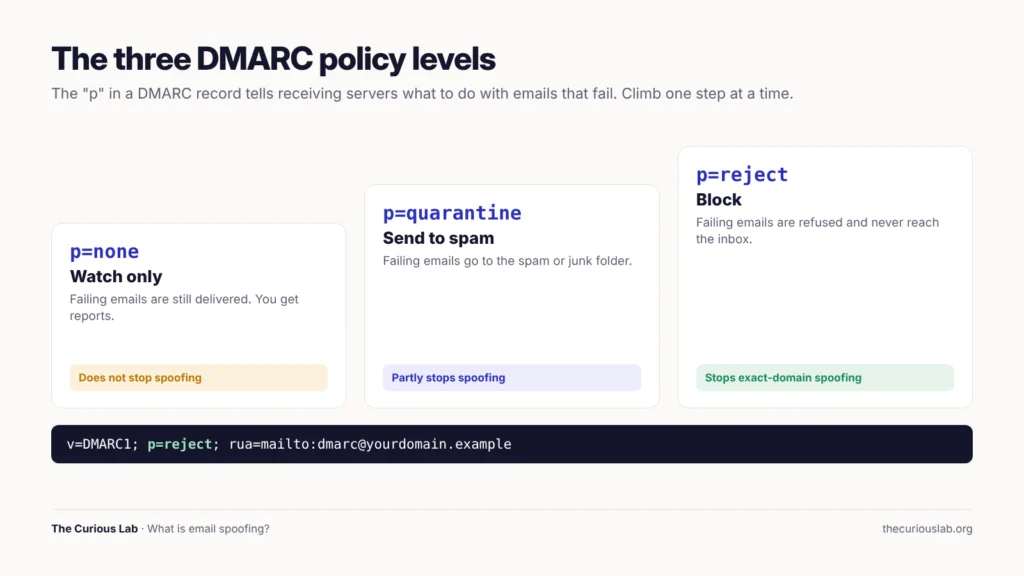
The three DMARC policies. Only quarantine and reject actually stop spoofed emails.
- p=none: watch only. Failing emails are delivered normally, and the owner gets reports. This is the safe starting point, but it doesn’t stop anything.
- p=quarantine: failing emails go to the spam or junk folder.
- p=reject: failing emails are blocked and never reach the inbox.
So, a domain with SPF and DKIM but DMARC at p=none is still easy to spoof. The lock is fitted, but it is not turned.
How the three work together
Here is what happens when a spoofed email arrives “from” a domain with all three set up at p=reject.
- The attacker’s server isn’t on the domain’s SPF list, so SPF fails for that domain.
- The email has no valid DKIM seal from that domain, so DKIM fails for that domain.
- DMARC sees that neither check passed for the domain in the “From” line.
- DMARC applies the owner’s rule, p=reject, and the email is blocked.
Basically, SPF and DKIM collect the evidence, and DMARC makes the decision.
Why are so many domains still easy to spoof?
While there is a myth that big email providers already block every fake sender, it is wrong. A receiving server can only enforce the rules a domain owner has published. If the owner publishes nothing, or only p=none, the receiving server has no instruction to block anything.
The big providers have pushed hard to change this.
- Google and Yahoo: From February 2024, both began requiring anyone who sends more than 5,000 emails a day to their users to set up SPF, DKIM, and DMARC. Google reported that these rules cut the number of unauthenticated messages reaching Gmail users by 65% in 2024, which means 265 billion fewer unauthenticated emails that year.
- Microsoft: From May 5, 2025, Outlook.com, Hotmail.com, and Live.com began applying similar rules to senders of more than 5,000 emails a day, sending non-compliant email to the junk folder.
How to tell if an email is spoofed?
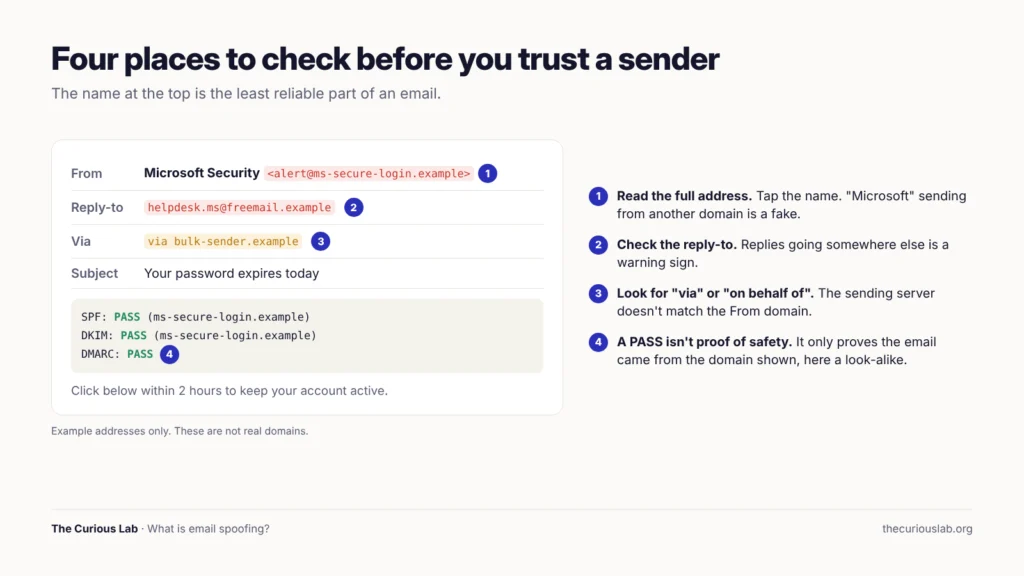
Four places to check before you trust a sender. The name at the top is the least reliable part of an email.
Look at the address, not the name. Tap or hover over the sender’s name to see the full address. A display name of “Microsoft Security” with an address at a random free email service is a fake.
Check the reply-to address. Start a reply without sending it, and look at the “To” line. If you received the email from your supplier but your reply would go to a different address, stop.
Look for “via” or “on behalf of”. Gmail shows “via,” and Outlook shows “on behalf of” when the sending server doesn’t match the domain in the “From” line. This is sometimes normal for newsletters, but it is a warning sign on an email “from your bank”.
Read the authentication results. In Gmail, open the email, click the three dots, and choose “Show original”. You will see lines for SPF, DKIM, and DMARC, each marked PASS or FAIL. In Outlook, you can find the same results in the message details or message source. A FAIL on DMARC for an email that claims to be from a big company is a strong sign of spoofing.
Watch the request. Pressure, secrecy, and a request for money, a code, or a login are the real warning signs, whatever the sender looks like.
Note that a PASS doesn’t prove an email is safe. It only proves the email came from the domain shown. A look-alike domain can pass every check for itself, and a hacked real account passes too. So, the checks above help you catch spoofing, but the request is still what you judge.
If an email has a link and you are not sure about it, you can paste the link, or the whole message, into our free Link Safety Checker before you open it.
How to protect yourself from spoofed emails
- Never trust the sender name alone. Always check the full address.
- Never use the contact details inside a suspicious email. Open the company’s app, type the website address yourself, or call the number on your card or bill.
- Never change payment details because of an email. Call the supplier on a number you already had before the email arrived.
- Never share a one-time code or password by email. No real company asks for these.
- Turn on two-step verification for your email and bank, so a stolen password alone isn’t enough. We explained how in our post on how to protect your home computer.
- Use a password manager. It won’t fill in your password on a fake login page because the web address doesn’t match. You can create a strong password with our free password generator.
- Report spoofed emails using the “Report phishing” or “Report spam” option in your email app. This helps the provider block the same email for other people.
These steps also defeat AI-written emails, which we covered in our post on how to prevent AI cyber attacks. AI can make the message perfect, but it can’t change the address it really came from.
How to protect your domain from email spoofing
This is for anyone who owns a website, a business, or any domain that sends email. You don’t need to be a developer. You only need access to the place where your domain’s DNS is managed, such as your domain registrar, your web host, or Cloudflare.
Here are the steps, in order.
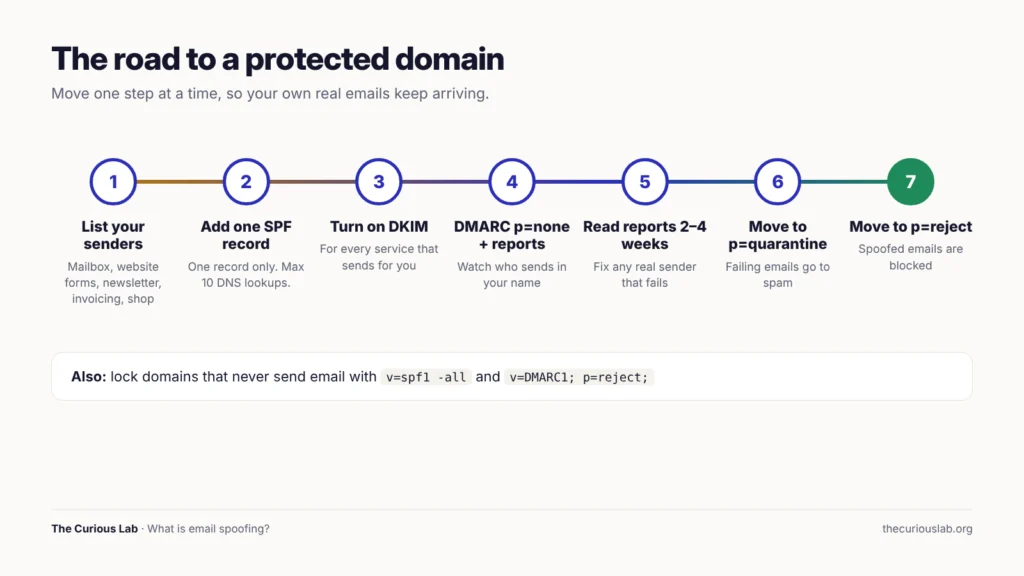
The road to a protected domain. Move one step at a time, so your own real emails keep arriving.
Step 1 — List everything that sends email for you
Write down every service that sends email using your domain. Your mailbox provider (such as Google Workspace or Microsoft 365), your website’s contact form, your newsletter tool, your invoicing software, and your online shop all count.
This list matters because any service you forget will start failing once you reach p=reject.
Step 2 — Add one SPF record
Add a single TXT record that lists all your sending services. Each provider publishes the exact “include” value to use.
Note that a domain must have only one SPF record. Two SPF records break both. Also, SPF allows a maximum of 10 DNS lookups. If you add too many services, the record stops working, so remove services you no longer use.
Step 3 — Turn on DKIM for every sender
Your mailbox provider and each sending service give you DKIM records to add, usually as TXT or CNAME records. Turn on DKIM signing in each service after adding them.
Step 4 — Add DMARC at p=none, with reports
Start with a watch-only policy and a mailbox for reports:
v=DMARC1; p=none; rua=mailto:[email protected]
The reports arrive as files that are hard to read by hand. A DMARC reporting service turns them into simple charts. Many have free plans for small domains.
Attaching a YouTube video for better reference; you can come across a lot of videos on DMARC policy
https://www.youtube.com/watch?v=RzHxR72Rpk4&pp=ygUdRE1BUkMgYXQgcD1ub25lLCB3aXRoIHJlcG9ydHM%3D
Step 5 — Read the reports, then tighten
Read the reports for two to four weeks. Check that every real sender from Step 1 passes. Fix any that fail.
Then move to p=quarantine. After a few more weeks with no problems, move to p=reject. Remember, p=none alone doesn’t stop spoofing. The job is only done at quarantine or reject.
Step 6 — Lock the domains that don’t send email
Attackers love parked domains, the extra domains a business owns but never uses for email. Protect them with two simple records:
- SPF: v=spf1 -all (no server may send for this domain)
- DMARC: v=DMARC1; p=reject;
Step 7 — Close the internal paths
If your company uses Microsoft 365 and nothing relies on Direct Send, turn on “Reject Direct Send” in the Exchange admin center. Check first with your IT team, because some printers and scanners still use it.
Check your grade
Our free [Email Spoofing Checker]([ADD LINK]) reads your domain’s SPF, DKIM, and DMARC records and gives your domain a grade from A to F, so you can see how easy it is to spoof. It only reads public DNS records and never sends an email.
What to do if someone is sending emails from your address
It is common to get angry replies or bounce messages for emails you never sent. Don’t panic. Here is what to do.
- Check that your account is really safe. Look at your email account’s recent sign-in activity and sent folder. If you see sign-ins or sent emails you don’t recognize, this is account takeover, not spoofing. Change your password from a clean device and sign out of all sessions.
- Turn on two-step verification, if it isn’t on already.
- If you own the domain, follow the steps in the section above and move DMARC to p=reject. Your DMARC reports will also show where the fake emails are coming from.
- If you use a free email address such as Gmail or Outlook, the provider already protects its domain. Spoofed emails “from” your address are usually blocked or marked as suspicious. Report any that you see.
- Warn your contacts that fake emails are going around in your name, and ask them not to click links or pay anything without calling you first.
- For a business, tell your customers which address you send from, and that you never change bank details by email.
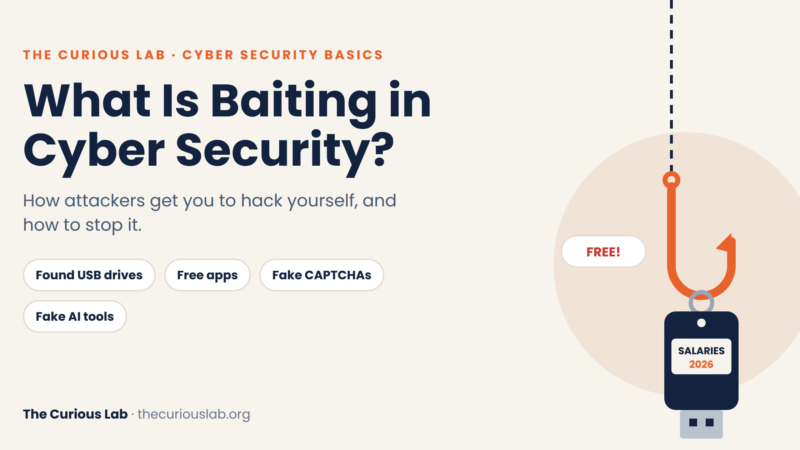
- Report it. In the US, report fraud at ic3.gov and ReportFraud.ftc.gov. We listed where to report in the UK, India, Australia, Canada, and Singapore in our post on baiting.
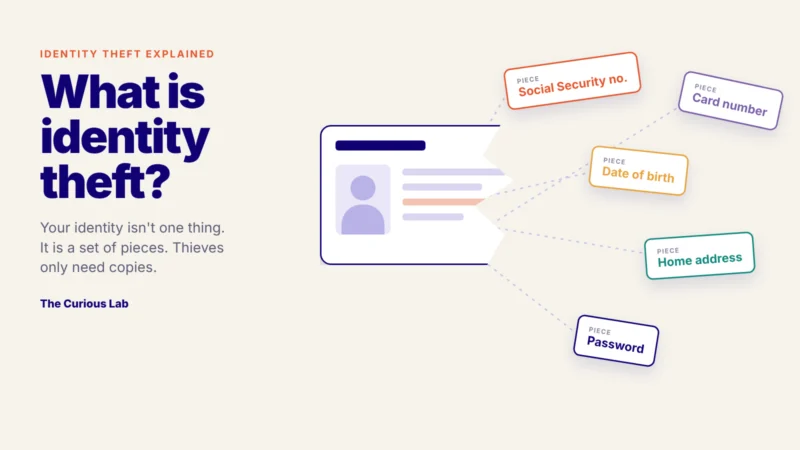
Note that if a spoofed email used your name to trick someone into sharing personal details, those details can end up with identity thieves. We explained the signs to watch for in our post on what is identity theft. The same stolen details are often sold again on dark web markets, as we described in our post on dark web basics, so one spoofed email can lead to more attacks later.
A real story: the “perfect” emails from Disney, Nike and IBM
In 2024, people around the world received emails that looked like they came from disney.com, nike.com, ibm.com, and bestbuy.com. The emails offered things such as a Disney+ account notice and linked to fake pages that asked for card details.
These weren’t look-alike domains. The emails came from the real domains, and they passed both SPF and DKIM. Gmail and other big email services delivered them straight to the inbox.
Researchers at Guardio Labs traced the emails and named the campaign EchoSpoofing. The attackers had found a weak setting in the email protection service of Proofpoint, a security company that many of the world’s largest companies use to filter and send their email.
Here is how it worked. Each of these brands allowed its Microsoft 365 email to pass through Proofpoint’s servers. But the setting accepted email from any Microsoft 365 account, not only the brand’s own. So, the attackers set up their own Microsoft 365 accounts, wrote emails with the brand’s address in the “From” line, and pushed them through Proofpoint. Proofpoint treated them as the brand’s real email, added a genuine DKIM seal, and sent them out. Guardio said the fake emails were “echoed” back as genuine, which gave the campaign its name.
The campaign started in January 2024. It sent an average of about 3 million spoofed emails a day, with peaks of 14 million a day in early June, mostly pretending to be Disney. Guardio estimated that about 360 million emails were sent over 180 days. Guardio worked with Proofpoint, which tightened its settings and published new advice for its customers.
This story shows the most important fact about email authentication. SPF, DKIM and DMARC are only as strong as the systems allowed to pass them. A domain can have every record in place and still be spoofed if one trusted service sends on its behalf too freely. So, Step 1 in the section above, listing every service that sends for you and checking how each one is set up, matters as much as the records themselves.
Final thoughts
As said, email spoofing works because of immediate trust in the name, which is common in our day-to-day life.
Note that you don’t need to do everything today. If you are a reader, start by checking the full address of every email that asks for money, a code, or a login. If you own a domain, start by checking your grade and adding DMARC at p=none with reports. Those two steps alone take away most of the attacker’s disguise.
If you are new to cybersecurity, start with our guide on how cyberattacks work.
We will update this post if we find new spoofing patterns worth knowing.
Stay safe, stay alert!
Related posts from The Curious Lab
- What Is Phishing? How Phishing Actually Succeeds
- How a Real Government Email Fooled Revolut: Business Email Compromise Explained
- Dark Web Basics: Tools, Links, How to Access
- How to Tell If Someone Is Scamming You Online? Signs, Tests and Free Tools
- What Is Identity Theft? How It Happens, Types, Signs and What to Do
- How to Prevent AI Cyber Attacks? A Simple Guide for Everyone
- What Is Baiting in Cybersecurity? How Do Attackers Get You to Hack Yourself?
- How Can You Protect Your Home Computer? A Simple Guide for Everyone
- How Cyberattacks Work
Free tools from The Curious Lab
- [Email Spoofing Checker]([ADD LINK]): see how easy it is to send fake emails from your domain, with an A to F grade.
- Link Safety Checker: check a link, or the whole email it came in, before you open it.
- Password Generator: create a strong, random password in one click.
- Curious Lab Breach Index: see the data breaches made public this year.