
What Is Baiting in Cybersecurity? How Do Attackers Get You to Hack Yourself?
Baiting doesn’t involve a hacker breaking into your system.
Instead, you open the door for the attacker without knowing it. You plug in a USB drive you found. You download a free app from an unverified source. You copy and paste a “verification code.” Note that all of this is done by you.
This is what makes baiting so dangerous. There is no break-in to notice. The attack only works because of your own actions, so it feels completely normal.
In this post, we will see what baiting is, the different types, which baits are working right now in the US, UK, and other countries, how much money people are losing, and how to protect yourself.
No technical background is needed to understand this. We have written it for the common person, with basic technical details added along the way.
What is baiting in cybersecurity?
Baiting is a type of social engineering attack.
Social engineering means tricking a person instead of tricking a computer. The attacker works on your mind, not on your machine.
In baiting, the attacker gets your attention with an offer, such as a free gift card, a free app download, free music, a USB drive labeled “Salaries 2026,” or a message saying you got a parking ticket.
Hidden inside the bait is malware, a script, or a trick that gives the attacker access to your device, your passwords, or your company network.
The attacker doesn’t need to chase you. They just leave the bait where you will find it and wait. It is like fishing.
The four parts of a baiting attack:
Every baiting attack, old or new, has the same four parts.
- The Lure: something you want. A freebie, a gift, a shortcut, or plain curiosity.
- The Hook: one small action you take. Plug in, download, paste, or scan.
- The Line: what runs silently in the background after that action.
- The Catch: what the attacker gets. Your passwords, remote control of your device, or a way into your company for ransomware.
Note that if you break any one of these four links, the attack fails.
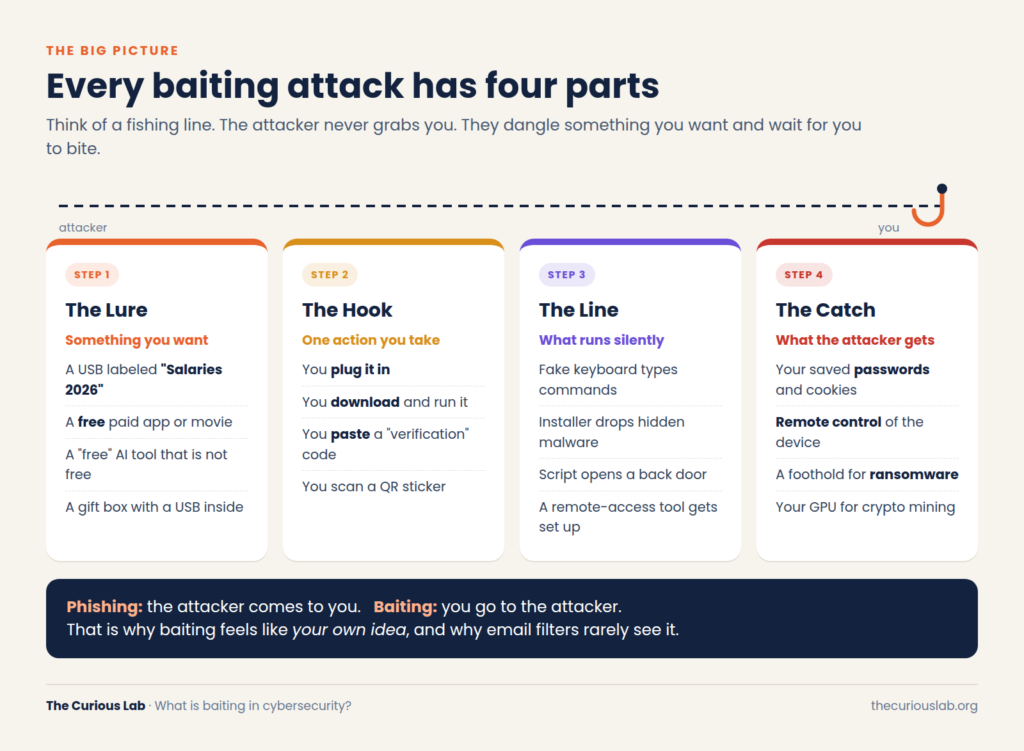
The four parts of a baiting attack. Break any one link, and the attack fails.
How is baiting different from phishing?
Both phishing and baiting are social engineering. Both trick people. Here is the difference.
In phishing, the attacker comes to you. An email lands in your inbox. A text message arrives. Someone calls you. (We covered this in detail in our post on what is phishing.)
In baiting, you go to the attacker. You pick up the USB drive. You search for the free software. You click the download button.
So, in phishing, when a strange email arrives, you still get time to think: whether the attachment is safe, whether there is malware, who really sent it, etc. Basically, you get time for decision-making.
But in baiting, you take the action yourself. You went looking for the free software, so you trust it. Nobody seems to be targeting you, and that is why your guard stays down. It is also why email filters miss it. A USB drive in a parking lot never passes through an email filter.
| Phishing | Baiting | Pretexting | |
| Who starts it | The attacker contacts you | You find the bait | The attacker contacts you |
| What it uses | Fear, urgency, authority | Curiosity, greed, kindness | A believable fake story |
| Typical form | Email, SMS, call | USB, free download, fake page | “Hi, I’m from IT support…” |
| Why it works | You react fast | It feels like your own choice | You trust the role |
Why do smart people take the bait?
Most people believe they are too smart to plug in a random USB drive. The research says otherwise.
In 2016, researchers at the University of Illinois dropped 297 USB drives around their campus. 98% of them were picked up, and files were opened on about 45% of them. The first one was plugged in less than six minutes after it was dropped.
These weren’t careless people. When the researchers asked why they plugged the drive in, most said they were trying to find the owner so they could return it.
So baiting doesn’t only use greed. It uses kindness, curiosity, and habit too. Basically, baiting turns good human qualities into a weakness.
Types of baiting attacks:
We group baiting into three families: bait you can hold in your hand, bait on your screen, and the newest bait, which lives inside AI tools.
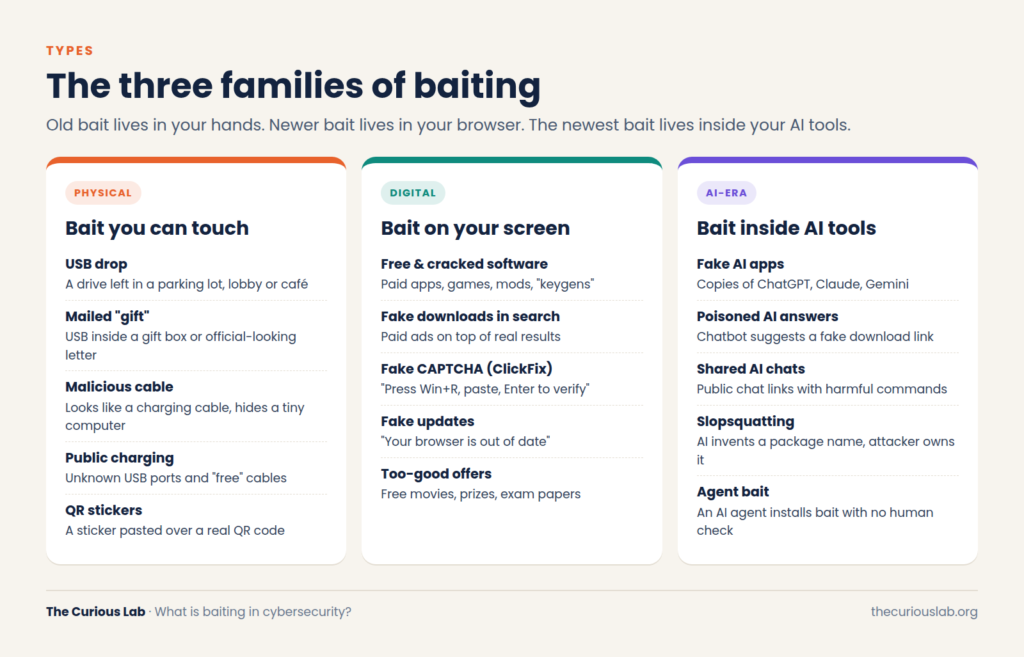
Three families of baiting. The newest one is growing the fastest.
Family 1 — Physical baiting: bait you can touch
USB drops: A USB drive is left in a parking lot, a lobby, an elevator, or a café near an office, often with a tempting label like “Payroll.”
Mailed “gifts”: The attacker mails a USB drive in a gift box or an official-looking envelope, with a letter telling you to plug it in to “claim your gift card.”
Cables and QR stickers: A normal-looking charging cable can hide a tiny computer, and fake QR stickers on parking meters lead to fake payment pages.
Family 2 — Digital baiting: bait on your screen
Free and cracked software: Paid apps and games offered for free, with hidden malware inside.
Fake downloads and fake updates: Attackers pay for ads above the real search result, or show a pop-up saying your browser is out of date. A real browser updates itself and doesn’t ask you to download updates from random websites.
Fake CAPTCHAs (ClickFix): This is the biggest new bait of 2025 and 2026, and we cover it in its own section below.
Family 3 — AI-era baiting: bait inside AI tools
This family is newer, and it’s growing faster than anything else.
Fake AI apps: Kaspersky reported more than 92,000 attacks between January and early May 2026 where malware was disguised as popular AI services such as ChatGPT, Claude, and Gemini.
Poisoned AI answers: In 2026, Microsoft found that people asking AI chatbots where to download popular free tools were given links to attacker-controlled websites.
Made-up software packages: A software package is a ready-made piece of code that developers add to their projects. Many developers now ask AI assistants which package to use, and sometimes the AI suggests one that doesn’t actually exist. The name sounds real, so the developer tries to install it. A 2025 study found that about 19.7% of the packages suggested by AI tools were made up. Attackers take advantage of this by registering those made-up names themselves and putting malware inside, so the next person who installs that package gets the attacker’s code instead.
Note that the bait always moves to wherever people trust without thinking. First it was found on USB drives, then in free software, then in top search results. Today it is AI answers.
What happens when you plug in a found USB?
A “USB drive” isn’t always a drive. From the outside, all of these look the same.
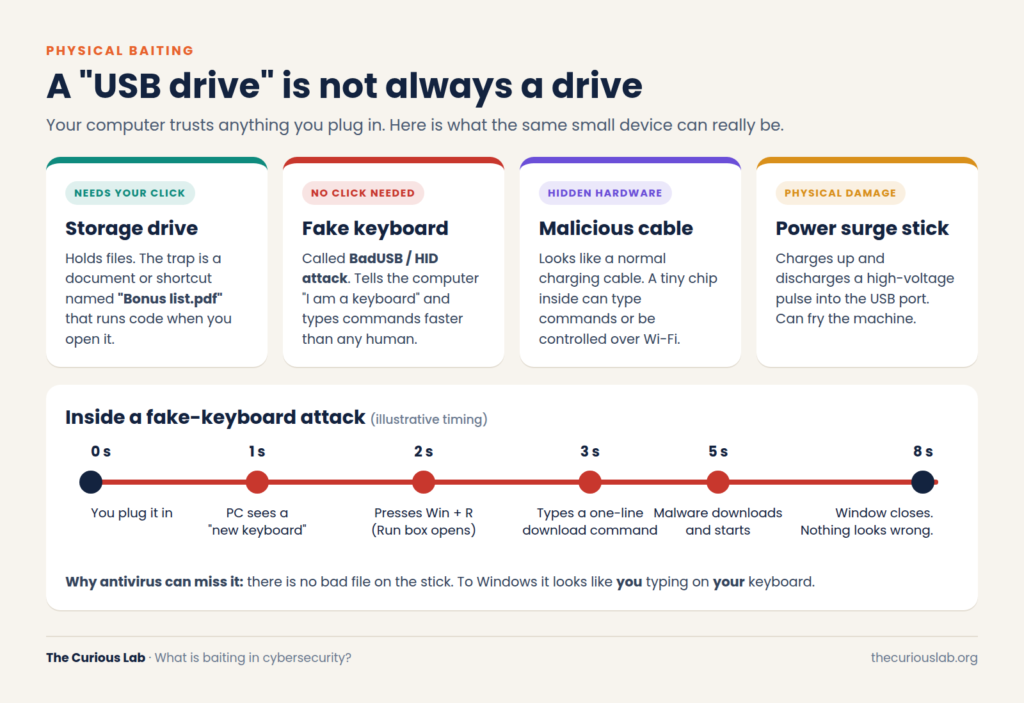
A “USB drive” can be four very different things. The fake keyboard is the scariest.
A storage drive with a trap file: It holds a file named something like “Bonus List.pdf” that is really a shortcut or script. It runs when you double-click it, which is why the file names are so tempting.
A fake keyboard (BadUSB): Every USB device tells your computer what it is, and your computer believes it. A BadUSB device looks like a flash drive but says it is a keyboard. Then, in a few seconds, it opens the Windows Run box, types a command that downloads malware, presses Enter, and closes the window.
Antivirus can miss this because there is no bad file on the stick to scan. To Windows, it looks like you’re typing. Only behavior-based security tools notice that “someone” is typing faster than any human could.
The fake “I’m not a robot” check (ClickFix)
Out of all the baits in this post, this one needs the most attention, because it shows up on normal websites that people visit every day.
Security teams call it ClickFix. The attackers quietly hack real websites and add a fake check to them, so the site itself looks familiar. In September 2026, researchers at Netskope found more than 5,400 legitimate websites showing these fake prompts.
It starts with a box that says “Verify you are human.” You click the checkbox, the same way you have done many times before. After that, the box asks you to do three more things: press Win + R, then Ctrl + V, and then Enter. Most people find this a bit strange, but it doesn’t look dangerous, so they just follow the steps.
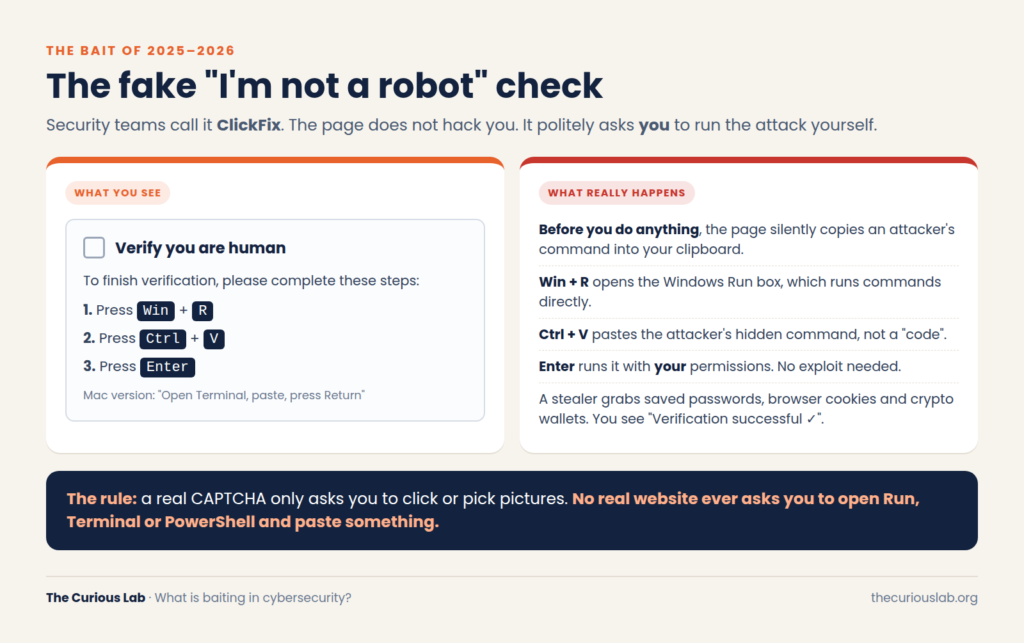
What you see versus what really happens behind a fake CAPTCHA.
Note that the attack had already started when you clicked the checkbox. At that moment, the page copied a command from the attacker into your clipboard, and it didn’t show you anything on the screen. Win + R opens the Windows Run box, a small tool that runs commands straight away. So when you press Ctrl + V, you are pasting the attacker’s command into it, and pressing Enter runs that command with your own permissions. Basically, you typed in the attack yourself.
In most cases, that command installs an info-stealer. This is a type of malware that takes the passwords saved in your browser, your browser cookies, and your crypto wallets. Mac users are targeted too; for them, the page asks you to paste the command into Terminal instead.
The rule here is simple: a real CAPTCHA will only ask you to check a box or choose pictures. No real website will ever ask you to open Run, Terminal, or PowerShell and paste something.
Which baits are working right now in the US, UK, and other countries?
The baits above are what security teams worry about inside companies. But when we look at where ordinary people lose their money, most of it goes to an offer: a cheap ticket, a fine you must pay today, an investment that “doubles your money,” or an app you must install.
Note that some of these are closer to phishing than pure baiting. We have included them because they work the same way: the victim is tempted into taking the final action on their own.
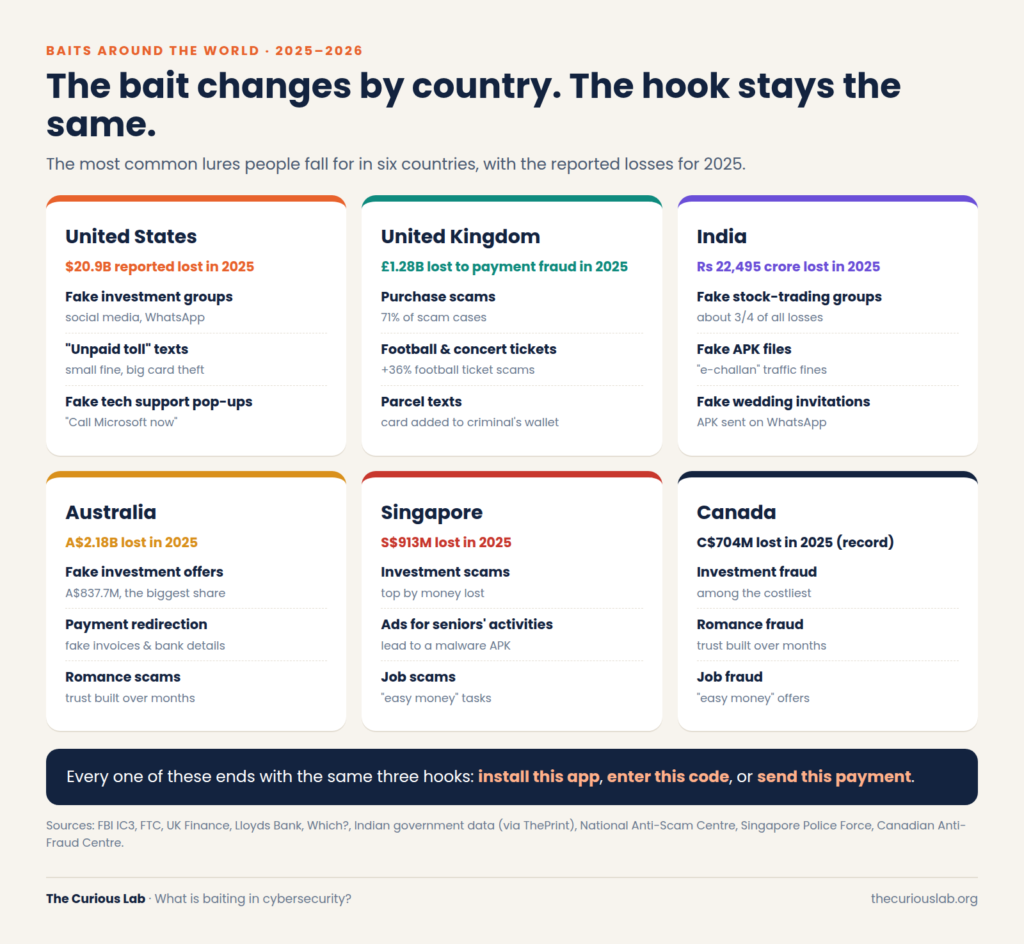
The bait changes from country to country. The hook stays the same.
United States
Fake investment offers are the biggest money-taker. According to the FBI’s 2025 Internet Crime Report, Americans reported losing $8.65 billion to investment fraud in 2025, usually starting on social media or in a WhatsApp group.
Shopping ads on social media are the most reported social media scam, according to the FTC.
“Unpaid toll” texts say you owe a small fine and must pay today. The fine is small on purpose, because people pay small amounts without thinking. The real goal is your card details.
Fake tech support pop-ups appear while you are browsing and take over the whole screen, often with a loud warning that your computer is infected. The message tells you to call “Microsoft” on the number shown, but the person who answers is the scammer. Americans reported losing $2.1 billion to tech support scams in 2025.
United Kingdom
According to UK Finance, criminals stole £1.28 billion through payment fraud in the UK in 2025. There were 3.81 million cases in total, which means a very large number of ordinary people were hit, not just a few unlucky ones.
Purchase scams are the most common bait in the UK. Someone sees a phone, a car or even a puppy advertised online at a good price, pays for it by bank transfer, and then nothing arrives. Note that these made up 71% of all authorized payment scam cases, where the victim sends the money themselves, and people lost £118.1 million this way.
Ticket scams are rising. Lloyds Bank reported a 36% rise in football ticket scams between October 2025 and March 2026, with an average loss of £215.
Investment scams rose 40% to £221.5 million, often starting with fake ads that use the faces of well-known people.
Parcel texts ask for your card details and a one-time code. Which? warn that criminals use that code to add your card to their own Apple Pay or Google Pay wallet.
India
Indians lost about ₹22,495 crore to cyber fraud in 2025, with more than 28 lakh (2.8 million) complaints, according to government data reported in the Indian press.
Fake stock-trading groups on WhatsApp and Telegram took about three-quarters of all losses. Victims install a fake trading app, and the money never comes out.
Fake APK files are spreading fast. An APK is an Android app installed from outside the Play Store. A WhatsApp message says you have a traffic fine (an “e-challan”) and sends an APK file. In 2026, a fake “MParivahan” app could read SMS messages, including bank one-time passwords (OTPs).
Australia, Singapore and Canada
Australia: Australians reported losing A$2.18 billion to scams in 2025, and investment scams took the most, at A$837.7 million. Losses are still well below the 2022 peak of A$3.1 billion, which shows that coordinated action works.
Singapore: In 2025, people in Singapore lost S$913 million to scams. That is 19% less than the year before, but the baits are not getting any simpler. In June 2026, Singapore Police put out a warning about ads on Facebook and TikTok. These ads offered activities for senior citizens, and when someone showed interest, a scammer messaged them on WhatsApp and sent an APK file to “see the list of activities.” Once it was installed, the malware removed security apps like ScamShield from the phone. Basically, the phone had no protection left, and the victim didn’t even know it.
Canada: Canadians reported a record C$704 million in fraud losses in 2025, and the Canadian Anti-Fraud Center estimates that fewer than 1 in 10 frauds are ever reported.
Basically, the bait wears a local costume, but the hook is always one of three things: install this app, enter this code, or send this payment.
How much money is being stolen?
We have used official figures only, because many “global” estimates online are guesses based on surveys.
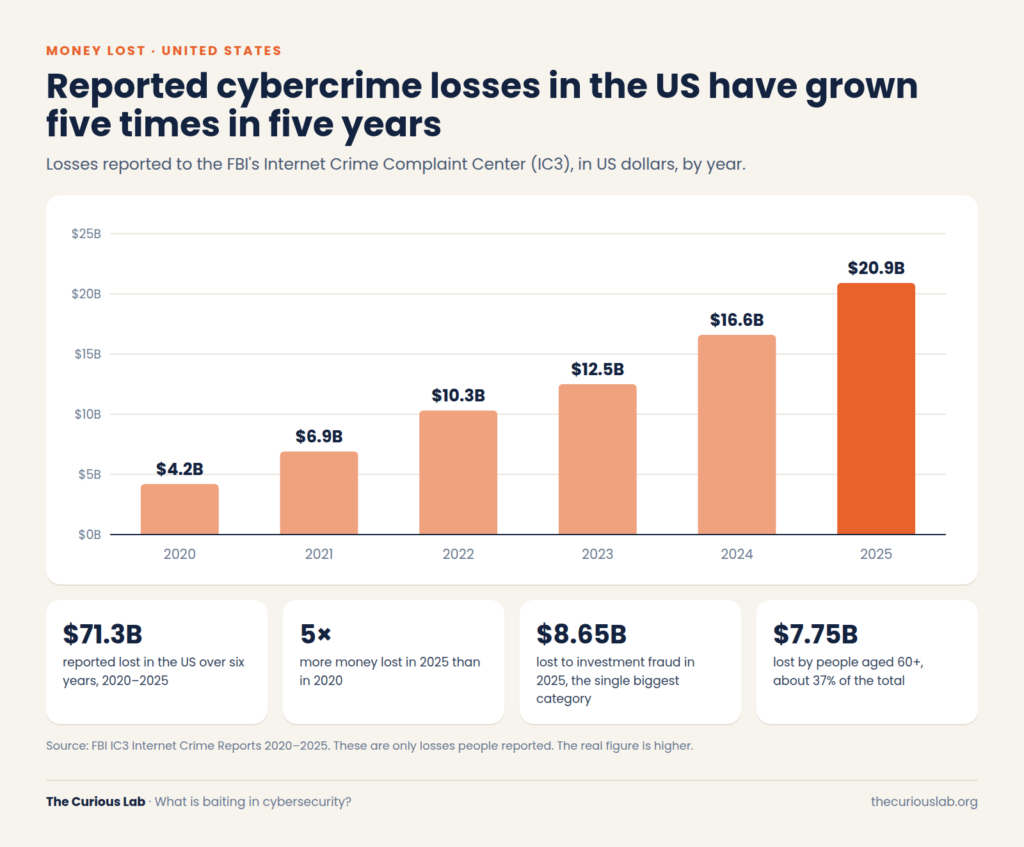 Reported cybercrime losses in the US, 2020 to 2025. Source: FBI IC3.
In 2020, Americans reported losing $4.2 billion to cybercrime. In 2025, it was $20.9 billion, five times more in five years and up 26% in 2025 alone. Across those six years, the total reported to the FBI is $71.3 billion. People aged 60 and over lost $7.75 billion in 2025, about 37% of the total.
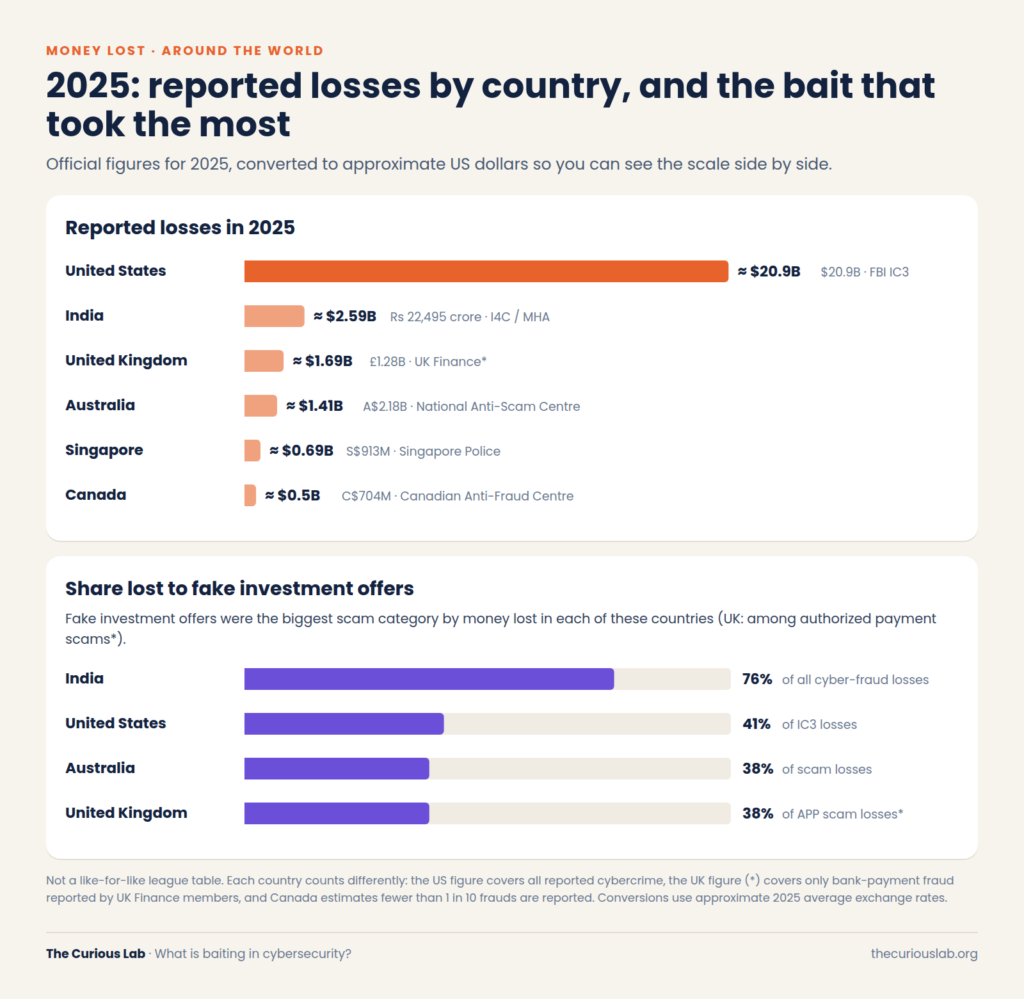
Reported losses in 2025 by country (approximate US dollars) and the share lost to fake investment offers.
This chart puts six countries side by side in approximate US dollars. Note that it isn’t a league table, because each country counts fraud differently. The US figure covers all reported cybercrime, while the UK figure covers only payment fraud reported by banks.
Still, two things are clear. First, the investment offer is the biggest bait everywhere: about 76% of losses in India, 41% in the US and 38% in Australia. Second, greed bait takes far more per victim. Working from UK Finance’s totals, a UK investment scam took roughly £14,900 per victim, while a purchase scam took roughly £670. That is about 22 times more.
How does baiting affect common people?
Behind every number is an ordinary person.
It takes savings, not spare change. Investment bait goes after pensions, house deposits and money saved for children’s education.
It doesn’t only hit older people. In Singapore, 85% of scam victims in 2025 were under 65. Young people shop, invest, and look for jobs online more, so they encounter more bait.
Getting money back depends on where you live. In the UK, banks must now reimburse most victims of authorized payment scams, and in 2025 they paid back £354.3 million, about 61% of those losses. In many other countries, once you send the money yourself, it’s usually gone.
A lot of victims also stay quiet and never report what happened, because they feel embarrassed. Note that falling for bait has nothing to do with being foolish. The attacker is using your kindness and trust against you. When you report it, the police and your bank can warn others, and the same bait is less likely to catch the next person.
How to protect yourself from baiting:
There is no single tool that can fully stop baiting. The reason is simple: in baiting, you are the one who takes the action, and most tools trust what you do. So protection comes in two parts. First, a habit that makes you stop for a few seconds before you click, plug in, or install anything. Second, a few layers of security on your device and accounts, so that even if you do take the bait, something is still there to catch it.
The 5-second BAIT check
Before you plug in, download, scan, or paste anything, check these four things. The first letters spell the attack’s own name.
- B = Behind it: Know who is giving this away and what they gain. Free usually means someone else is paying.
- A = Asked for it: Check whether you went looking for this or it found you. A drive on the floor or a gift you never ordered is a warning sign.
- I = Instructions odd: Stop if it asks you to plug something in, paste a command, turn off your antivirus, or “run as administrator.” Normal things don’t need that.
- T = True source: Get the same thing from the official website or app store instead of the link you were handed.
If even one of these feels off, stop. Nothing good is lost by waiting five minutes.
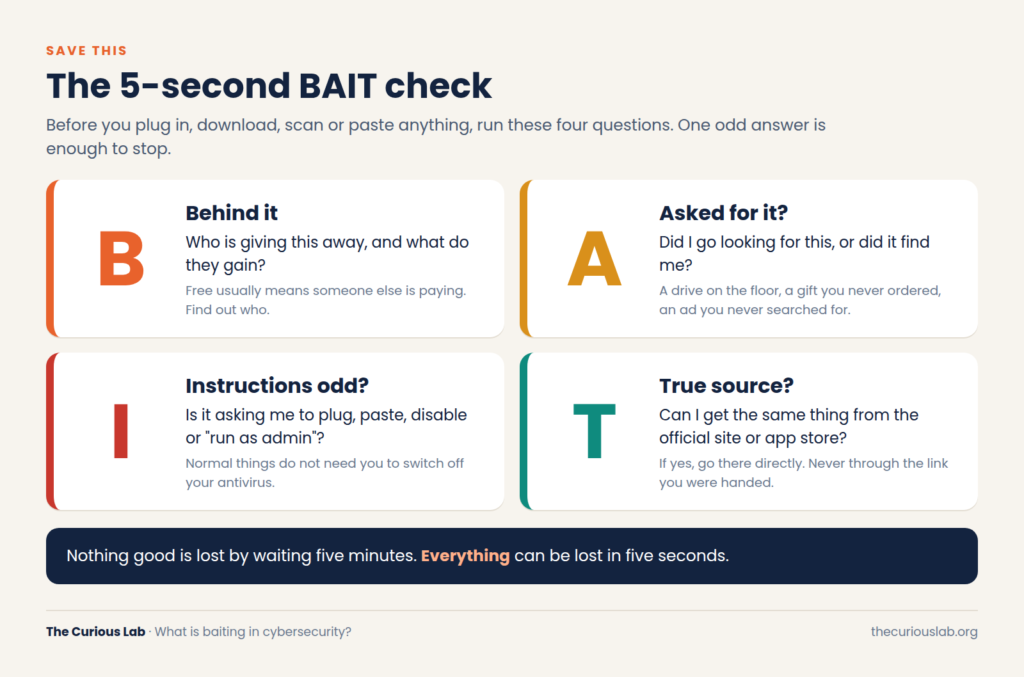
Save this. Four checks, five seconds.
Clean habits to follow:
- Never plug in a found USB. Not even to find the owner.
- Use your own charger and cable in public places.
- Download only from official sources and type website addresses yourself instead of clicking ads.
- Never paste anything into Run, Terminal, or PowerShell because a website told you to.
- Never install APK files sent over WhatsApp or text.
- Check AI suggestions. If an AI gives you a download link, compare it with the official website first.
Layers and tools:
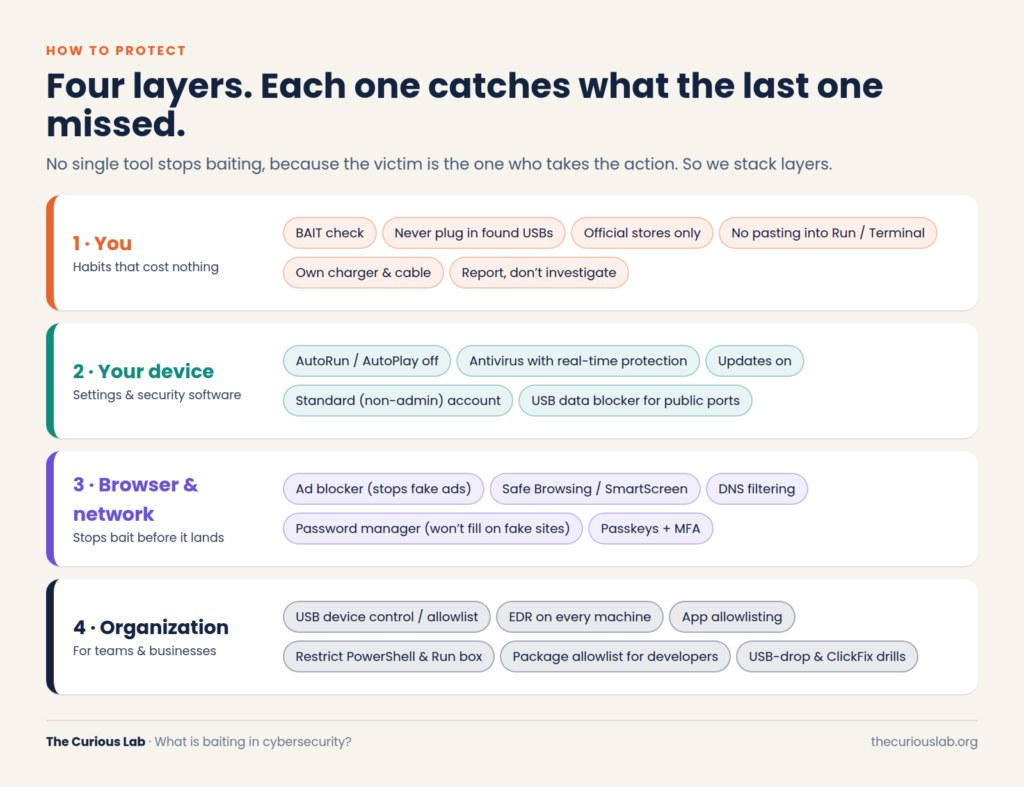
Four layers of protection. Each one catches what the last one missed.
Your device: Keep AutoPlay off for USB drives, keep your antivirus on (Windows Security is free and built in), keep updates on, and use a standard user account for daily work instead of an administrator account.
Your browser: Use an ad blocker such as uBlock Origin, keep Google Safe Browsing or Microsoft SmartScreen on, and use a password manager such as Bitwarden. A password manager won’t fill in your password on a fake website, because the web address doesn’t match.
Your organization: For companies, the basics are to block any USB device the company has not approved, and to run EDR (Endpoint Detection and Response) on every computer. EDR watches how programs behave, not only what files they contain. It also helps to allow only approved software on work machines, and to run safe USB-drop tests now and then to see who plugs in a “found” drive.
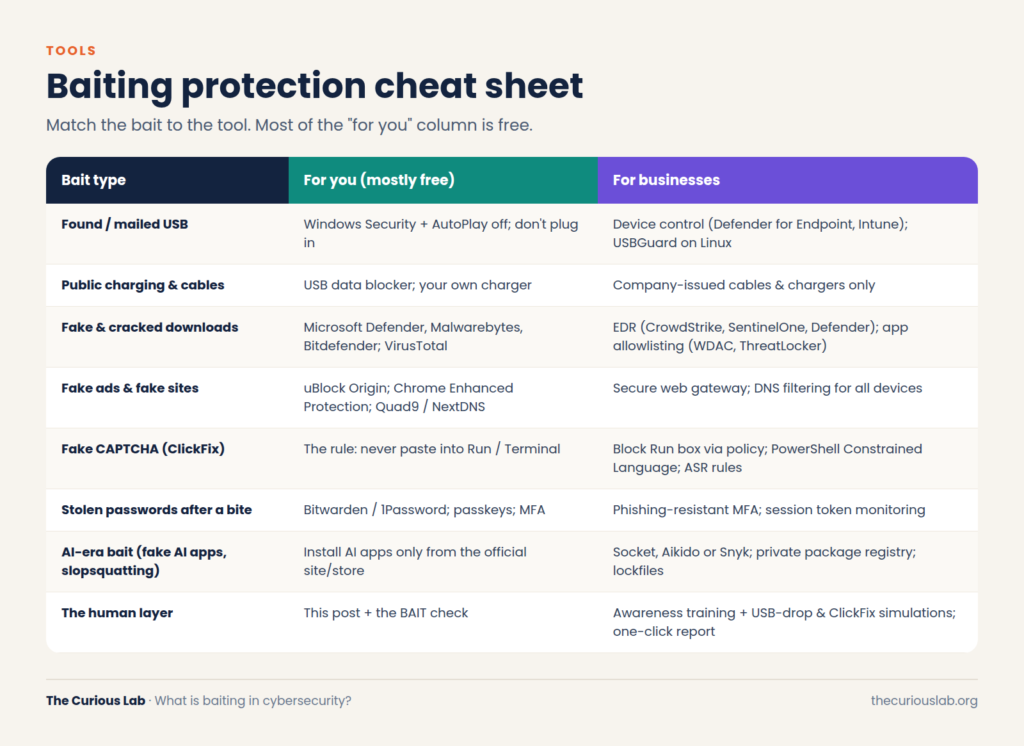
Match the bait to the tool.
Note that AI is now used on both sides. Attackers use it to make their bait look more real, while security companies use it to spot scam pages faster. So if an AI tool gives you a link or a download, check it on the official website before you trust it.
What to do if you already took the bait:
Don’t panic, and don’t keep it to yourself. The faster you act, the less damage the attacker can do.
- Disconnect from the internet. Turn off Wi-Fi or unplug the network cable, so the attacker loses the connection.
- Unplug the device. Do not plug it into another computer “to check.”
- At work, tell your IT team straight away, even if you are not sure anything happened.
- Use a different, clean device to change your important passwords. Start with your email and banking, and sign out of all devices where you can.
- Call your bank if you sent money or typed in your card details.
After that, report it. In the UK, call 159 to reach your bank safely, and report it to Report Fraud. In the US, you can report it at ic3.gov and ReportFraud.ftc.gov. In India, call 1930 or go to cybercrime.gov.in. In Australia, use Scamwatch and ReportCyber. In Canada, contact the Canadian Anti-Fraud Center. In Singapore, call 1799.
A real story: the gift box that wasn’t a gift
In 2020, some businesses in the United States got a package in the mail that looked like it was from Best Buy. Inside, there was a thank-you letter, a gift card, a small USB device, and, in some boxes, even a teddy bear. The letter told the person to plug in the USB to see the list of things they could buy with the gift card.
The package actually came from FIN7, a major cybercrime group. In 2021, they did it again with packages pretending to come from Amazon and the US Department of Health and Human Services.
The USB wasn’t a storage drive. It was a BadUSB device that acted like a keyboard and typed commands to download malware. According to the FBI, this opened the door for the attackers’ tools, and in some cases the goal was ransomware.
No password was stolen, and no software bug was used. The whole attack depended on one person being polite enough to accept a gift.
Final thoughts
Baiting is one of the oldest tricks in cybersecurity, but it keeps changing shape. It started with USB drives and free software. Today it hides in fake CAPTCHAs, fake apps, and even AI answers.
The idea stays the same: give people something they want, and let them open the door themselves. The defense is also simple. Pause for five seconds, run the BAIT check, get things from the true source, and let your security tools catch what slips through.
If you are new to cybersecurity, start with our guide on how cyberattacks work.
Stay safe, stay alert!