
How Cyberattacks Work?
Every time a cyber attack happens, the headline is always the same: a company has been hacked, an operating system has been hacked, and so on. The word “hacked” is the only word focused on here.
If you look at the images, you will see a hidden face, a computer system, and some random codes running in the computer.
The reality is very different from that picture.
The real cyberattack is not a moment. It is a process. It is a sequence of stages that unfolds over days, weeks, months, and sometimes years.
Once you see an attack as a chain of steps rather than a single event, the news will make sense to you.
In this post, we will see the lifecycle of an attack, stage by stage, with examples.
Attacks follow a lifecycle:
We are not the first to notice that attacks have a structure. The security industry has spent more than a decade building frameworks to describe them. Two of these frameworks are the most widely used today.
The first is the Cyber Kill Chain, published by Lockheed Martin in 2011. It breaks an attack into seven phases, from the attacker’s first research to reaching their final goal. The attacker must complete every step in the chain to succeed. So a defender who disrupts a single link breaks the attack.
The second is the MITRE ATT&CK, a far more detailed and continuously updated knowledge base maintained by the non-profit MITRE Corporation.
In simple terms, MITRE ATT&CK is a catalog of tricks and methods that hackers use to break into computer systems and cause damage. It is a playbook of the moves attackers make, from sneaking in the door to stealing data and covering their tracks.
The security team uses this catalog to understand how the attacks happen, spot them early, and improve their defense. It’s like knowing a burglar’s technique to protect our house. The tool is free, regularly updated, and used worldwide. It turns a messy, scary cyberattack into a clear map so that defenders can stay one step ahead of attackers.
Below, we break an attack into nine stages.
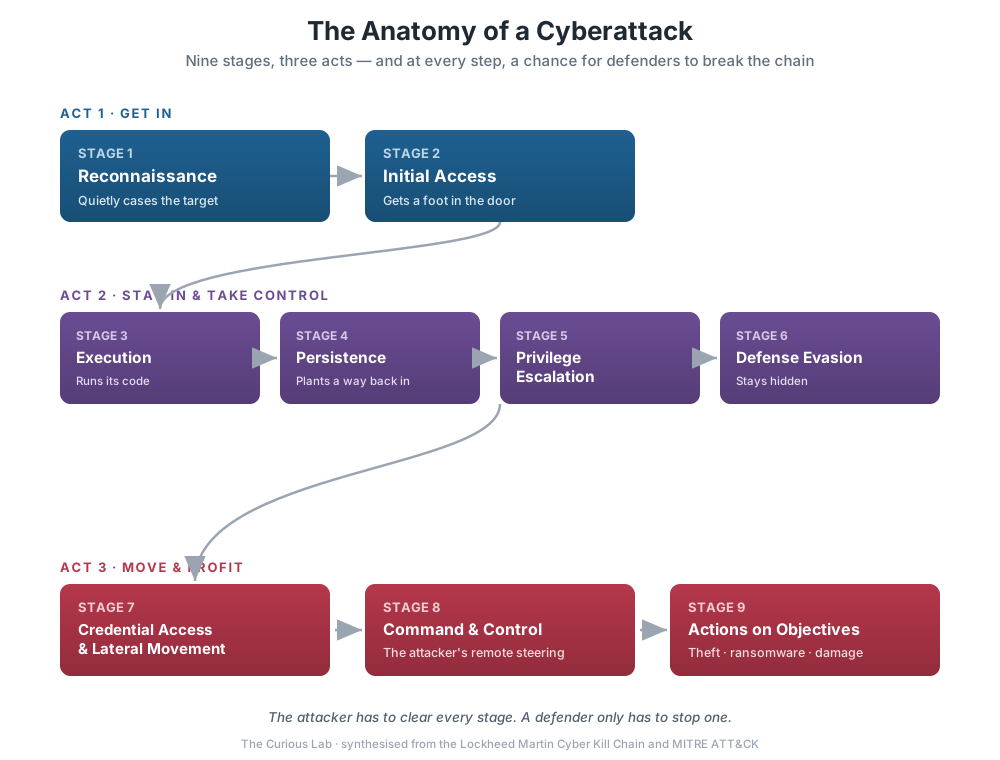
Stage 1 — Reconnaissance: casing the target
The word reconnaissance might be new to you if you are new to cybersecurity. But it is a widely used term in the field. It’s a technical term for information gathering. It might be tricky, but get used to it if you are entering cybersecurity.
So, before an actual attack takes place, the attacker will do his/her homework.
Passive reconnaissance leaves no footprint on your system. It relies on open-source intelligence, meaning information anyone can find. For example, attackers use LinkedIn to collect employee names, job titles, and who reports to whom. They read job adverts, which can reveal which software and security tools the company uses. They also dig through old data leaks, looking for passwords that people might reuse. None of this touches your system.
Active reconnaissance is a bit louder. Here, the attacker scans the company’s systems to see which internet ports are open and which software versions are running.
The attacker patiently gathers all the information, like name, job position, email, and the name of the CFO they are reporting to. This list is the raw material for the next stage of attack.
Stage 2 — Initial Access: getting a foot in the door
This is the moment that most people picture the hack. Here, we will know which doors the attackers actually use. Because the real world ranking is not what the movies show. According to the Verizon 2025 Data Breach Investigations Report, which analyzed more than 22,000 security incidents, the most common entry points are:
Stolen or compromised credentials: Around 22% of breaches. This is the most commonly used vector for gaining access. Reused passwords and credentials bought from a previous data breach are the first set of keys for an attack. This is no surprise, since many people reuse the same password on several platforms. Also, they are unaware that their credentials are available for sale. We will discuss this in later posts.
Exploiting a vulnerability: About 20% of breaches started with an exploited software vulnerability. Edge devices such as VPNs and firewalls were a growing target, rising from 3% to 22% of these exploitation cases.
Phishing: Phishing accounts for 16% of breaches. It works by tricking a person into clicking a link or entering a password on a fake page.
Supply-chain compromise: Slipping in through a trusted vendor or a poisoned software update. The same report found that the share of breaches involving a third party doubled, from 15% to 30%.
The pattern is clear. Attackers would rather log in than break in. That is why so many companies now push for strong passwords and two-factor authentication.
Stage 3 — Execution: running malicious code
After gaining access to a system, the attacker has to run their own code without alerting the company’s defenders.
This code is often hidden in something that looks harmless, such as a Word or Excel file with malicious macros.
Security programs like antivirus actively monitor systems and try to detect malicious code that enters the system, flagging it before it can run. So the attacker has to be careful. Otherwise, the entire effort will be wasted.
The attacker often tries to get around the antivirus first, then runs the malicious code. Later, they may copy large amounts of data out of the system, sometimes gigabytes or even terabytes.
Stage 4 — Persistence: making sure they can get back in
Once an attacker gains control of your network, they don’t want to lose access if the victim restarts the system or changes the password. So they plant a backdoor that survives this. For example, they may set their malware to start again every time the system reboots, or create a hidden account.
This is the most frustrating stage. A company spots the suspicious activity, resets the password, and thinks the problem is solved. But the attacker is still hiding in the network. To solve this, defenders have to find every foothold in the system and remove it, which is far harder than it sounds.
Stage 5 — Privilege Escalation: gaining more power
At first, the attacker usually compromises a low-privilege employee account. This employee will not have enough access to steal a database or to spread ransomware across the company. So the attacker will try to gain access to an administrator account.
This will be done by exploiting misconfigurations or by finding a vulnerability. It is hard to get access to the administrator. Once it is achieved, the attacker will have access to the entire environment.
Stage 6 — Defense Evasion: staying hidden
Throughout the process, the attacker should be careful, as defenders may be watching. So, it is important to stay invisible.
The attacker uses many techniques to bypass antivirus and endpoint detection tools. They delete or edit logs, make malicious files appear as ordinary ones, and encrypt communications so that no one can read the messages.
This is only to buy time. The longer the attack goes undetected, the longer the attacker can steal data, spread further in the network, and make it harder to fully remove them from the system.
Stage 7 — Credential Access & Lateral Movement: spreading
The first target is usually an ordinary employee’s laptop with limited data. So the attackers move from one system to another using the credentials they collect. They slowly map the entire network and move further to reach customer information, financial data, usernames, and passwords.
While this happens, monitoring tools may treat it as normal activity, since it is done with real user accounts.
Stage 8 — Command and Control: remote steering
Now, after infecting the devices, the attacker needs a way to control them. The malware quietly connects to the attacker’s server, called a command-and-control server, to send stolen data and get instructions for the next task.
If these connections looked obviously suspicious, security tools could catch them. So attackers disguise the traffic to look ordinary. A few common tricks:
- Making it look like normal web browsing, as if the computer is just visiting websites.
- Hiding it inside encrypted connections, the same kind of scrambling your bank’s website uses, so no one can peek at what’s really being sent.
- Routing it through trusted services like popular cloud platforms, so the destination seems harmless.
This is crucial because the attacker can compromise the device, but moving the information out of the network to their own systems is harder. This is a weak point that defenders can watch for.
Stage 9 — Actions on Objectives: the payoff
There are a few goals for an attacker.
Stealing: An attacker quietly steals sensitive information, your personal details, financial records, and company secrets. This is the classic data breach you hear about on the news. The stolen information might be sold to other criminals or used to commit fraud.
Ransomware: The attacker locks the files, often tries to lock or delete the backups too, and then demands payment to unlock them. This type of attack makes the news because large companies are often targeted and asked for millions of dollars to release the files or the data.
Modern ransomware gangs usually pull a double trick, sometimes called “double extortion.” First, they steal a copy of your data, then they lock you out of it. Now they have two ways to pressure you: pay up, or they will keep your files locked and leak your data to the world. Even if you have backups and could restore your files yourself, they can still threaten to publish everything.
Other goals: fraud, spying, or destruction. A common criminal might drain your bank accounts. A nation-state’s spies might steal government or corporate secrets.
One attack, end to end: the Colonial Pipeline shutdown:
In May 2021, a ransomware attack forced the shutdown of the Colonial Pipeline, which carries about 45% of the fuel used on the East Coast of the United States. It triggered fuel shortages and panic-buying along the East Coast, and a federal emergency declaration covering 17 states and Washington, D.C.
The attackers, a ransomware group called DarkSide, got in through stolen credentials (Stage 2).
Charles Carmakal of the security firm Mandiant, which investigated the attack, told Bloomberg that the entry point was a password for an old VPN account that was no longer in use but could still access the network. Crucially, it was not protected by multi-factor authentication.
The password was later found in a batch of leaked passwords on the dark web. Mandiant said an employee may have reused it on another account that was hacked, but it was not certain this is how the attackers got it.
The attack followed the middle stages described above, as the attackers moved through the network. They were inside from at least April 29, about a week before the ransomware hit. On May 6, the day before, they stole nearly 100 GB of data in about two hours.
Then, on May 7, they deployed the ransomware, which encrypted files and left a note demanding payment.
Colonial shut down the pipeline itself as a precaution, and reports said it could not bill customers. It paid a ransom of 75 bitcoin, about $4.4 million. All this started with one compromised password on an account without multi-factor authentication.
Key Takeaway
A cyber attack is a process, not a single event that happens in a few minutes.
Now you should be clear on how a cyber attack happens. When a news item about a cyber attack pops up, you can now ask how the attackers got in, how long they were inside, and which weak spot let them in.
In upcoming posts, we will take each stage and discuss each topic in depth.
References
- Lockheed Martin — Cyber Kill Chain®. https://www.lockheedmartin.com/en-us/capabilities/cyber/cyber-kill-chain.html
- MITRE — ATT&CK® knowledge base. https://attack.mitre.org/
- Verizon — 2025 Data Breach Investigations Report (DBIR). https://www.verizon.com/business/resources/reports/dbir/
- Wikipedia — Colonial Pipeline ransomware attack https://en.wikipedia.org/wiki/Colonial_Pipeline_ransomware_attack
- The Hacker News — report of Colonial Pipeline breach began with a compromised VPN password. https://thehackernews.com/2021/06/hackers-breached-colonial-pipeline.html
- U.S. Department of Energy — Colonial Pipeline Cyber Incidenthttps://www.energy.gov/ceser/colonial-pipeline-cyber-incident
- Infosecurity Magazine: Verizon DBIR, jump in vulnerability exploitation
- Al Jazeera: Hackers breached Colonial Pipeline with one compromised password
- Lockheed Martin: Intelligence-Driven Computer Network Defense (Cyber Kill Chain white paper)