
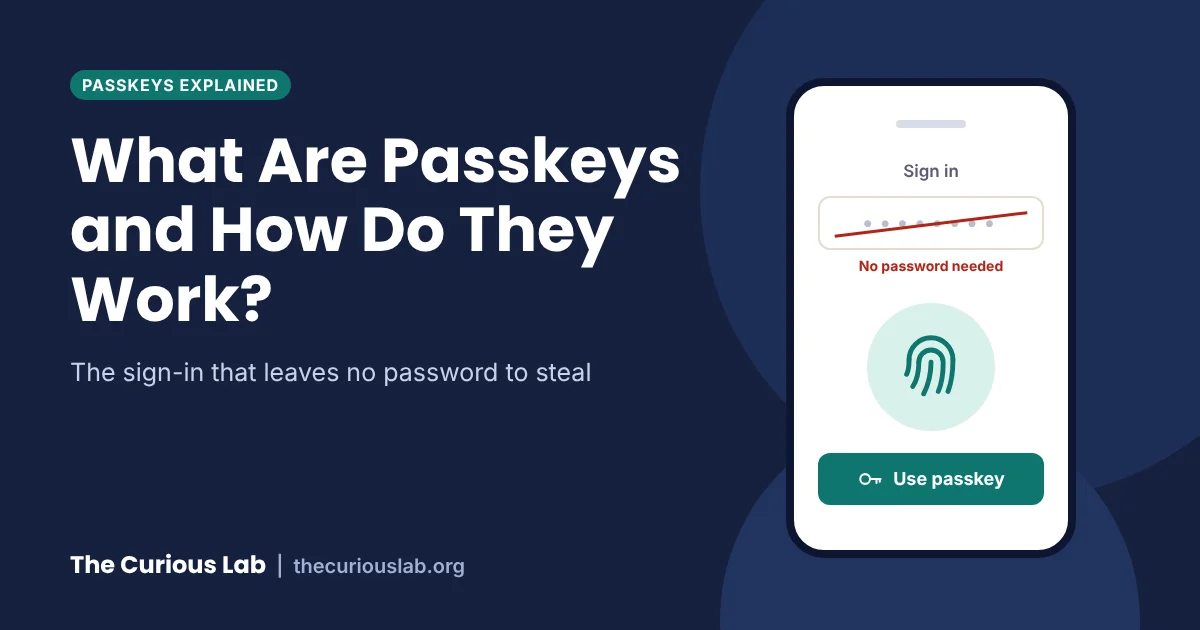
What is passkey and how do they work?
As technology grows, people depend on a lot of websites on the internet. Every time a user needs to use a website, they need to create a username and password for the website.
As usage increases, people are creating and remembering too many usernames and passwords, and attackers keep stealing them.
So, considering this, in July 2012, a group of technology companies formed the FIDO Alliance to fix this. FIDO stands for Fast IDentity Online. Its aim was a way to sign in that relied less on passwords.
Over the following years, hundreds of companies worked within the FIDO Alliance and the World Wide Web Consortium (W3C), the body that sets the standards for the web. Together, they wrote the rules for signing in with a key kept on your device instead of a password kept in your head.
For a long time, this had one big limit. You had to set it up again on every device you owned.
The turning point came on May 5, 2022. On that day, Apple, Google, and Microsoft announced together that they would build the same standard into their phones and computers. The sign-in key would now follow you to your other devices, even new ones. That key is what we call a passkey.
Apple was the first to bring it to the public, in iOS in 2022. Google followed in 2023 and made passkeys the default sign-in for its users. Microsoft added them to personal accounts in 2024.
So, no single company invented the passkey. Three competitors agreed on one standard, and the rest of the industry followed.
Now we’ll look at what a passkey is, what happens on your device when you use one, where it is kept, what it can’t protect you from, and how to create your first one.
What is a passkey?
A passkey is a way to sign in to an account without a password. You unlock your phone or computer the way you always do, with your fingerprint, your face, or your PIN, and you are signed in.
There is nothing to remember and nothing to type.
Behind that simple step is a pair of digital keys that are made together and then split.
- The public key goes to the website. Consider it a lock. A lock can check a key, but it can’t open anything on its own.
- The private key stays on your device. This is the key that fits the lock. It is never typed, never shown on the screen, and never sent to the website.
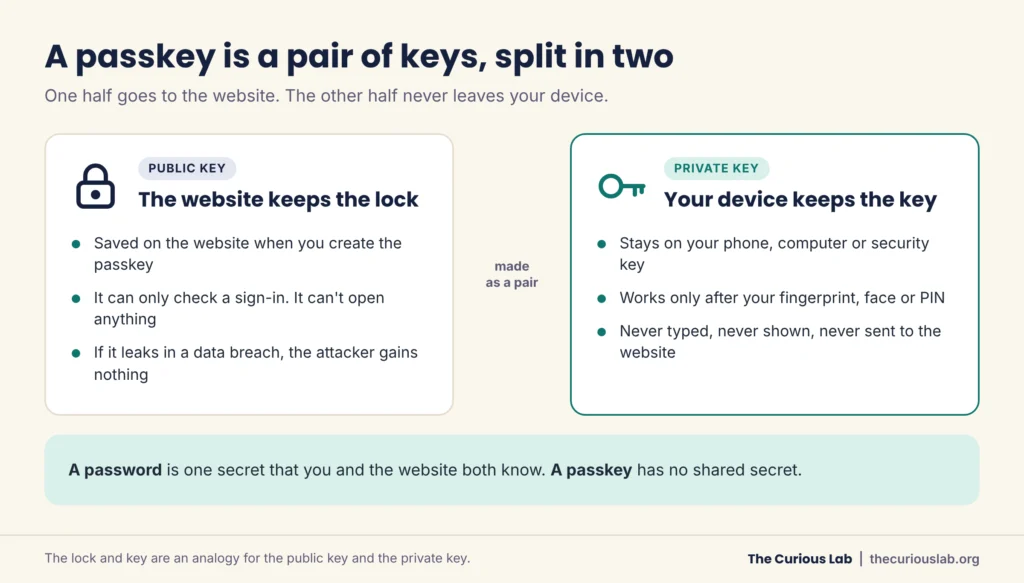
A passkey is one pair of keys. The website stores the lock. Your device holds the only key.
So, with a password, you and the website both know the same secret. With a passkey, there is no shared secret at all. The website only ever holds the lock.
As mentioned earlier, Apple, Google, and Microsoft all follow the same FIDO standard. This is why the same passkey idea works across iPhones, Android phones, Windows PCs, and Macs.
Why did passwords need replacing?
A password has one weakness that no amount of care can remove. It works for anyone who knows it.
That one weakness creates four everyday problems.
It can be phished. A fake page asks for it, and you type it in. We covered this in our post on what is phishing.
It can be leaked. The website stores a copy. When the website is breached, your password can leak with it.
It gets reused. One leaked password then opens every other account where you used it.
It can be guessed. Short or common passwords fall to automated guessing.
The harm is real. In April 2026, the FIDO Alliance surveyed 11,000 people in ten countries. 33% of the users said that in the past year they had an account compromised or received a notice that their data was in a breach.
One-time codes sent by text message help, but they share the same weakness. A code is also something you type, so a fake page can ask for it too. Basically, anything you can type into a real page, you can be tricked into typing into a fake one.
How do passkeys work?
A passkey does its work in two moments: once when you create it, and then each time you sign in.
Creating a passkey
- You choose “Create a passkey” in the account’s security settings.
- Your device asks for your fingerprint, face, or PIN.
- Your device makes a new pair of keys for that one website.
- The public key is sent to the website. The private key is saved on your device.
Each account gets its own pair. A passkey for your email has nothing in common with a passkey for your bank.
Signing in with a passkey
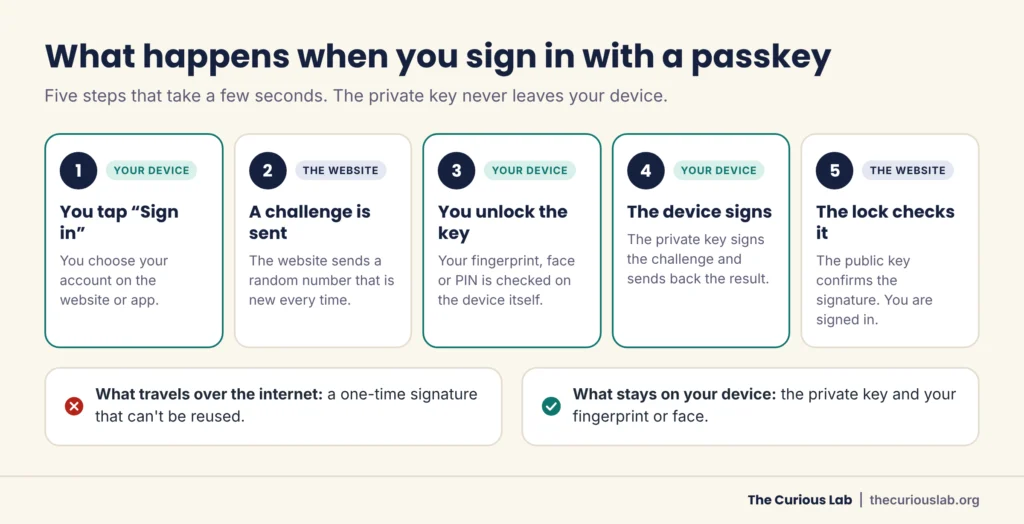
The five steps of a passkey sign-in. Only a one-time signature travels to the website.
- You tap “Sign in” and pick your account.
- The website sends your device a challenge. A challenge is a random number that is new every time.
- Your device asks for your fingerprint, face, or PIN.
- The private key signs the challenge. Signing means doing a calculation that only this key can do.
- The website checks the answer with the public key. If it fits, you are in.
All of this takes a few seconds, and you see only the fingerprint or face prompt.
Note that the challenge changes every time. So, even if an attacker recorded one sign-in, the recording would be useless for the next one.
It is a myth that a passkey sends your fingerprint or your face to the website. Your device checks them locally, the same way it does when you unlock the screen. The website receives only the signed answer.
Why can’t a fake website steal a passkey?
This is the biggest reason to use passkeys.
When your device creates a passkey, it records the exact web address the passkey belongs to. Later, the device will only use that passkey on that same address.
Say, for example, your bank’s address is yourbank.example, and an attacker builds a copy at yourbamk.example. These are example domains to illustrate the idea, and they are not real domains.
You might miss the one changed letter. Your device does not. It finds no passkey for yourbamk.example, so it offers nothing and sends nothing.
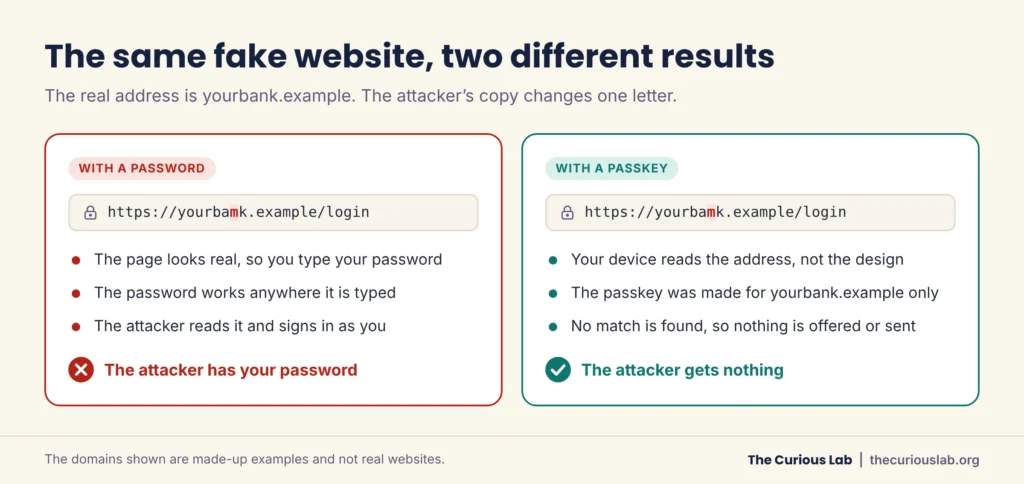
A password works wherever it is typed. A passkey works only on the address it was made for.
Phishing depends on fooling a person. Here, the person is no longer the one doing the checking. This is what makes passkeys “phishing-resistant”, the term that security teams use for them.
It also means a disguise stops mattering. An email can copy a trusted sender perfectly, as we explained in our post on what is email spoofing, and the page behind its link still gets nothing from a passkey.
The attack that three stolen passwords could not finish
On July 20, 2022, at least 76 employees of Cloudflare, a large internet company, received the same text message in less than one minute.
The text looked like it came from the company. It carried a link to a page that copied the company’s login page. Three employees typed in their usernames and passwords. The page sent those details straight to the attacker.
The attacker now held three real passwords, and still could not sign in.
Cloudflare had given every employee a small security key that uses the same FIDO standard as a passkey. The key was built to work only on the real company address, so it gave the fake page nothing. Cloudflare confirmed that none of its systems were broken into. Twilio, a company targeted by a very similar attack around the same time, was breached.
Here are the three sign-in methods side by side.
| Password | Password + text code | Passkey | |
|---|---|---|---|
| What you do | Type it | Type both | Fingerprint, face or PIN |
| A fake website can collect it | Yes | Yes | No |
| Leaks in a website breach | It can | The password can | Only the lock, which is useless |
| Can be reused on other sites | Yes | Yes | No, one pair per site |
| Can be guessed | Yes | The password can | No |
Where is a passkey stored?
A passkey can live in one of three places.
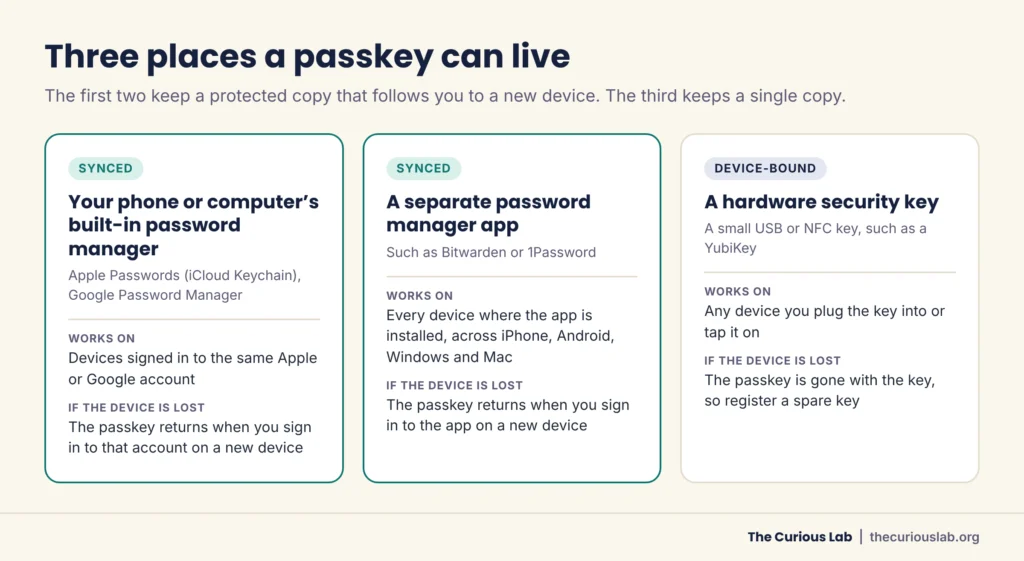
Synced passkeys follow you to a new device. A hardware key keeps a single copy.
Your phone or computer’s built-in password manager. On Apple devices, this is iCloud Keychain. On Android and Chrome, it is Google Password Manager. Both keep an encrypted copy and sync it to your other devices signed in to the same account.
A separate password manager app, such as Bitwarden or 1Password. This suits you if you use, say, an iPhone and a Windows PC together.
A hardware security key, such as a YubiKey. The passkey stays on that one physical key and is not copied anywhere. This is what the Cloudflare employees carried.
What happens if you lose your phone
This is the most common worry, and for synced passkeys the answer is reassuring. The passkeys are not only on the phone. When you sign in to the same Apple or Google account, or the same password manager, on a new device, they come back.
The person who finds your phone can’t use them either. Each passkey still needs your fingerprint, face, or PIN.
A hardware key is different. If it is lost, the passkeys on it are gone, so people who use hardware keys register a spare one.
Signing in on a device that isn’t yours
You don’t need to copy a passkey onto a borrowed computer. The website shows a QR code; you scan it with your phone, and you approve the sign-in on the phone. The two devices must be close to each other for this to work, so an attacker in another country can’t use the same trick on you.
How many people use passkeys in 2026?
Passkeys are no longer a new experiment. Here is where they stand.
- The FIDO Alliance estimates that about 7 billion passkeys are in use worldwide, up from 5 billion in May 2026.
- In its 2026 survey, 90% of people had heard of passkeys, and 75% had turned one on for at least one account.
- Amazon says more than 500 million of its customers have enabled passkeys.
- Microsoft has made new accounts passwordless by default since May 2025.
The FIDO Alliance also collects sign-in data from large companies in its yearly Passkey Index. The October 2026 edition found that 36% of successful sign-ins used a passkey, up from 26% a year earlier. Passkey sign-ins worked 93% of the time, against 78% for traditional sign-ins with a second step. Each one also saved about 27 seconds.
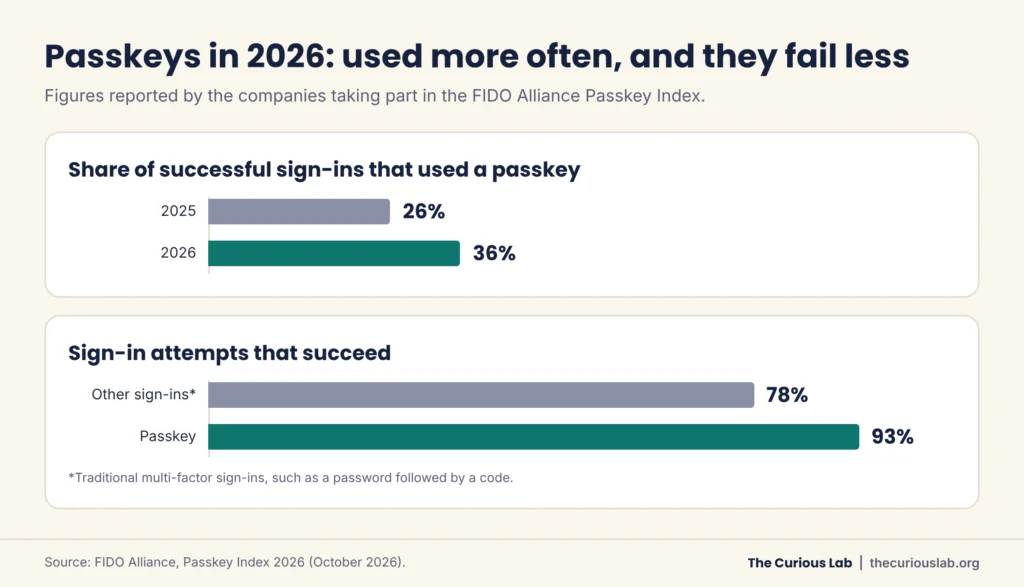
Passkey use and sign-in success among companies in the Passkey Index. Source: FIDO Alliance, Passkey Index 2026.
Both the security and the speed matter here. Both are reasons companies keep adding passkeys, which means you will see the option on more of your accounts.
What can a passkey not protect you from?
We consider passkeys the best sign-in method available to a common person today. They still have limits, and you should know them.
The old password is usually still there. Most accounts keep the password as a backup after you add a passkey. So, an attacker can skip the passkey and go after the backup. In 2025, researchers at Proofpoint showed a fake login page that pretended the visitor’s browser couldn’t use passkeys, which pushed the visitor to a weaker sign-in method the page could capture. Proofpoint said it had not yet seen this used in real attacks.
Malware on your device. A passkey protects the moment of signing in. It can’t protect a browser or a device that an attacker already controls. Researchers at SquareX demonstrated this kind of attack against a compromised browser at the DEF CON security conference.
The account that holds your passkeys. Your Apple account, Google account or password manager now guards every synced passkey. If you lose access to it, you lose access to all of them at once.
Scams where you act yourself. A passkey can’t stop you from sending money to a fake seller or a fake investment. We covered those signs in our post on how to tell if someone is scamming you online.
Remember, if a sign-in page says your passkey “isn’t supported” and asks for your password or a code instead, stop. Close the page and open the website by typing its address yourself.
How do you set up your first passkey?
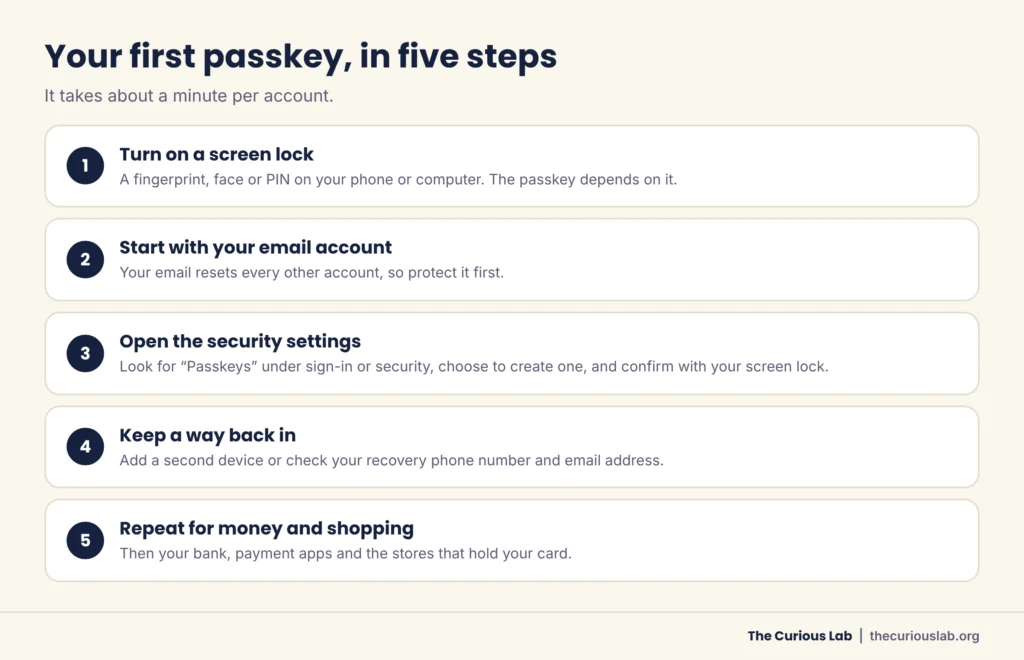
Five steps to your first passkey.
Step 1: Turn on a screen lock. Your passkeys are only as safe as the fingerprint, face or PIN that unlocks your device.
Step 2: Start with your email account. Your email can reset the password of almost every other account you own, so it deserves the strongest lock first.
Step 3: Find “Passkeys” in the security settings. The wording changes from site to site. On Amazon, for example, you open Your Account, choose Login & Security, and select “Set up” next to Passkeys. Your device then asks for your fingerprint, face, or PIN, and the passkey is created.
Step 4: Keep a way back in. Check that your recovery phone number and recovery email are current. If you have a second device, sign in on it as well.
Step 5: Repeat for your bank, payment apps, and shopping accounts.
A few rules while you switch over:
- Do not approve a passkey prompt that you did not start yourself.
- Do not remove two-step verification from accounts that still have a password. We explained how to turn it on in our post on how to protect your home computer.
- Never share the PIN or password of the account that stores your passkeys.
- For accounts that don’t offer passkeys yet, keep a long, different password for each one. You can create one with our free Password Generator.
Are passwords going away?
Not yet. Many websites don’t offer passkeys, and most that do still keep a password behind them. For the next few years, you will use both.
That is fine, because every account you move to a passkey is one less password that can be phished, leaked, or guessed. The three Cloudflare employees made a normal human mistake, and nothing was lost, because the sign-in no longer depended on them spotting a fake page.
So, start with one account today. Make it your email.
We will update this post as more services move to passkeys.
Stay safe, stay alert!