
 Chief Editor
 Privilege Escalation Explained: How Attackers Go From User to Admin
Most people think a hacker breaks in and instantly has everything.
Your files. Your passwords. The whole company network. All at once.
That is almost never how it happens.
In most attacks, the attacker gets in as a nobody. A basic user account. A contractor login. A low-level web server process. They can look around, but they cannot touch anything important.
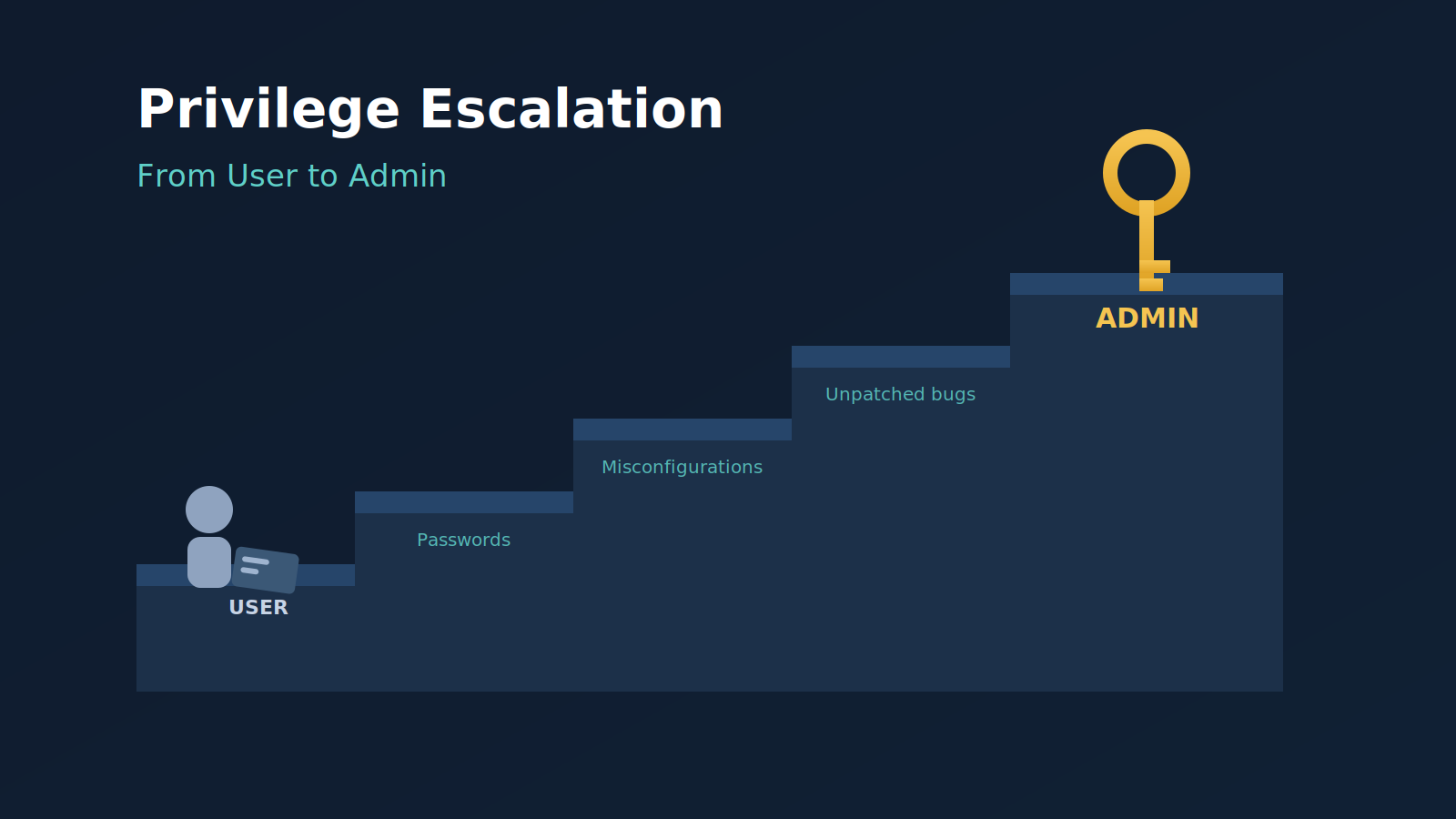
So the real work starts after the break-in. The attacker has to climb from “nobody” to “admin.”
That climb has a name. It’s called privilege escalation.
In this post, we will see what privilege actually means, the two directions attackers climb, the most common ways they do it, and one real breach where a single file turned a contractor login into control of an entire company. We will finish with what you can do about it, whether you manage one laptop or ten thousand servers.
No computer science degree required. And if you are technical, there are notes along the way for you too.
What is “privilege” anyway?
Think about a hotel.
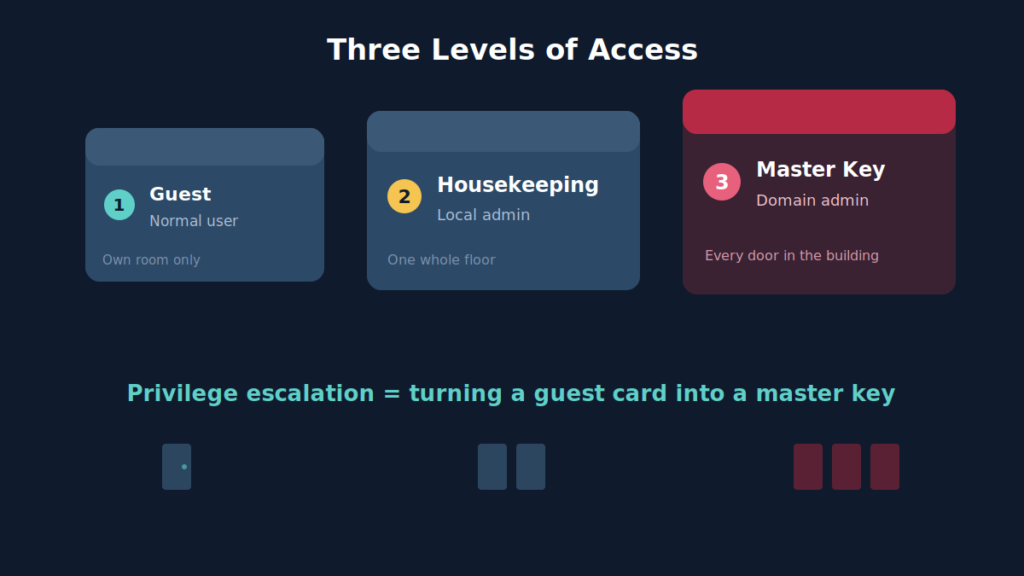
When you check in, you get a key card. It opens your room and maybe the gym. That’s it.
The housekeeping staff has a different card. It opens every room on their floor.
The hotel manager has a master card. It opens every door in the building, including the safe and the server room.
Computers work exactly the same way. Every account has a set of permissions. That set is called its privilege level.
- A normal user can open their own files and run everyday programs.
- An administrator (called “root” on Linux and Mac) can install software, read anyone’s files, turn off security tools, and create new accounts.
- A domain admin in a company network is the hotel manager. One account controls every computer the company owns.
Privilege escalation simply means turning a guest key card into a master card.
Why don’t attackers just start as admin?
Because admin accounts are the most protected accounts in any organization.
They usually have stronger passwords, extra login checks, and fewer people who know they exist. Attacking them directly is hard.
Normal accounts are the opposite. There are thousands of them. Some belong to contractors or interns. Some are reused on other websites. Some belong to people who will happily approve a login request just to make their phone stop buzzing.
So the attacker takes the easy door first. Then they look for a way upstairs.
As we saw in our post on how cyberattacks work, getting in is only one stage of an attack. Privilege escalation is the stage that decides how bad the day becomes.
The two directions of privilege escalation:
Attackers don’t only climb up. Sometimes they move sideways first.
Vertical escalation — climbing up: user to admin
This is the classic version. The attacker has a normal account and gains higher rights on the same system.
Example: a web server process that can only read website files finds a way to run commands as root.
Horizontal escalation — moving sideways: user to another user
Here the attacker takes over a different account at the same level. It doesn’t sound dangerous. But that other account might have something the first one didn’t.
Maybe it’s the finance manager’s account, with access to payment systems. Maybe it’s an IT support account that is one small step away from admin.
In real attacks, the two are mixed. Sideways, sideways, up. Sideways again, up again.
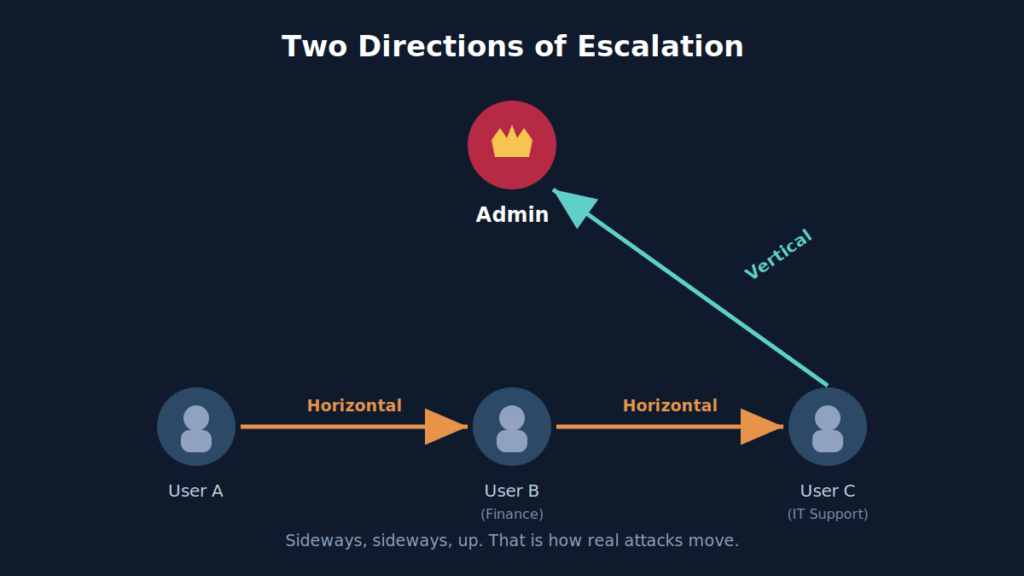
Quick summary. Privilege = what an account is allowed to do. Vertical escalation = going up. Horizontal escalation = going sideways. Attackers use both.
How do attackers actually escalate?
You might think it takes genius-level hacking.
Honestly, most of the time it doesn’t. It takes patience and a good checklist.
Once inside, attackers run through a routine called enumeration. It’s a technical word for “looking around carefully.” What account am I? What groups am I in? What software is installed? What files can I read? What runs automatically?
They are looking for one of these five doors.
Door 1 — Passwords left lying around
This is the most common door by far. And the least exciting.
Organizations leave passwords everywhere:
- Scripts: IT staff write small automation scripts and paste an admin password inside so the script can log in by itself.
- Config files: Database and application settings files often hold passwords in plain text.
- Shared folders: Documents named “passwords.xlsx” or “server logins.txt” still exist in 2026. Many of them.
- Browser saved passwords and command history: An admin who typed a password into a terminal once may have left it in the history file.
The attacker doesn’t need to crack anything. They just need to read.
For technical readers: On Windows, once an attacker has local admin on one machine, the next move is usually harvesting credentials from memory. The LSASS process holds login material for anyone who signed in recently. If a domain admin ever logged into that machine to fix something, their credentials may be sitting right there. This is why “local admin on one laptop” so often becomes “domain admin” within hours.
Door 2 — Misconfigurations
A misconfiguration is a setting that is technically working, but set up in an unsafe way.
Imagine the hotel gives a cleaner permission to use the master card “only for the laundry room.” But the card doesn’t actually know the difference. It opens every door.
Some common examples:
- Overly generous sudo rules (Linux): “Sudo” lets a normal user run specific commands as root. If an admin allows a user to run a text editor or file tool with sudo, many of those programs can open a full root shell. The admin meant to give one small power. They gave all of it.
- SUID programs (Linux): Some programs are flagged to always run with their owner’s rights, often root, no matter who starts them. If the wrong program has this flag, any user can borrow root through it.
- Weak service permissions (Windows): Windows services often run as SYSTEM, the highest local account. If a normal user is allowed to change the service’s settings or replace its program file, they can make SYSTEM run their code.
- Unquoted service paths (Windows): If a service’s file path contains spaces and has no quotation marks, Windows tries several possible locations in order. If a user can write to one of the earlier locations, Windows may run their file instead.
For technical readers: Public catalogs like GTFOBins (Linux) and LOLBAS (Windows) document which legitimate binaries can be abused when misconfigured. Defenders should use these lists to audit their own sudo rules and SUID files before attackers do.
Door 3 — Unpatched vulnerabilities
Sometimes the problem isn’t a setting. It’s a bug in the software itself.
A local privilege escalation bug lets any logged-in user become admin, just by running a small program. These bugs often sit in the operating system’s core, called the kernel, or in tools that run with high privileges.
A good example is PwnKit.
In January 2022, researchers at Qualys revealed a flaw in a Linux tool called pkexec. This tool comes installed by default on most major Linux distributions. The flaw let any normal user become root.
Here’s the part that surprised everyone. The bug had been sitting there since 2009. For about twelve years, almost every Linux machine had a hidden staircase from user to root, and nobody knew.
If this sounds like a zero-day, you’re right. We covered how those work in What Is a Zero-Day?. The difference is that once a bug like PwnKit is public, it stops being a zero-day. It becomes a known problem with a known fix. Attackers count on the fact that many systems won’t be patched for months.
Door 4 — Things the admin runs automatically
This one is sneaky.
Admins schedule tasks to run by themselves. Backups at midnight. Clean-up scripts every hour. These tasks usually run with admin rights.
Now suppose one of those scripts is stored in a folder that normal users are allowed to edit.
The attacker doesn’t need to become admin. They just add one line to the script and wait. At midnight, the admin’s own scheduled task runs the attacker’s code with full privileges.
The attacker didn’t climb the stairs. They got the manager to carry them up.
For technical readers: Check cron jobs, systemd timers, Windows Scheduled Tasks, startup folders, and login scripts. The question is always the same: does this run as a high-privilege account, and can a low-privilege account modify anything it touches, including the files it imports or the folders in its path?
Door 5 — Permissions nobody reviewed
In big companies, the real keys aren’t on one computer.
They live in identity systems. Active Directory. Microsoft Entra ID. AWS. Google Cloud. These are the systems that decide who is allowed to do what.
Over the years, permissions pile up. Like old keys on a janitor’s ring that nobody wants to throw away.
Someone gets access for a project. The project ends. The access stays.
After a while, no one remembers why a certain group can reset another group’s passwords. But it still can. And an attacker only has to find it.
The cloud makes this stranger.
An account might not be called “admin.” But if it is allowed to change its own permissions, it is admin already. It just hasn’t given itself the title yet.
For technical readers: In AWS, watch for permissions like iam:AttachUserPolicy, iam:CreatePolicyVersion and iam:PassRole on accounts that aren’t supposed to be admins. Any of these lets an account promote itself. In Active Directory, a free tool called BloodHound draws all these hidden permission links as a map. Attackers use it to find the shortest route to Domain Admin. Run it on your own network first, and cut those routes before someone else walks them.
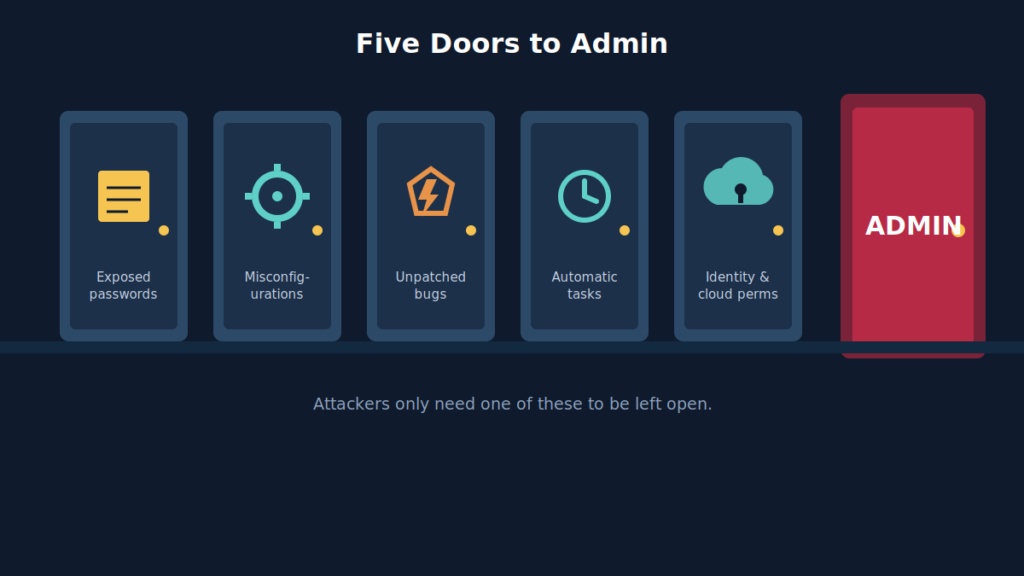
Quick summary. Attackers rarely “hack” their way up to admin.
They find a password someone left behind. A setting someone got wrong. A patch someone didn’t install. A task someone forgot about. A permission nobody reviewed.
Look at that list again. Every single one is a human decision.
That sounds like bad news. It’s actually good news. Because human decisions can be checked, and they can be fixed.
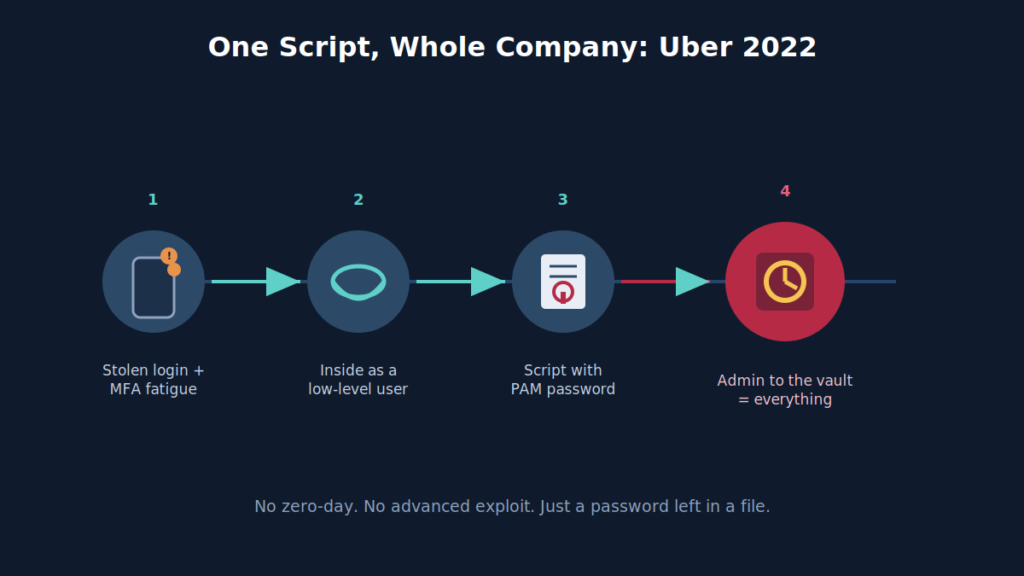
A real example: how one script handed over Uber
In September 2022, an attacker linked to the Lapsus$ group got into Uber.
The entry was simple. They had a contractor’s stolen password. When the login asked for approval on the contractor’s phone, the attacker kept sending requests. Over and over. According to reports, they then contacted the contractor on WhatsApp, pretending to be Uber IT, and told him to accept the prompt so the notifications would stop.
He accepted.
At this point, the attacker was a nobody. A contractor account on the company VPN. Limited access. A bad day for Uber, but a manageable one.
Then the attacker started looking around.
On an internal network share, they found a set of PowerShell scripts. PowerShell is a tool Windows admins use to automate their work. One of those scripts contained a hardcoded admin username and password.
Not for just any system. It was the admin login for Thycotic, Uber’s Privileged Access Management system.
A PAM system is the company’s vault for its most powerful passwords. It exists specifically to protect admin credentials.
And the password to the vault was sitting in a script, in a shared folder, readable by a contractor account.
With that one login, the attacker could pull out credentials for Uber’s cloud platforms, internal tools, security software, and more. Reports said they reached AWS, Google Cloud, Slack, the SentinelOne security console, and even Uber’s HackerOne bug bounty dashboard, where outside researchers report unfixed vulnerabilities.
The attacker announced the breach themselves, in Uber’s own Slack.
Look at how short that climb was. No advanced exploit. No zero-day. One contractor account, one shared folder, one file. That is Door 1 in its purest form.
How to stop privilege escalation
Let me be honest first.
You cannot make privilege escalation impossible. Software will always have bugs. People will always make mistakes. Anyone who promises otherwise is selling something.
But you don’t need “impossible.” You need slow, hard, and noisy.
Attackers like an easy climb. Quick and quiet. When the stairs are blocked, and an alarm goes off halfway up, most of them move on to an easier target.
Here is how to block the stairs.
If you use a personal computer
- Don’t do daily work as admin. Make a normal account for browsing and email. Keep the admin account for one thing: installing software. That way, if malware lands while you’re using the normal account, it starts at the very bottom of the stairs with nowhere to go.
- Install your updates. Boring advice, I know. But most escalation bugs, like PwnKit, already have a fix waiting. An update closes that staircase for good. Skipping it leaves the staircase open.
- Stop keeping passwords in notes and text files. A file called “passwords” is the first thing an intruder opens. Use a password manager instead. It’s safer and easier.
- Watch your admin prompts. If Windows or macOS suddenly asks for admin permission and you didn’t just try to install something, that’s a warning. Say no.
If you manage IT for a team or company
- Least privilege: Give every account only the access it needs for its job, not “just in case” access. Review it every quarter.
- Unique local admin passwords: If every laptop shares the same local admin password, one stolen laptop means every laptop. Microsoft’s LAPS tool gives each machine its own rotating password for free.
- Separate admin accounts: Admins should use one account for email and a different one for admin work. And domain admins should never log in to regular workstations.
- Scan for secrets: Search your file shares, scripts, and code repositories for passwords and API keys. Tools like GitGuardian, TruffleHog, and Gitleaks do this automatically. Do it before an attacker does.
- Protect the vault: If you use a PAM or password vault, require strong MFA and alerting on every admin login. It is your most valuable target.
- Patch high-privilege software fast: Operating systems, VPNs, identity servers, and anything that runs as root or SYSTEM should be first in line.
If you are on the technical or security side
This part keeps the language plain, but the actions are for people who run the systems.
- Audit the doors. Go back to the five doors from earlier and check each one on your own systems. Sudo rules. SUID binaries. Service permissions. Scheduled tasks. Folders that low-level users can write to. Do it on a schedule, not once.
- Map the attack paths. Run BloodHound against your own Active Directory and look at the shortest route to Domain Admin. Then check your cloud IAM for any identity that is allowed to change its own permissions. Find these paths before an attacker does, and cut them.
- Alert the moment someone climbs. This is the one most teams miss. On Windows, watch for accounts being added to privileged groups (Event IDs 4728, 4732, and 4756) and for high privileges handed out at login (4672) to accounts that shouldn’t have them. On Linux, use auditd to flag changes to the sudoers file and any new SUID file. When one of these fires unexpectedly, someone is on the stairs right now.
- Watch for credential theft. On Windows, an odd process reading LSASS memory is one of the loudest warning signs there is. It usually means an attacker is about to grab a stronger account and climb.
Final thoughts
Getting into a network is only the start.
Privilege escalation is the stage where a small incident turns into a disaster. It’s the difference between “an attacker got one laptop” and “an attacker got everything.”
Most of these climbs don’t require hacking knowledge, and the hacker doesn’t need to be brilliant. They need one password someone forgot. One setting someone rushed. One update someone kept putting off; they just need one or the other.
But that same truth is also comforting.
Because the causes are simple, the fixes are simple too.
A password left in a file? Use a password manager.
A bug left unpatched? Install the update.
Too many admin accounts? Cut them down to the few you really need.
And for the climbs you can’t prevent? Have someone watching for the moment a normal account suddenly turns powerful.
Nothing on that list is expensive. Nothing on it is clever. That’s the whole point.
None of this makes you impossible to hack. It makes you slow and expensive to hack. For most attackers, that is enough to send them looking elsewhere.
In the next post, we will look at what attackers do once they’ve become admin. How they move from one machine to the next and turn a single foothold into control of the whole network. It’s called lateral movement.
Stay safe, stay alert!


 Hubert Ramsey
 Fredric Sherman
 Chief Editor