
 Hubert Ramsey
 Privacy on social media isn’t just a buzzword anymore… It’s become essential. If you’re reading this, chances are you’ve thought about who can see your Instagram followers list and wondered if there’s a way to keep it private. Maybe your ex keeps checking who you follow, or perhaps you don’t want potential employers scrolling through your network. Whatever your reason, you’re not alone in wanting more control over your Instagram privacy.
Here’s the thing, though: Instagram doesn’t make it straightforward to hide your followers list. There’s no magic “hide followers” button sitting in your settings. But before you get discouraged, I’ve got good news. While you can’t completely hide your followers from everyone, there are several solid workarounds that give you way more control than you might think.
Let’s walk through everything you need to know about managing who sees your follower list in 2026.
Can You Actually Hide Your Followers on Instagram?
Let’s start with the honest answer: not completely. Instagram doesn’t offer a feature that hides your followers and following lists from absolutely everyone. It’s one of those platform limitations that can feel pretty frustrating, especially when other social networks give you more granular privacy controls.
However, (and this is important) you can definitely control who has access to your follower information. The key is understanding how Instagram’s privacy settings work and using them strategically.
If your account is public, anyone can see your followers list. That includes people who don’t follow you, people without Instagram accounts, and basically anyone with internet access. But when you switch to a private account, only your approved followers can see that information. Non-followers will just see your follower count as a number, nothing more.
Why Would You Want to Hide Your Followers?
Before diving into the how-to stuff, it’s worth understanding why this matters to so many people. Privacy preferences are deeply personal, and everyone has their own reasons for wanting to limit visibility.
Privacy and safety concerns top the list for many users. When strangers can see exactly who you’re connected to, it creates potential security risks. Maybe you don’t want certain people tracking your social circle or using that information to learn more about you than you’re comfortable sharing.
Professional boundaries matter too. Lots of people use Instagram for both personal and professional connections. Keeping your follower list private helps maintain separation between work colleagues and your personal life. It’s totally reasonable not to want your boss scrolling through your entire network.
Social pressure is another big factor. We’ve all felt that weird anxiety around follower counts at some point. By hiding your followers, you remove that pressure and just enjoy the platform without worrying about how your numbers compare to others.
Competitive reasons apply especially to influencers and business accounts. Brands often prefer keeping their audience data private from competitors who might analyze their follower demographics and engagement patterns.
The Main Method: Switch to a Private Account
Making your Instagram account private is by far the easiest and most effective way to hide your followers from people who don’t follow you. It’s a simple toggle, but it has significant implications for how your account works.
Here’s how to do it:
On Mobile:
- Open Instagram, then tap your profile picture in the bottom-right corner.
- Tap the three horizontal lines in the top right corner.
- Select “Settings and Privacy”.
- Go to “Account Privacy”.
- Toggle on “Private Account”.
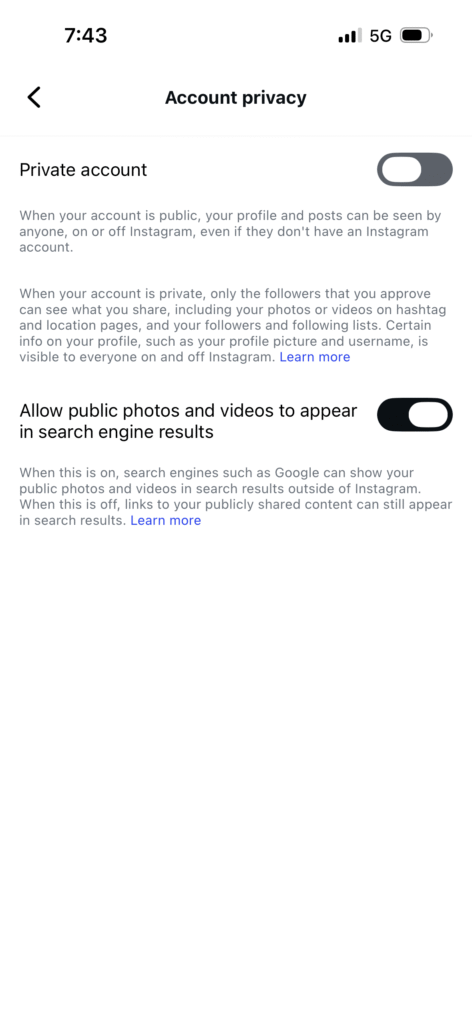
That’s it. Once you confirm the change, your account becomes private immediately.
What This Actually Does:
When your account is private, non-followers can only see your profile picture, bio, and follower/following counts as numbers. They can’t see who follows you, who you follow, or any of your posts. If they want access, they need to send a follow request that you manually approve.
Your approved followers can still see your entire follower list. There’s no way around that with a private account. But at least you control who gets into that inner circle in the first place.
The Downsides:
Going private isn’t perfect for everyone. If you’re trying to grow your Instagram presence, build a brand, or use the platform for business purposes, a private account can seriously limit your reach. New people won’t discover your content through hashtags or the explore page. You’ll have to manually approve every follow request, which can be time-consuming if you get many.
Business and creator accounts can switch to private, but it kind of defeats the purpose of those account types. They’re designed for maximum visibility and reach, not privacy.
Remove Followers You Don’t Want Anymore
Already have followers you wish you hadn’t approved? You can quietly remove them without the awkwardness of blocking.
Here’s the process:
- Go to your profile, then tap your followers list.
- Find the person you want to remove.
- Tap the three dots next to their name.
- Select “Remove Follower”.
They won’t get a notification about being removed. From their perspective, your account will just appear private again, and they’ll need to send a new follow request to see your content. This is a subtle way to clean up your follower list without burning bridges.
You should probably review your followers periodically if privacy matters to you. People change, relationships evolve, and you might realize there are accounts you no longer want seeing your content.
Block Specific Users
Sometimes removing a follower isn’t enough. If you want to completely cut someone off from seeing anything about your account, blocking is the nuclear option.
When you block someone:
- Go to their profile.
- Tap the three dots in the top right corner.
- Select “Block”.
- Confirm by tapping “Block” again.
Once blocked, they can’t see your posts or stories, view your follower list, or even find your account in search. You basically disappear from their Instagram experience entirely. And no, they don’t get notified about being blocked (though they might figure it out if they try searching for you).
Blocking is permanent until you decide to unblock them. Use it wisely for situations where you genuinely don’t want any connection with someone on the platform.
Use the Restrict Feature
Restrict is Instagram’s more diplomatic alternative to blocking. It’s perfect for situations where you can’t outright block someone (like a nosy coworker or relative) but you want to limit their access to your account.
To restrict someone:
- Go to their profile.
- Tap the three dots in the top right corner.
- Select “Restrict”.
When you restrict someone, they can still see your posts and follow you, but their comments on your posts will only be visible to them unless you approve them. They won’t be able to see when you’re online or if you’ve read their direct messages. It’s a sneaky way to create distance without the drama.
The restricted person won’t know they’ve been restricted, which makes this feature incredibly useful for managing awkward social situations.
Additional Privacy Settings Worth Knowing
Beyond just hiding your followers, Instagram offers several other privacy controls that can help you feel more secure on the platform.
Hide Your Activity Status:
Your activity status shows a little green dot indicating when you’re online. If you’d rather not broadcast your availability:
- Go to “Settings and Privacy”
- Tap “Messages and Story Replies”
- Find “Activity Status”
- Toggle it off
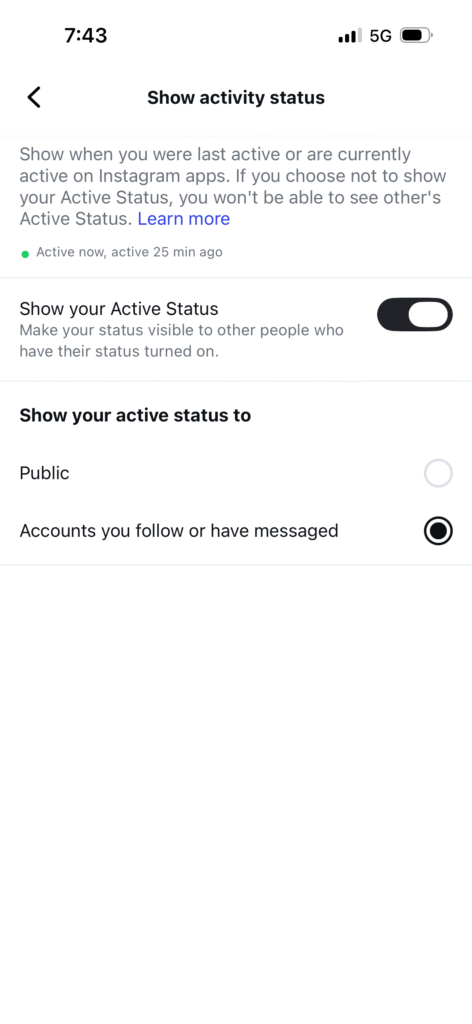
Keep in mind that turning off your activity status means you also can’t see when others are online. It’s a fair trade-off for many people.
Control Who Can Comment and Message You:
You can customize who can interact with your posts. Under “Settings and Privacy,” you’ll find options to:
- Limit comments to people you follow or your followers only.
- Block specific accounts from commenting.
- Control who can send you DMs or add you to groups.
These settings give you granular control over unwanted interactions.
Manage Story Privacy:
Stories are a separate beast when it comes to privacy. You can either share stories with everyone who follows you or create a “Close Friends” list for more intimate content.
To hide stories from specific people, go to “Settings and Privacy” → “Story and Reels” → “Hide Story From” and select the accounts you want to exclude.
Close Friends is particularly useful. You create a list of your closest connections, and when you post a story to that list, only those people can see it. Everyone else stays in the dark.
Review Tags Before They Appear:
You can prevent embarrassing or unwanted tags from automatically appearing on your profile. Go to “Settings and Privacy” → “Tags and Mentions” and toggle on “Manually Approve Tags.” Now, whenever someone tags you, it won’t appear on your profile until you approve it.
What About Business and Creator Accounts?
If you’re running a business or creator account, your options are more limited. These account types are specifically designed for public visibility, growth, and analytics. While you can technically switch a business or creator account to private, it kind of defeats the purpose.
You’ll lose access to:
- Instagram Insights and analytics.
- The ability to run ads.
- Shopping features.
- The link in bio for websites.
For most businesses and creators, staying public is necessary. But you can still use the block and restrict features strategically to manage specific problem accounts.
Common Questions and Misconceptions
“Can I hide my followers from specific people?”
Not directly. Your only option is to block those specific people, which prevents them from seeing anything about your account, including your follower list.
“Do third-party apps work for hiding followers?”
Absolutely not. Any app or service claiming it can hide your Instagram followers is either a scam or malware. Instagram’s privacy controls are server-side, meaning there’s no backdoor or API trick that external apps can exploit. Never give your login credentials to these services.
“Will people know if I remove them as a follower?”
No notification goes out when you remove someone. However, if they check your profile and notice they can’t see your posts anymore, they might realize what happened.
“Can I hide my follower count?”
Interestingly, Instagram tested hiding like counts a few years ago, but there’s currently no official way to hide your follower count. The number is always visible, even if the list isn’t.
Finding the Right Balance
Privacy on Instagram isn’t all-or-nothing. The key is finding a balance that works for your specific situation. Maybe you go private and carefully curate your follower list. Or maybe you stay public but actively use the restrict and block features to manage problem accounts.
Think about what you’re trying to protect and who you’re trying to protect it from. That’ll help you decide which combination of privacy settings makes sense for you.
Remember that Instagram’s privacy landscape keeps evolving. The platform regularly updates features and settings (sometimes for better, sometimes for worse). It’s worth checking your privacy settings every few months to make sure they still align with what you want.
Final Thoughts
At the end of the day, you deserve to feel comfortable and in control on Instagram. While the platform doesn’t offer a perfect “hide followers” solution, the combination of private accounts, strategic follower removal, blocking, and restricting gives you solid tools to manage your privacy.
Take some time to review your current settings. Who’s following you right now? Are there accounts you’d rather not have in that list? Do you need the reach of a public account, or would going private give you more peace of mind?
Your Instagram experience should work for you, not stress you out. Use these privacy tools to create boundaries that feel right, and don’t be afraid to adjust them as your needs change.


 Anas
Anas